.avif)
We speak to a lot of brands who are weighing up Dash and Air side-by-side. On the surface, they do similar jobs by helping you organise your visual content. But in reality, they diverge into different tools entirely.
The biggest difference is where each tool sits in your workflow. Air is built for creative operations: the work of producing content. Dash is built for creative deployment: getting finished content organised and out into the world.
This article looks at both tools in-depth, to help you decide which is better for your brand.
Dash vs Air: TL;DR
- Both tools do really well at: AI search, auto-tagging, version control and duplicate detection.
- Best for creative production and editing work = Air: Its AI editing canvas, annotations, and video intelligence are real strengths.
- Best for enabling self-serve for retailers, press, and partners = Dash: Branded portals and flexible sharing are the core of the product.
- Best for predictable budgeting = Dash: Fixed per-plan pricing with unlimited users, versus Air's credit-based model.
- Best for ecommerce deployment = Dash: You get Shopify, WooCommerce, Adobe CC and Canva integrations on every plan. Some of Air's integrations, like Shopify, app on the Enterprise tier.
- Best for AI-heavy creative tasks = Air: That includes relighting, reformatting, video transcription and facial recognition.
What is Air?
Air is a creative operations tool built for creative teams managing content production. It organises assets on boards and sub-boards rather than folders, and lets you switch between Gallery, Table, and Kanban views. Pricing is also credit-based, which is different from most other visual content management systems.
Over the last couple of years Air has leaned hard into AI. It now has an image editing suite, video intelligence, facial recognition, and visually similar search. If your team's centre of gravity is producing and polishing creative, Air has a lot to offer.
What is Dash?
Dash is a DAM built for growing ecommerce and DTC brands. Its focus is on helping brands move content from an organised space in the DAM, and out to your website, social channels, retailers and agencies.
That shows up in features like branded portals, collections, download presets, and native ecommerce integrations. Dash's pricing includes unlimited users and every feature on every plan, so you're not forced to upgrade to unlock the essentials.
Dash vs Air: Features
To put it simply; Dash’s designed to help ecommerce teams get their visual content out into the wild, fast. It's a single source of truth for all your visual content. Air, on the other hand, is focused on helping teams fine-tune their creative operations.
Let’s look into both platforms key features:
[fs-toc-omit] Searching for content
The whole point of a digital asset management tool is finding the right asset in seconds, not scrolling through folders like you would in a Google Drive.
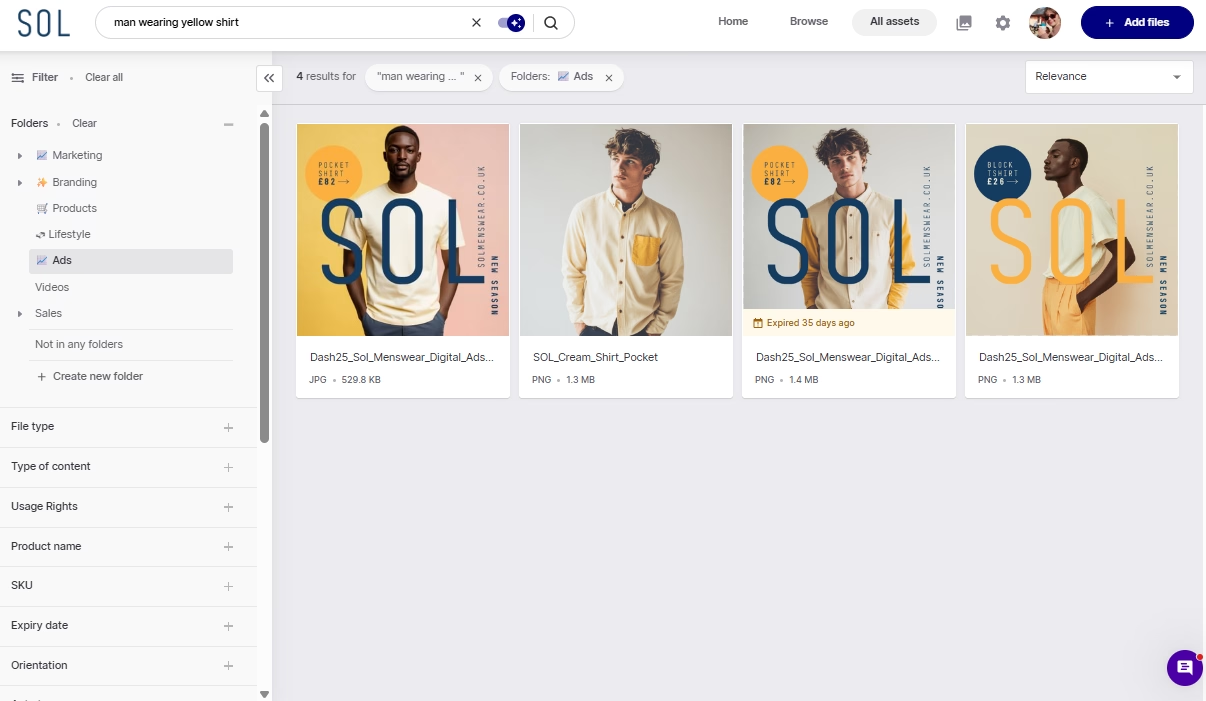
Similarities: Both Air and Dash have genuinely good AI-powered search. It means you can search for an image, even if the asset hasn’t been tagged. For example, search ‘man wearing yellow shirt’, and both tools can retrieve relevant assets quickly.
Differences: Dash lets you toggle AI search on and off, which helps when you want a strict, literal keyword match. Plus, Dash has clear filters which you can use to whittle down your search. For example, you might want the ‘man wearing yellow shirt’ image, but specifically from your ads folder. It just helps you pinpoint the asset faster.
[fs-toc-omit] Browsing your assets
This is where Air and Dash start to diverge. Air doesn’t use folders, instead they have boards. They can be used for project spaces like ‘Summer 2026 campaign’. You can create as many boards and subboards as you like, with the same assets living across different boards (without the need for duplication). You can also order your boards by Gallery, Table, and Kanban view. Kanban is handy for tracking assets through creative stages.
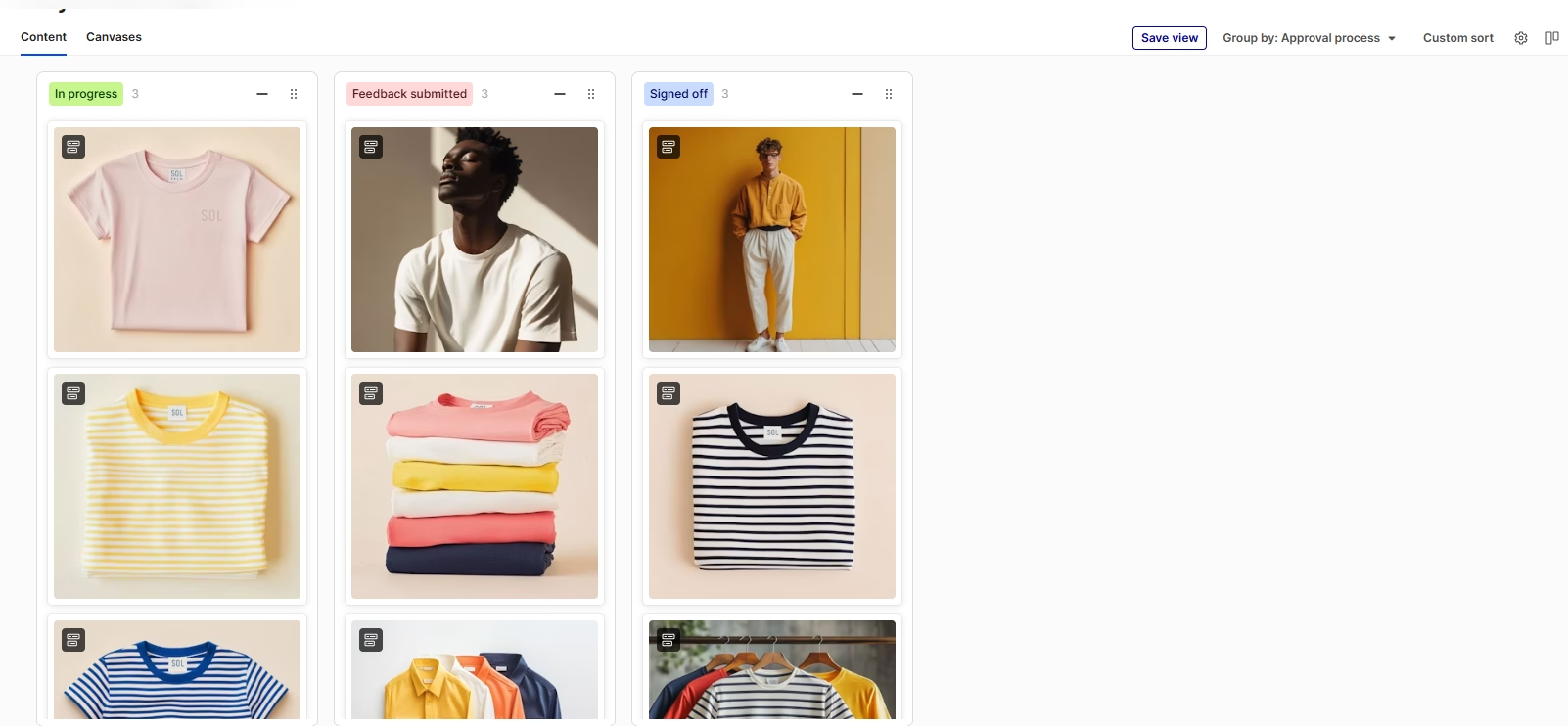
Dash keeps browsing simple with folders, filters and a visual grid with nice big thumbnails. It's built around asset retrieval, rather than project tracking.
Plus, when you select an asset, the AI similar image tool will show you assets that look similar, so you can explore related assets easily without lots of back and forth.
.png)
In summary: both tools have excellent AI search, so you'll find things fast either way. The real difference is what the organisation is built for. Air is built around creative operations, tracking assets and projects as they're produced. Dash is built around creative deployment, keeping a large library structured so any asset is fast to find and ready to use. Pick the one that matches what your team spends its time doing.
Speaking of organisation, let’s take a closer look at how you can tag and manage your assets.
[fs-toc-omit] Organising your content
Although both Dash and Air use AI search, tags and fields are still handy if you need product-specific content that the AI simply can’t pick up.
Similarities: Air and Dash give you the same core building blocks: manual tags, AI auto-tags, and custom fields. A custom field is a label you define, like SKU, campaign, or usage rights, so you can filter by the things your business cares about.
Differences: the tools differ in three places that shape how findable your library stays as it grows. Let’s get into it.
[fs-toc-omit] Tags and fields
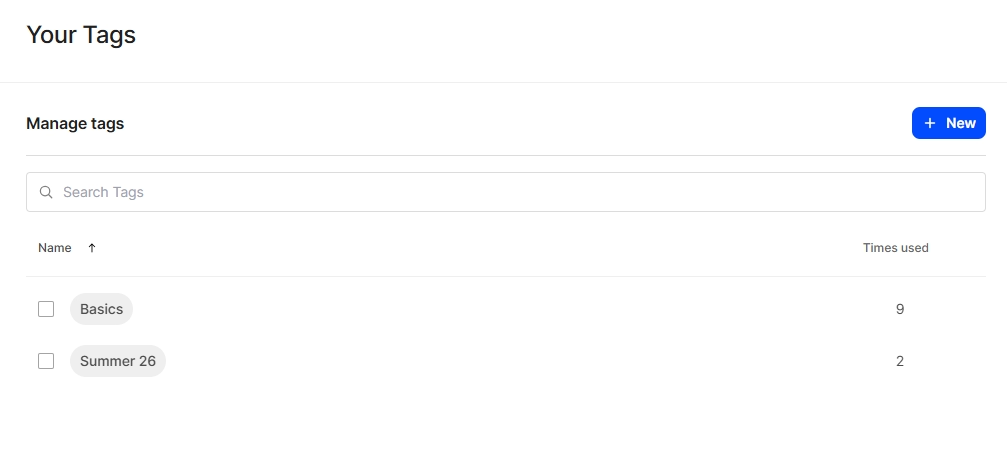
Air lets you manage tags centrally from admin settings, where you can see how many times each tag has been used across the library. That central view is useful for keeping a big tag list tidy.
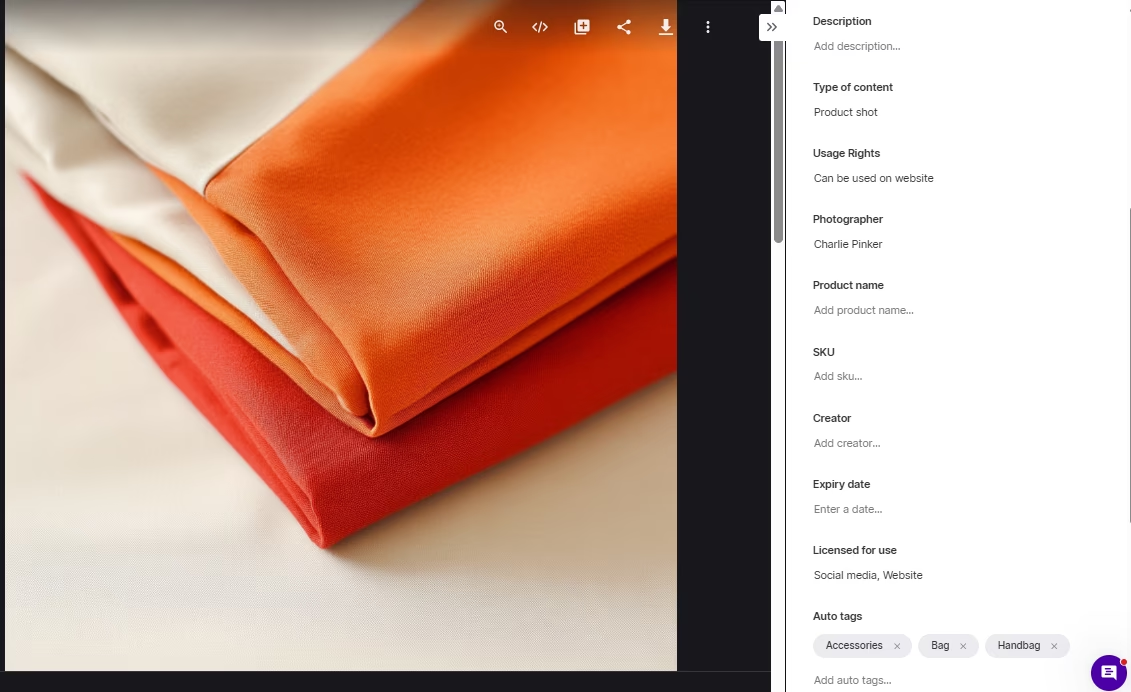
However, when testing we found that Air doesn't prompt you to tag or add fields on upload. Assets simply drop into whatever board you picked, so metadata gets skipped unless you go back and tag them afterwards. You can bulk tag to speed that up, selecting multiple assets and applying tags in one go, but it's still a step you have to remember to do.
Dash takes the opposite approach. It prompts you to add fields and tags at the point of upload, so tagging happens as part of adding an asset, not as a clean-up job later. With lots of people contributing, that keeps the library consistently searchable without relying on everyone to remember, or on one person to tidy up after them. Like Air, you can also bulk tag when you need to apply the same tags across lots of assets at once.
[fs-toc-omit] Folders vs boards
This is the biggest structural difference.
- Air organises around boards and sub-boards, which suit project-based creative work: a board per shoot, campaign, or launch.
- Dash uses folders, and lets you save one asset in multiple folders without duplicating the file. This is important when your library is split across many distinct sets.
We spoke with an agency using Air to manage content for around 40 clients. They told us they specifically wanted folder-based navigation over search-based discovery, because they were worried about accidentally pulling footage from the wrong client's folder. When the cost of grabbing the wrong asset is high, a clear folder structure is a safeguard.
In summary: Air's boards and multiple views suit creative projects and content in production. Dash's folders, tagging on upload, and duplication-free structure suit a big product catalogue that has to stay tidy for the long haul.
[fs-toc-omit] Image editing and resizing
Marketers constantly need the same shot in multiple formats. Whether it’s a product shot for your website, socials and retailers. Or a piece of user-generated content repurposed for your blog or newsletter.
Similarities: Air and Dash let you resize and crop your images so you don’t need to hassle your design team.
You can download multiple assets at preset sizes (social formats and so on) and choose the crop area for each. And you can pick which format you’d like. For example, JPG, PNG and WebP.
Differences: this is one of Air's clearest wins. Air has an AI editing canvas. You can resize into multiple sizes, convert file formats, edit or translate text in an image, and use AI to change lighting, adjust camera angle, upscale, or split out elements. AI prompts are guided rather than a blank free-for-all (although you’ll get the option to free-prompt too).
Here’s an example of where I asked Air’s editor to change the lighting position. (Left is the original, right is the edit). It’s not 100% accurate (the light coming through the window is off), but it's a great start. This is a simple way to make quick edits, although it's still not a replacement for a real designer.

One thing to note is that it’s unclear how much this might cost you. Because of Air’s credit-based system, each edit you made will cost a credit. Scroll down for an in-depth look at pricing.
Dash has no editing canvas. Its strength is crop-and-resize at the point of download, not retouching or AI editing.
In summary: for channel-ready resizing, both do a great job. For actual editing, relighting, reformatting, and AI touch-ups, Air is the stronger tool.
Sharing your content
For ecommerce brands, sharing content with retailers, press, and partners is often a huge part of their workflow. How easily a tool shares externally matters as much as how well it stores.
Similarities: both Air and Dash let you share individual assets or groups via links, with permission settings on each link (download only, expiry date for eg).
Differences: Sharing is Dash's clearest win. It gives you three routes:
- Portals: These are self-serve, public facing versions of your library. You can create as many portals as you need, and then to retailers, agencies and partners. It allows external teams to self-serve assets without hassling you. They can search and browse content just like they would in your regular DAM, but you have full control over what folders they have access to. You can also customise each portal to suit your different partners, to make them feel like real VIPs.
- Collections: Collate a selection of assets into a collection, add your team members and leave comments.
- Share links: One-off shares that are branded and have flexible expiry dates. You can send by email or simply copy and paste the link.
Air has share links and shareable boards, but no portals. To share with an external partner in Air, you can point them at a board or a set of assets via link (kind of like a collection in Dash).
In summary: Air's link-and-board sharing works for occasional external review. Dash's portals and collections are built for distributing to many partners at scale.
[fs-toc-omit] Guest uploads and collecting content
You’re likely working with external content creators and photographers to help you create content for your brand. It’s important they have a way to send you assets easily, without you having to pay for extra seats.
Similarities: Dash and Air support external upload without adding the person as a full user. Air does this through content-collection forms attached to a board. Dash does it through branded guest upload links. Both allow you to add details for your recipient. In Dash you pick what folder the final asset will land in, and in Air you pick which board it’ll go to.
Differences: Dash's guest upload automatically lands in a holding area for admin approval. Air’s guest upload form doesn’t have the same guardrails, you’ll need to toggle a setting that requires approval first.
In summary: both can collect from outside contributors now. Dash's version is more controlled. Air has more field options and is tied to boards.
[fs-toc-omit] Feedback, comments, and approval
Before content goes live, it usually needs a few rounds of feedback and a final sign-off. For brands, that sign-off matters as much as the feedback itself, because it's what stops off-brand or unapproved assets slipping out into the wild.
Similarities: Air and Dash support collaborative review, version control, and duplicate detection on upload, so nothing gets lost or accidentally doubled up.
Differences: Air is stronger on review which makes sense, as it positions itself as a creative operations tool. Dash, however, is stronger on governance.
Air lets you comment on any asset, and adds point-based and freeform annotations, so you can pin a note to an exact spot or draw straight onto an image to get your point across. Dash's comments are scoped to the approval process and collections rather than any asset, and it doesn't have annotation tools. Where Dash pulls ahead is control. It has a proper admin approval step, so uploads can be held for sign-off before they go live in your account, and it logs user download activity so you can see who's taking what. Air doesn't appear to track which assets users are downloading.
In summary: Air is the better creative feedback tool. Dash is the better tool for controlling what's approved, what's live, and who's downloading what.
[fs-toc-omit] Video and AI
Video is now core content for most brands, and it's where these two tools diverge the fastest. This is also where Air's heavy investment in AI shows up most clearly.
Similarities: both let you work with video in-library and both apply AI tagging automatically.
Differences: Air has gone all-in here. Its video intelligence auto-transcribes speech, identifies who's speaking, generates smart tags for objects and scenes, writes summaries, and splits longer videos into chapters, on files up to 10GB and 8K. It also has facial recognition, so you can find every clip featuring a particular person.
Dash's video handling is more practical than AI-led: hover to preview, trim and resize in-app, and leave timestamped comments in the approval flow. Dash has AI search and visually similar images, but no video transcription, chapters, or facial recognition.
In summary: if AI-driven video work matters to you, Air is ahead. Dash covers the everyday video basics well, and has AI video features currently on its roadmap, but it isn't trying to be an AI creative suite.
[fs-toc-omit] Integrations
A DAM only saves you time if it plugs into the tools you already use to publish. Both Air and Dash integrate widely, and there's a lot of overlap, but the gaps tell you who each tool is built for.
Similarities: both integrate with Canva, Slack, Adobe tools, and WordPress. They also both import from Dropbox, Google Drive, and SharePoint, and offer CDN links and API access. Both will also let you import assets from other DAMs like Canto and Bynder, Brandfolder. At Dash, we can help you migrate assets for free.
Differences: Air's integration set is broad, and skews towards creative production, automation, and migration:
- Figma, Adobe Premiere Pro, and a Chrome web clipper for creative work
- Zapier, Make, and n8n for automation, plus an MCP integration for AI agents
- Sanity for headless CMS publishing
- Native desktop apps for Mac and Windows, and an iOS mobile app
- Shopify integration, available on Enterprise only.
Dash's set is narrower but leans hard into ecommerce and marketing deployment:
- Shopify integration, available on all plans
- WooCommerce
- Hootsuite for social scheduling
- Microsoft Office
- Corebook for brand guidelines
- Direct import from Dropbox, Google Drive, OneDrive, SharePoint, and Google Photos
In summary: Air arguably has broader coverage overall, especially for creative tools, automation, and desktop workflows. Dash's advantage is specific: if your job is getting products live and campaigns out, the ecommerce and social publishing tools (WooCommerce, Hootsuite, Office) are there on every plan, and its Shopify integration goes deeper on bulk product updates.
[fs-toc-omit] A closer look at Shopify integrations
Both tools plug into Shopify, but this is where Dash's ecommerce focus shows. Air's app covers the basics: browse your library and attach assets to a product, one listing at a time. Dash's is built to run your product catalogue. It matches creative to listings by SKU and pushes updates to hundreds of product pages at once, all managed from Dash rather than Shopify's clunky media library. For a brand shifting a lot of SKUs, that's the difference between a handy add-on and a real time-saver.
Dash's Shopify integration:
- Stores and searches all your product shots in Dash, filterable by SKU and product type, so you're not wrestling with Shopify's own media library.
- Lets you open a Shopify product page and pull images straight from Dash, reorder them, and save, with no downloading or re-uploading.
- Auto-matches creative to listings by SKU. Tag an asset with its SKU in Dash and it lines up against the right Shopify product, ready for review.
- Pushes updates across your whole catalogue at once, so you can set image order and export to hundreds of product pages in one go rather than editing them one by one.
- Is included on every plan, but isn't in the Shopify App Store. You request a setup link from Dash's team, then install it.
Air's Shopify integration:
- Lets you browse, search, and filter your Air library from within Shopify, via the ‘More actions’ menu, and add assets to a product listing.
- Supports both image and video media on Shopify products.
- Is a proper Shopify app, but sits on the Enterprise plan, with a Business add-on available on request.
The practical difference is scale. Dash is built for launching and updating a lot of SKUs at once, with SKU matching and bulk catalogue pushes doing the heavy lifting. Air's app is more about adding the right assets to individual listings as part of a creative workflow, and it's reserved for Enterprise.
In summary: both connect Shopify to your asset library, but for different jobs. Air's app is the smoother ‘browse and attach’ experience for individual product pages, and it handles video. Dash's app is built for scale, with SKU matching and bulk catalogue pushes for teams updating a lot of products at once.
Security
Choosing a DAM means trusting a third party with your entire brand library, so it's worth knowing how each one keeps it safe.
Similarities: both are solid, and cover the fundamentals you'd expect:
- Encrypt your data both while it's being sent and while it's stored, so it can't be read if intercepted
- Support single sign-on, so your team logs in with an existing company account rather than a separate password
- Run regular security testing by outside experts to find weak spots before anyone else does
- Monitor for incidents and keep backups in more than one location
- Give admins detailed control over who can see and do what
Differences: the two emphasise different things. Air holds SOC 2 certification, an independent audit of how it handles data security, first achieved in 2021. Dash focuses on data residency and clear commitments. It stores your files and backups in the EU, promises to tell you within 24 hours if there's ever a breach, and deletes your data within 90 days of cancellation after giving you a chance to export it first.
In summary: both are enterprise-grade on the fundamentals. Whichever you choose, check it against your own compliance requirements.
User interface
A DAM only delivers value if the whole team actually uses it. If it's clunky, people are less likely to use it, which defeats the point of the software in the first place.
Similarities: this one's a genuine tie, and the review scores back that up. Both Dash and Air sit at 4.6 on G2, and both are consistently praised for being lovely to look at and easy to use, with big thumbnails and clear previews.
Differences: It comes down to philosophy more than quality. Air's board-and-canvas layout leans into creative operations and a mood-board feel.
Dash's grid-and-folder layout is built for fast retrieval, whether that's your team or an external partner browsing a portal.
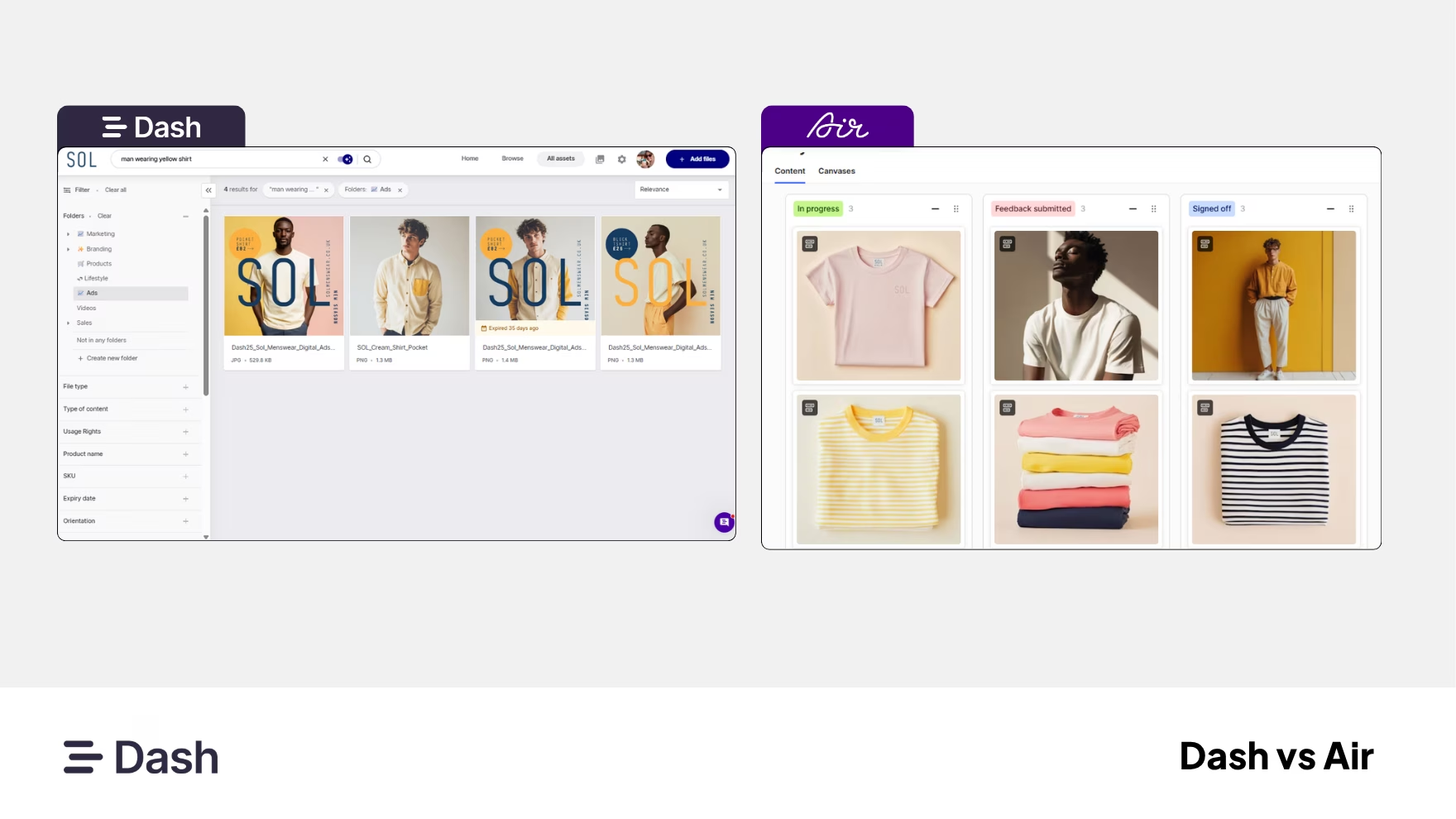
In summary: both are a pleasure to use, and the matching 4.6 scores say neither wins on looks alone. Pick the layout that fits how your team thinks: boards for creative work, folders for finding things fast.
Getting started: migration and onboarding
Getting your existing library moved over is often the biggest hurdle in switching DAM. So it's worth looking at how much of the heavy lifting each one does for you.
Similarities: both let you import your library yourself from the big storage tools like Google Drive, Dropbox, OneDrive, SharePoint, and Google Photos. And both keep your existing folder structure intact so nothing arrives in a jumble. They can also migrate you straight from an existing DAM like Bynder, Canto, or Brandfolder, though for those you'll go through customer support to get set up rather than doing it yourself. Neither charges a setup or onboarding fee.
Differences: the real difference is how much hands-on help you get, and on which plan. Dash includes free onboarding sessions and migration support on every plan, including help moving very large libraries and clearing out duplicates afterwards, plus in-app chat that G2 reviewers single out again and again.
Air offers support too, and handles DAM migrations with its team just like Dash does.But its dedicated migration help and formal team training are reserved only for the Enterprise tier (which is at least $900+ a month). Air's live support also runs on North American hours, so that’s worth keeping in mind if your team is in the UK or Europe.
In summary: both let smaller teams get set up on their own, and both can pull from big storage tools and rival DAMs alike, so import breadth is roughly even. The real difference is the everyday human help: Dash includes hands-on migration and onboarding on every plan, where Air saves the dedicated, white-glove version for Enterprise.
Pricing
Dash and Air charge in completely different ways. Dash is a flat monthly fee. Air runs on credits. Here’s a breakdown of the different plans.
Dash plans
Dash uses fixed per-plan pricing. Every plan includes unlimited users and every feature and integration. You only pay more if you need more storage or downloads, not because your team grew.
- Start up: $109/month, 250 downloads/month, 10GB
- Small team: $239/month, 500 downloads/month, 50GB
- Growing brand: $389/month, 1,000 downloads/month, 100GB
- Established brand: from $589month, unlimited downloads, 200GB
Extra storage is £5/month per 50GB, and there's 10% off annual billing. One useful detail: Dash only moves you up a plan after two consecutive months over your download limit, so a single busy month won't bump you.
Air plans
Air uses a credit-based model. Every plan includes unlimited users, so you're never charged per seat, and a monthly credit allowance funds storage, AI image editing, and video generation from one shared pool. Its plans run:
- Free: 120 credits/month, roughly 20GB or about 24 AI-generated images, no card required
- Starter: $25/month
- Business: $900/month
- Enterprise: $2,000/month
Air also sells top-up credit packs, priced by tier.
The trade-off is predictability. Credits don't roll over, so unused allowance is lost each month, and because storage and AI both draw from the same pool, a heavy month of editing or video can eat into the storage you were relying on. For ecommerce brands with seasonal output, that makes costs harder to forecast. Dash's downloads-and-storage model does the opposite: you know what you're paying, and a busy period won't inflate the bill.
In Summary: Air’s credit model doesn't map cleanly onto Dash's storage-and-download plans, so it’s hard to say whether one tool is cheaper than the other. The clearer difference is the shape of the cost. Dash is fixed and predictable. Air is variable, and it's unclear how your credits are used.
[fs-toc-omit] Where each tool has the edge
Where Air tends to win:
Air has the edge in creative operations (creating content and feedback).
- AI image editing inside the DAM: resize, reformat, relight, change camera angle, upscale, translate text
- Point-based and freeform annotations for creative feedback
- Video intelligence: transcription, speaker ID, smart tags, summaries, chapters
- Facial recognition and visually similar search
- Commenting on any asset, plus Kanban boards for managing creative projects
Where Dash tends to win:
Dash has the edge in creative deployment (getting finished content out into the world).
- Branded, no-login portals for distributing to retailers, press, and partners at scale
- Collections and flexible share links that update in real time
- A real admin approval step, plus download-activity tracking for governance
- Self-serve metadata/CSV export, where Air's tag and field export needs the Enterprise API
- Shopify, WooCommerce, and Hootsuite on every plan, plus free hands-on migration and onboarding on every plan
- Predictable per-plan pricing with unlimited users
Dash vs Air: What tool should you choose?
Both tools score a deserved 4.6 on G2, so this isn't good versus bad. The real question is whether you need a creative operations tool or a DAM, because that's the difference between them.
Choose Air if you need creative operations. Air is built for managing creative work through production: organising assets on boards, editing and adapting them, reviewing with pinned comments and annotations, tracking approval status on a Kanban board, and multiplying approved work into variants for every channel. Its AI editing, video intelligence, and creative integrations like Figma and Premiere Pro all serve that. If your bottleneck is managing and refining creative, Air is built for it.
Choose Dash if you need a digital asset management system. Dash is built to be the single home for your finished assets, and to get them out into the world. Organising a large product library, controlling what's approved and live, and distributing to channels, retailers, and partners through branded portals and a bulk Shopify workflow. For a growing ecommerce or DTC brand, that's usually the job that needs doing, and it's what Dash is for.
You can try Dash for yourself by taking out a free trial, or booking a demo with a member of our team.
Dash vs Air FAQs
Is Dash cheaper than Air?
It depends on usage, and the models don't line up neatly. Dash uses fixed per-plan pricing (from £79/$99 per month) with unlimited users. Air uses monthly credits that fund storage and AI, also with unlimited users. Dash's cost is more predictable. Check Air's live pricing for a current like-for-like.
Does Air have AI search?
Yes. Air auto-tags on upload and supports AI search, plus visually similar search, video transcription, and facial recognition. Its AI feature set is extensive.
Does Dash have an image editor?
Not a full editing canvas. Dash lets you crop and resize to preset sizes at download. For AI editing, relighting, or reformatting inside the DAM, Air is stronger.
Does Air have portals?
No. Air shares via links and shareable boards. Branded, no-login portals are a Dash feature.
Can external creators upload to both?
Yes. Air uses board-based content-collection forms. Dash uses branded guest upload links that capture the uploader's email and hold submissions for review.
Does Air integrate with Shopify?
Yes, but the native Shopify app is on the Enterprise plan (with a Business add-on on request). Dash includes Shopify and WooCommerce on every plan.
Which is better for a creative team versus an ecommerce team?
Air suits creative production and editing. Dash suits organising a large library and distributing approved assets across channels and partners.

Amy Burchill is the SEO and Content Manager for Dash. She works with ecommerce experts to create articles for DTC brands wanting to improve their campaigns.