
Category pages are one of the most commercially important page types in ecommerce. But they’re often one of the most under-optimised.
While many brands invest in product page optimisation, their category pages are often left as little more than a heading and a product grid. For a page type that Google regularly serves for high-intent, transactional keywords, it can be a costly oversight.
👋 I'm Theo Roberts, Head of SEO at eComOne, a performance marketing agency specialising in ecommerce. In this article, I’ll break down exactly why category pages matter, what most brands are getting wrong, and how to fix it.
What is an ecommerce category page?
Ecommerce category pages are the collection pages on your online store that house all the products relevant to a specific category. Just take this example from Hennie Haynes.

From a search engine optimization (SEO) perspective, category pages are often the page type Google serves for transactional keywords. In other words: they’re shown to people who are ready to buy.
That means it’s essential you optimise them properly.
Why you need to optimise your category pages now more than ever
I see so many big players in the ecommerce space not at the top of the SERP because their category pages aren't well optimised.
All they have on their ecommerce site is what I’d consider a ‘traditional’ category page. That’s a H1 with the category name and then a product grid with some filters — nothing else. The product grid is still essential. It's a big signal to search engines about all the products you have within the category, and pagination helps with rankings. I'm not saying it's not important — it is.
But for many website visitors , especially high-intent shoppers, a category page is their very first impression of your ecommerce store and brand. If your page is broken, or there's not a variety of product choices, your bounce rate is going to increase. Instead, your competitor who has a beautifully-optimised page, both technically and from a UX perspective, is going to acquire that customer and the revenue.
How to optimise your category pages
So, how should you go about creating and optimizing your category pages? Here’s what I’d do first.
1. Start with keyword research and SERP analysis
It always starts with research. Keyword research will tell you which categories to create, what those pages need to rank for, and how to structure the content. Your category structure should be driven by how people actually search.
SERP analysis sits alongside this. Before building or overhauling any category page on your ecommerce website, look at what's already ranking. This tells you what Google considers the most relevant answer for the keyword you're targeting.
2. Get the on-page basics right
A piece of me dies when I see title tags that don't feature the keyword. Or, sometimes it’s the polar opposite: multiple keywords are crammed into the title even though there are other specific category pages set up for those same terms (also known as keyword stuffing). So make sure you’re getting the basics right. You’ll be able to tweak your title tags and metadata within your CMS.
Here’s what every category page needs:
- A title tag that includes the primary keyword, ideally 50–60 characters, without stuffing (to check title tags of a web page, right click >inspect)
- A meta description that’s around 150–160 characters, written to drive clicks as well as include key terms
- A category description that covers the topic (like this one from Locks Direct)

- Descriptive alt tags on product images
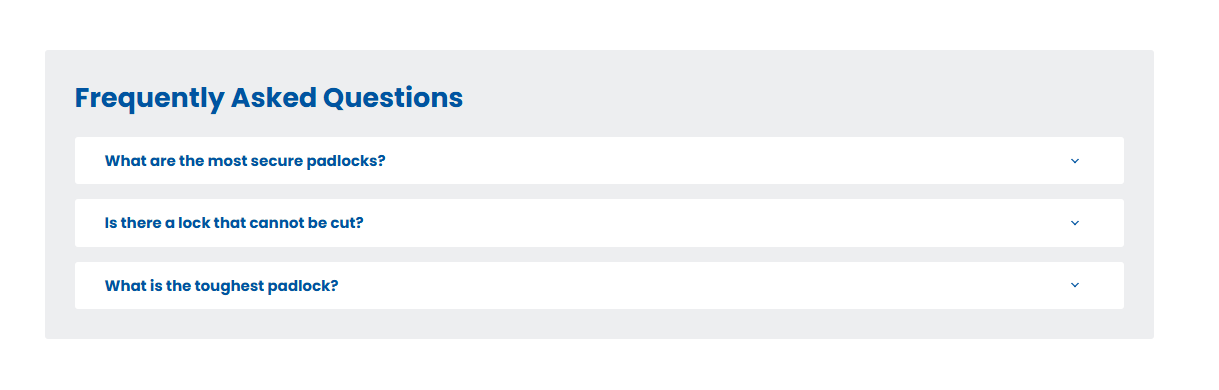
- FAQs (you’ll find these when you scroll to the bottom of one of Lock Direct’s category pages)
- Internal links to relevant supporting blogs and pages

3. Build out subcategories
Not every user is browsing the same way. Some are looking for the best products, others the most affordable. That’s why you need to create layered subcategories on top of your parent categories.
A great example of this in action is Splash About, a swimming brand. They sell both kids’ and adult swimwear, but their category structure is clearly designed around what parents actually need.
Take a look at the screenshot below. You’ll see three levels of collections working together. At the top is a broad category ‘Learn to swim’. This is then broken down into product types, such as ‘floats’ and ‘float jackets’. From there, it goes a level deeper into more intent-driven subcategories like ‘adjustable swim vest’ and ‘early years swim vest’.

4. Build out category hubs
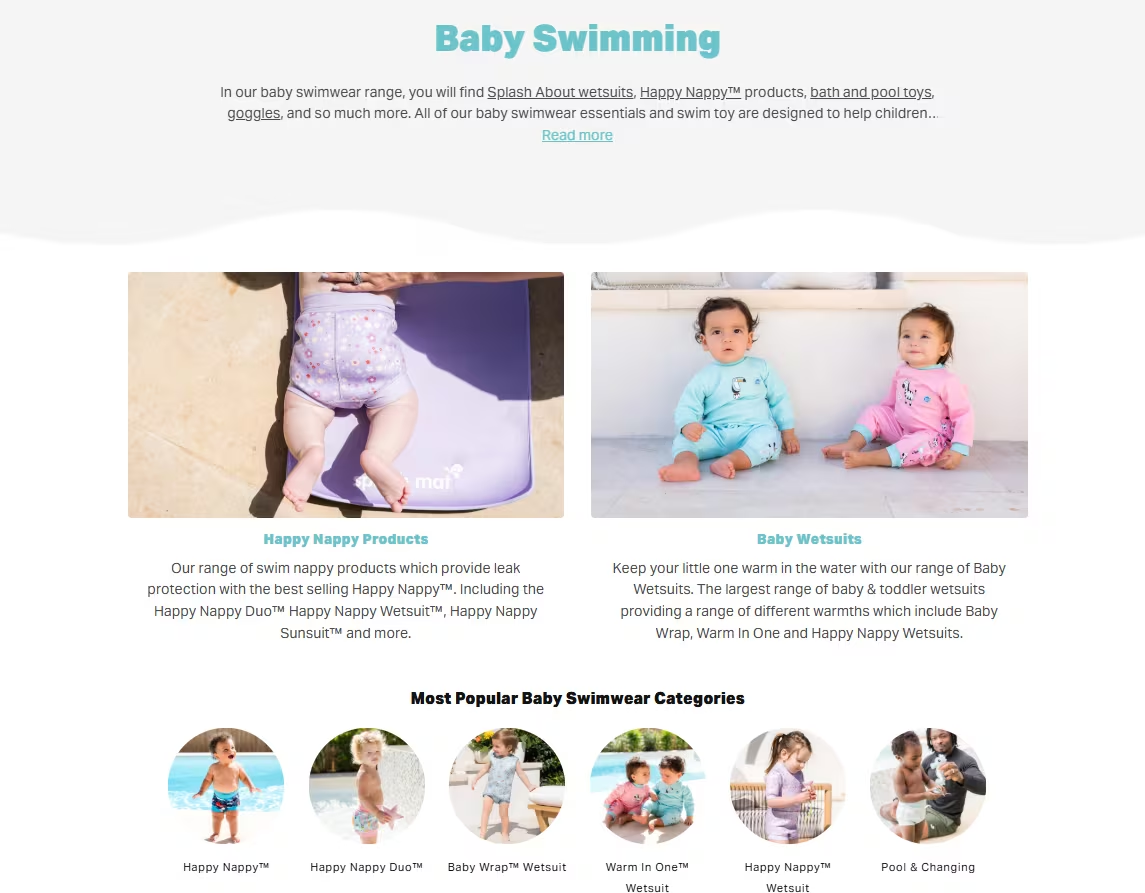
Once you’ve identified your categories and subcategories, you should create category hubs. The ‘Baby swimming’ category hub from Splash About is a great example— it creates clear routes through the category, helping users quickly find the products that best match their needs.
5. Write content that AI will surface
Your category page's content should answer real customer questions, stay on brand, and naturally include your relevant keywords.
When thinking of AI, clear and structured content is more likely to be surfaced. That means going beyond a short description and using formats that match how people search, like:
- Listicles
- How-to guides
- Comparison content.
Going back to the Locks Direct example, they’ve built a nifty system that allows you to compare products easily on the page.

6. Build supporting content and link it back
Hopefully, creating content is already part of your marketing mix. Make sure that relevant blogs and other helpful content are internally linking to the relevant category page, reinforcing it as the central hub for that keyword.
So in the case of Splash About, any content they’ve written about ‘Baby swimming’ will link back to that specific category page.
7. Test what works
With clients at eComOne, we're now building and testing these new category hub modules. We’re measuring how they perform against more traditional approaches using . A/B tests.
Here arHere are some ecommerce businesses worth looking at for inspiration (some of which we’ve already included in this article): e some brands worth looking at for inspiration (some of which we’ve already included in this article):
At a glance: what a well-optimised category page includes
- Keyword research and SERP analysis completed before building
- Primary keyword in the title tag, at the right length, without stuffing
- Meta description at the right length, written for clicks
- Category description that covers the topic
- Descriptive alt tags on all product images
- FAQs
- Internal links to relevant supporting blogs and pages
- Intent-led modules beyond the product grid
- Supporting content (blogs, guides) linking back to the page
- A/B testing to measure what works
Want to know how your category pages are performing?
If your category pages aren't driving the rankings and revenue they should be, an SEO audit is the best place to start. At eComOne, we work with ecommerce brands to identify exactly where the opportunities are and build a strategy to go after them.
👉 Find out more about eComOne
And if you need a place to store all the content needed for those category pages, Dash is the tool for you. It’s a place to organise, manage and share all your brand’s visual content. So you can easily send product images to your category pages, without spending ages hunting around for them in tools like Google Drive and Dropbox.
👉 Learn more about Dash

Theo Roberts is Head of SEO at eComOne, where he leads organic search strategy for ambitious ecommerce brands. Working closely with clients and internal teams, he focuses on driving measurable growth through technical SEO, content strategy, digital PR and AI-led search visibility.With a strong background in ecommerce and digital marketing, Theo specialises in turning complex search challenges into clear, commercially focused strategies that deliver results. He works hands-on across audits, content planning and performance optimisation, helping brands compete where it matters most.