If you’re still using Webdam, you’ve probably already seen the writing on the wall.
After years of sitting quietly in the background, the platform is now being retired by Bynder. What was once a dependable DAM is no longer being supported in the way it used to be. From September 2026, Bynder is switching Webdam off and moving all customers over to its own system. That's right, Webdam is being decommissioned.
So rather than have Bynder force your hand and go with them by default, step back and ask:
What other Webdam alternatives are available to me?
Because if you’re being made to switch from Webdam, you may as well find an alternative that fits you best.
Let’s explore your options, shall we?
What is Webdam?
Webdam is a digital asset management (DAM) platform designed to help teams organise, store, and share their visual content.
It was bought by VC-backed, industry heavyweight Bynder in 2018. And since then, it hasn’t kept up pace with the rest of the market. Even before the shutdown, users were already noting Bynder quietly sunsetting it and deprioritising it. It was clear that it was nearing the end of its lifecycle and falling behind newer tools.
Consider Webdam alternatives (not just Bynder)
When a product gets discontinued, it’s easy to just follow the recommended transition. In this case, that’s moving by default to Bynder.
But here’s the thing: migrating to a new tool is the hard part. And there’s no way around that, thanks to Bynder’s decision to pull the plug on it.
So once you’ve accepted that migration effort is inevitable, you’ve earned the right to choose the best system, not just the default one.
And there are a few reasons teams are looking beyond Webflow and Bynder, namely:
- Rising costs (especially once add-ons are included)
- Enterprise complexity that many teams don’t actually need
- A chance to clean up messy asset libraries during migration
- Switching to a company that doesn’t force them to learn a new tool and pay higher costs to continue their usage
What to look for in a Webdam alternative
Before we get into the tools, here’s what actually matters when choosing a new DAM:
- Fast, accurate search so your team can find assets instantly
- Simple organisation without relying on perfect manual tagging
- Flexible storage that scales with your asset library
- Integrations with tools like Adobe, Shopify and your CMS
- Transparent pricing (no hidden feature unlocks)
- Easy onboarding so migration doesn’t drag on for months
If a platform makes any of these harder than they need to be, it’s probably not the right fit.
The best Webdam alternatives to consider
Here are some of the most popular DAM tools teams are switching to in 2026.
1. Dash (for growing brands and ecommerce teams)
We’ll start with Dash (that’s us).
Dash is a digital asset management platform built for marketing and creative teams that need to move fast, without the complexity and cost of enterprise DAMs like Webdam.
Unlike tools like Bynder or Brandfolder, Dash is designed to be simple, transparent, and genuinely easy to use.
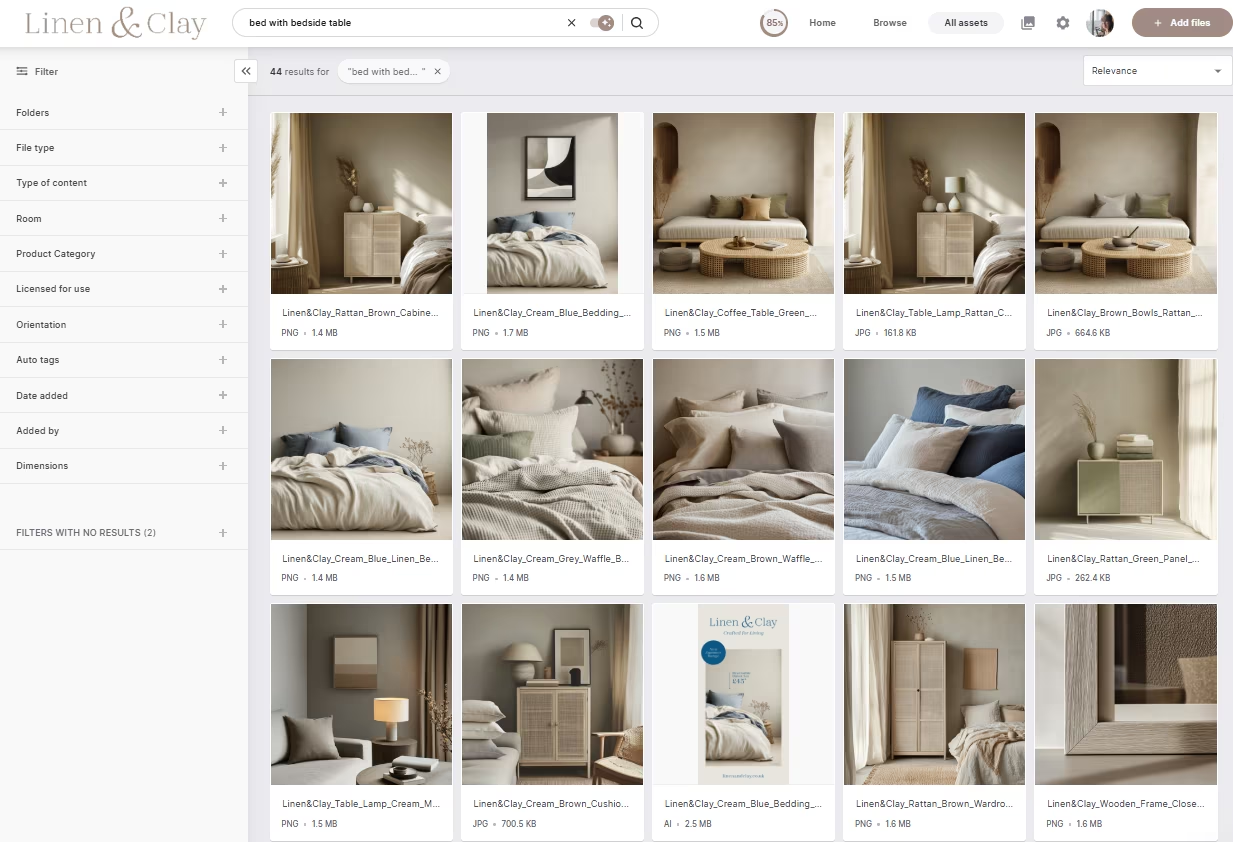
Why teams choose Dash:
- Everything included (no paid add-ons for core features)
- Unlimited users with no per-seat pricing
- AI-powered search and auto-tagging
- Preset download sizes (no duplicate assets needed)
- Fast onboarding (typically weeks, not months)
- Integration with key ecommerce tools like Shopify
If you’re coming from Webdam, Dash gives you everything you need—without adding layers of complexity.
Dash pricing starts from £79 / $109 a month and includes unlimited users and all features.
2. Bynder (for large enterprise teams)
Bynder might seem like the most obvious alternative to Webdam, and it’s the one you’ll end up by default on if you don’t find an alternative. And for some teams, it’s the right choice.
It’s a well-established DAM platform built for large organisations with complex workflows.
Where Bynder works well:
- Advanced permissions and governance
- Strong support and onboarding
- Integrations across large marketing stacks
Where teams hesitate:
- Costs can increase quickly depending on features
- More setup and configuration required
- Can feel heavier than needed for smaller teams
In short: Bynder is a powerful DAM, but not always the easiest or most cost-effective option.
Bynder’s pricing starts at $450 a month and can ramp up quickly. Find out more in our Bynder alternatives article.
3. Brandfolder (for enterprise asset management)
Brandfolder is another enterprise DAM that’s often compared to Bynder and Webdam.
It’s packed with features and designed for large-scale organisations managing huge asset libraries.
Pros:
- Extensive feature set
- Analytics and reporting tools
- Strong enterprise security
Cons:
- Can feel cumbersome to use
- Search and navigation can be inconsistent
- Pricing can be high, especially at scale
In short? Brandfolder is best suited to large teams with the budget and need for advanced functionality.
Costs for Brandfolder can start from $1,600 a month, so if you don’t have the budget we’d strongly recommend looking at Brandfolder alternatives.
4. Canto (for mid-sized asset management)
Canto is a more traditional DAM platform that sits somewhere between simplicity and enterprise functionality.
Pros:
- Clean interface
- Good for organising large asset libraries
- Decent search and tagging tools
Cons:
- Limited flexibility compared to newer tools
- Interface can feel dated in places
- Fewer modern automation features
It’s a solid option, but its recent acquisition of Image Relay has tipped product direction into a more PIM-adjacent route. It might not be the best fit for Webdam customers.
The budget you’ll need for Canto is unclear, thanks to them unhelpfully locking information away behind demo bookings. But you’re most likely looking at at least $600 a month according to reports. Check Canto alternatives for more information.
5. Air (for creative workflow management)
Air positions itself more as a creative operations tool than a traditional DAM, although it falls pretty squarely into the product category. It’s popular with creative teams in medium-sized businesses managing content production and feedback, especially in the US.
Pros:
- Visual, board-based interface
- Strong for creative collaboration
- Good for managing work-in-progress assets
Cons:
- Less suited for long-term asset storage
- Pricing can feel unpredictable at scale
- Not built for full asset lifecycle management
- Recently switched to a credit-based pricing system that’s hard to parse
Air can be great for creative workflows. But it’s less useful as a central asset library, and its new pricing update signals a worrying turn for some of its core customers.
They’ve recently updated their pricing to a credit-based system where every action you undertake in Air costs a credit. Pricing for businesses starts at $900 a month. So make sure you consider Air alternatives if you’re toying with going for this DAM platform.
Which Webdam alternative is right for you?
It depends on what your team actually needs.
If you’re working in enterprise, global teams stay with Bynder or switch to Brandfolder.
If you’re solely focused on creative production workflows and don’t mind price uncertainty, Air is a solid choice.
But if you’d rather simple, easy to use, scalable DAM without complexity or expensive price tags, then pick Dash.
{{dam-comparison="/blog-components"}}
Next steps: Don’t let a forced migration dictate your next 5 years
Webdam being discontinued isn’t ideal. But it does give you something valuable: a reset.
Instead of carrying over the same issues (messy folders, duplicate assets, slow workflows) you can build a system that actually works for your team.
So if you’re currently weighing up Webdam alternatives, the best place to start is with a clear comparison. Download our DAM comparison worksheet to map out your requirements, pricing, and must-have features.
Or if you’d rather see it Dash in action, book a demo with Dash and we’ll show you how to migrate, organise, and actually use your assets ... without the complexity.

Barney is the Marketing Lead for Dash. He writes about small business marketing strategies and how DTC brands can boost sales.