.avif)
On the surface, Bynder and Dash both solve the same problem: they’re digital asset management tools that allow you to organise, find, share and deploy your brand’s creative content from one central library.
But they're built for different types of companies. Bynder is an enterprise platform used by enterprise companies who have complex workflows and requirements. From our research, Bynder starts at around $450 per month, which means smaller brands are often priced out of the market.
Dash, on the other hand, is built for small and growing brands. Pricing starts at £79 / $109 per month and is designed for teams who need a DAM solution that doesn’t cost the earth.
If you’re currently weighing up the two tools, this in-depth comparison should help you find the best DAM for your team.
{{dam-comparison="/blog-components"}}
Dash vs Bynder: TL;DR
Don’t have time to read the full article? Here’s a summary of Dash and Bynder’s key similarities and differences.
- What they are: Bynder is an enterprise DAM. It has a large feature set and is designed for enterprise organisations with multiple departments and hundreds of team members. Dash is an easy-to-use DAM, specifically built for growing ecommerce brands with smaller, fast-moving teams who don’t need the complexities of enterprise systems.
- Pricing: Dash publishes flat prices from £79 / $109 a month with all features and unlimited users included. Pricing increases alongside your storage and download limits. Bynder’s pricing works on modules. You pick bundles of features depending on your needs. However, pricing is quote-only and typically lands in the tens of thousands per year.
- Searching for assets: Both have multiple ways to search for assets, including AI natural language search. This is an AI feature that allows you to search for long-phrases like “coffee table in natural sunlight”. It means you can find content even if it hasn’t been properly labelled or tagged. Bynder's AI search suite is broader and includes face recognition and speech-to-text, but these have additional costs attached to them.
- Editing: Dash and Bynder both allow you to crop, resize and reformat your assets. Bynder takes it a step further with creative-automation templating through its ‘Studio’ module. Again, these will require you to pay more / choose a different plan.
- Built for ecommerce: Dash is designed specifically for ecommerce brands. For example, it has a native Shopify workflow which includes SKU matching, and bulk catalogue updates. Bynder also integrates with Shopify through a third-party developer, but it’s unclear how much you’ll be paying.
- Ease of use and setup: Dash is rated higher for ease of use and gets teams live within one month. This is considerably quicker to Bynder, which takes about 4 months on average.
What is Bynder?
Bynder is an enterprise digital asset management platform founded in 2013 and headquartered in Amsterdam. It's used by large, often global brands to centralise assets, enforce brand consistency and run creative workflows at scale. Customers include Spotify, Puma, Five Guys and Icelandair.
Bynder’s pricing and feature set use a modular model. There's a core DAM, then a set of add-on modules for things like AI search, creative automation, brand guidelines and content workflow. That makes it flexible for big teams with complex needs, but it also means the version of Bynder you're quoted depends heavily on which modules you buy.
What is Dash?
Dash is a DAM built specifically for growing ecommerce and DTC brands. Rather than trying to be everything to every enterprise, it does the core DAM jobs well, has transparent pricing, and includes every feature and unlimited users on every plan.
Customers include Mountain Equipment, Beavertown, Brewdog, Gozney, Passenger and COAT Paints.
Dash vs Bynder: features
So what features do you actually get with Dash and Bynder, and is there much difference? Let’s get into it.
Module placements are taken from Bynder’s own product and pricing pages, September 2026. Because Bynder is quote-only, you'll need to confirm which modules are in any given package with a live quote.
In summary: to get roughly what Dash includes as standard, a growing brand on Bynder would typically need the core DAM plus around four separately-quoted add-on modules like AI Search Experience, Asset Workflow, CX User Community and an Integration Marketplace connector. That’s before anything like Studio or Analytics is added.
Dash keeps it simple by including all features on every plan.
Searching your assets
The whole point of a DAM is finding the right asset fast. A good tool will allow you to use keywords, tags and filters to find the right content in seconds.
Similarities: Dash and Bynder both offer AI-powered natural language search, so you can type what you're looking for (like ‘coffee table in natural lighting’) instead of guessing file names. Both also support tag and metadata filtering.
Differences: Bynder's AI search suite is broader. It includes speech-to-text transcripts in over 100 languages, facial recognition, and text-in-image search. The catch is that this sits in a paid add-on. AI Search is something you’ll need to purchase as part of the AI module.
Dash includes AI natural language search across your whole library as standard on every plan. You can also use tags and filters to get more specific about the content you’re looking for. (Scoot to the next section to learn more about these features.)
In Dash there’s also a handy touch for ecommerce teams: you can paste hundreds of SKU codes straight from a spreadsheet into Dash's SKU field to pull up all the matching assets at once, rather than searching them one by one.
In summary: Bynder wins on breadth of AI search if you need face recognition or audio transcripts, but you'll pay extra for it. Dash gives you strong natural language search, tags and filters included on every plan.
Organising your content
How you organise your asset library is key to ensuring it remains usable as you grow. Features like AI search massively help with finding images and videos even if your library isn’t organised, but you’ll still want to make sure there are some rules on tags. folders and fields.
For example, you might want to tag assets by SKU or campaign-type. Or create separate folders for your sales, marketing and branding teams. A good thing to note is that in most DAMs, one asset can live across multiple folders so you’re not trawling through duplicate content.
Similarities: Bynder and Dash both use a mix of folders, tags and custom metadata fields. Both also auto-tag on upload, meaning the DAM can identify what’s in an image and assign a relevant tag.
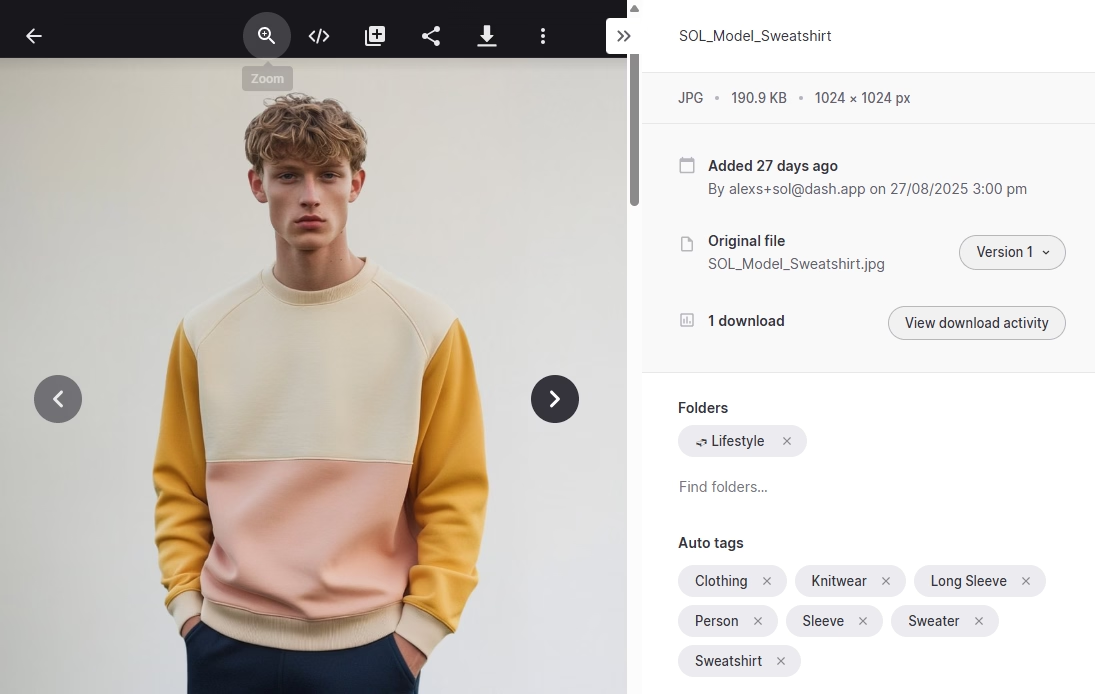
Differences: The difference is in the fields. Dash's custom fields are built around how ecommerce teams catalogue their work, with fields for things like SKU, campaign and season. Bynder can be configured for the same kind of structured metadata, but setting that up is part of its heavier initial configuration.
In summary: Auto-tagging is comparable on both. The edge for ecommerce is Dash's ready-made SKU, campaign and season fields; Bynder is more configurable but takes more setup to get there.
Image editing and resizing
When your team can crop and reformat assets themselves, it means they don’t have to wait on a designer every time they need a square version for Instagram, or a specific size for product pages. A good DAM should let you resize and crop assets, all within the same system.
Similarities: Both Dash and Bynder let you crop, resize and reformat images without leaving the tool, and both generate reusable preset sizes.
Differences: Bynder's resizing can auto-crop to the focal point and remove backgrounds. It also has a separate module called Studio, for templated designs and video. But cropping is permission-controlled, so not everyone can do it.
Dash keeps editing simple and self-serve. Anyone can crop, resize, apply presets, bulk-download and trim video. That extends to portals too. Retailers and partners can crop and resize assets to suit their own needs, without having to ask your team.
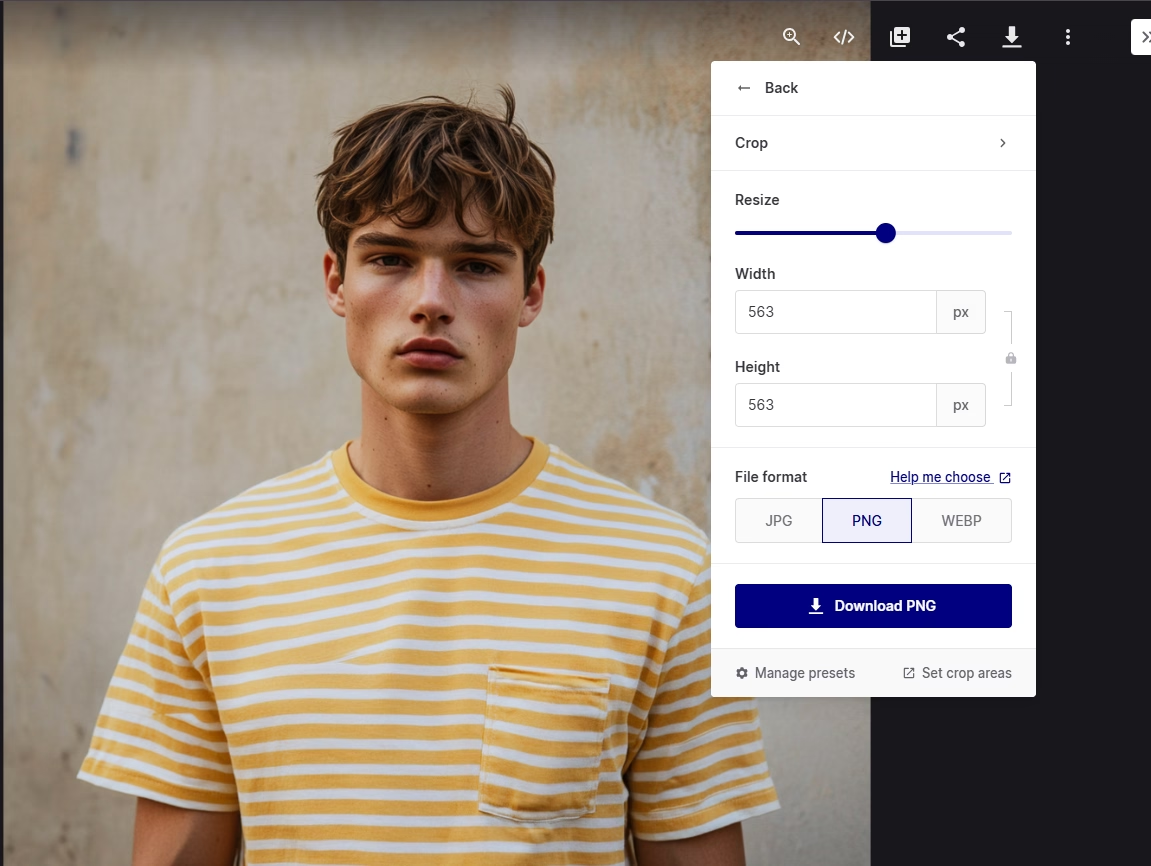
In summary: Bynder does more, but with more setup and tighter controls. Dash covers the everyday jobs, lets anyone do them, and pushes that self-serve editing out to partners in portals.
Sharing and portals
Your assets are only useful if the right people can reach them. Partners, distributors and agencies always need your latest logos, product shots and campaign files. Sharing that over email or WeTransfer can end up in a mess of expired links and it can be hard to keep track of who has what file.
Similarities: Bynder and Dash both let you share by link or email, and both offer branded, self-serve portals so partners can find and download approved assets on their own. They both let you control which folders and downloads partners can access.
Differences: This is fairly evenly matched. Bynder's portals and ‘brand guidelines’ module are pitched at large brands managing many regions and sub-brands. Dash's portals are pitched at growing brands sharing product imagery with retailers and resellers, and are included on every plan rather than gated.
In summary: Both are similar, but Bynder scales to complex multi-brand setups; Dash gives you partner portals on every plan with no add-on.
Guest uploads and collecting content
It’s likely that a lot of your content comes from outside your team. Photographers, videographers, freelancers and creators all need a way to get files to you. You also want to check what comes in before it lands in your library. Good content collection gives outsiders a simple way to submit work, and gives you a way to approve it first.
Similarities: Dash and Bynder support collecting external content and reviewing it before it's published.
Differences: Dash keeps this simple. You send a guest upload link, and contributors submit files straight into Dash without needing an account. Those uploads land in a holding area where you can approve or reject each one before it joins the library. There's also a separate feedback flow, where content submitted for review can be commented on by admins and non-admins alike.
Bynder handles collection and review through its Asset Workflow module, which is built for structured briefing, proofing and approval. That's more setup, and it's a paid add-on rather than something included by default.
In summary: Dash makes collecting and reviewing content quick and self-serve, included on every plan. Bynder is more structured, but that sits in a paid module and takes more setup.
Integrations
A DAM should be part of your brand's wider tech stack. Being able to connect to tools you use on a regular basis is important in helping you create an efficient workflow for your team.
Similarities: Bynder and Dash both integrate with creative and marketing tools, and both connect to Hootsuite for social.
Differences: Bynder's integration ecosystem is much larger and reaches into enterprise systems like Salesforce Commerce Cloud, Contentful, Akeneo and SharePoint.
Dash's integration list is shorter, but focused on the ecommerce and marketing stack: Shopify, WooCommerce, Canva, Hootsuite, Figma, Sketch, Adobe, plus Zapier.
In summary: Bynder wins on integration breadth, especially for enterprise systems. Dash covers the tools small and fast-growing ecommerce brands are likely using on a day-to-day basis.
AI capabilities
AI in a DAM mostly means less manual tagging and faster search. Some tools also add generative creation.
Similarities: Both auto-tag with AI, both offer natural language search, and both can surface visually similar images so you can find near-matches without describing them.
Differences: Bynder has a wider AI portfolio. Its AI features include similarity search (like Dash’s similar images), search by image, text-in-image search, speech-to-text, natural language search and face recognition.
It also has generative AI for copy inside its Content Workflow module and creative automation in Studio. Most of this is modular and priced separately.
Dash focuses its AI on finding assets fast. Natural language search understands plain-English queries, auto-tagging makes assets searchable the moment they land, and visually similar search surfaces near-matches in a click. All of it is included on every plan, switched on from day one, with nothing to configure.
In summary: If you want a broad AI toolkit including generative copy and face recognition, Bynder leads, at a price. If you want reliable AI search and tagging included by default, Dash covers it.
Security and permissions
As soon as external partners and multiple teams touch your library, you need control over who sees and downloads what.
Similarities: Both offer user permissions and permission groups, and both let you control partner access through portals. Both are cloud-hosted SaaS platforms.
Differences: Bynder targets large enterprises, so it carries the more extensive governance, granular permission controls and compliance tooling that big organisations require. Dash offers the permission groups and access controls a growing brand needs, without the administrative overhead.
In summary: Bynder is built for enterprise-grade governance and complex permission structures. Dash covers what a growing team needs without the complexity. Confirm specific certifications on each vendor's trust page before publishing.
Getting started, migration and onboarding
A DAM only delivers value once your team actually uses it. A slow or painful rollout kills adoption.
Similarities: Dash and Bynder both offer onboarding support and both help you import from existing storage.
Differences: This is a real gap. Bynder customers praise its dedicated onboarding, though some note the platform can feel overwhelming initially due to its extensive features, and big learning curve.
Dash offers free onboarding and migration on every plan and is designed to be live in hours, rather than months. In fact, you’ll get live with Dash four times faster than you would with Bynder.
In summary: Bynder gives you a dedicated onboarding team, which enterprises value, but the setup is heavier. Dash is faster to adopt and includes onboarding free on every plan.
Pricing
Bynder and Dash price in completely different ways.
Dash publishes flat, public pricing. Every plan includes all features, unlimited users, and free migration and onboarding. You only pay more for additional storage and downloads.
- Start up: £79/mo — 10GB, 250 downloads
- Small team: £179/mo — 50GB, 500 downloads
- Growing brand: £299/mo — 100GB, 1,000 downloads
- Established brand: £449/mo — 200GB–50TB, unlimited downloads
There's 10% off annual billing, and you can pay monthly with 30 days' notice to cancel. Dash also only bumps you to a higher plan after two consecutive months over your download limit, so one busy month won't trigger an upgrade.
Bynder doesn't publish list prices. Its pricing is modular and customized based on the number of users, storage, feature modules selected, and contract length. And it does not publish fixed list prices publicly.
Plus, advanced capabilities like Digital Brand Guidelines, Content Workflow, Studio, and integrations are sold as add-ons.
In summary: these aren't really competing on the same pricing field. Dash is a predictable few hundred pounds a month with everything included. Bynder is a negotiated enterprise contract, which can climb into tens of thousands per year once modules are added.. Which is ‘better value’ depends entirely on whether you'll use the enterprise capability.
Note: Because Bynder is quote-only, we’re unable to offer exact figures. However, anecdotal data and rough estimates on the web suggest pricing can range from $450 per month, into the tens of thousands per year.
Where each tool has the edge
Here’s a summary of what we’ve looked at in this article, and where each tool comes out on top/
[fs-toc-omit] Where Dash tends to be the better fit:
- Transparent, predictable pricing with all features and unlimited users included
- Fast, self-serve setup with free onboarding on every plan
- Made specifically for ecommerce brands
- Deep native Shopify workflow with SKU matching and bulk catalogue updates
- Simple guest uploads for working with freelancers and photographers
- Monthly contract option, not just annual
- Rated slightly higher for ease of use, with a small-business user base
[fs-toc-omit] Where Bynder tends to be the better fit:
- More AI features, including face recognition, speech-to-text and generative copy
- Creative automation and templating through the Studio module
- Native brand guidelines and structured content-workflow modules
- 160+ integrations, including enterprise systems like Salesforce and Contentful
- Enterprise-grade governance, permissions and analytics
- Dedicated onboarding and proven scale across very large, multi-region brands
Dash vs Bynder: What tool should you choose?
Dash scores 4.6 on G2 and Bynder 4.5, so this isn't good versus bad. Both are capable DAMs. The real question is how much platform you need, because that's the difference between them.
Choose Bynder if you need an enterprise platform. Bynder is built for large, often global brands managing content at scale across many teams, regions and sub-brands. Its strength is breadth: a core DAM plus modules for AI search, creative automation, content workflows, brand guidelines, analytics and deep integrations, all configured to fit a big organisation. If you have complex governance needs and the budget and resource to match, Bynder is built for it.
Choose Dash if you're a fast-growing ecommerce brand. Dash is built to be the single home for your assets and to get them out into the world, without the enterprise overhead. Every feature is included on every plan, the price is public, and your team can be live in days rather than months..
You can try Dash for yourself by taking out a free trial, or booking a demo with a member of our team.
Dash vs Bynder FAQs
[fs-toc-omit] Is Dash cheaper than Bynder?
Yes. Dash starts at £79 / $109 a month with everything included. Bynder is quote-only and typically runs into the tens of thousands per year once modules are added. But you're paying for different amounts of capability.
[fs-toc-omit] Does Bynder have AI search?
Yes, and a broad one, including natural language search, face recognition, speech-to-text and text-in-image. Most of it sits in a paid add-on module rather than the core product.
[fs-toc-omit] Does Dash integrate with Shopify?
Yes, natively, and it's one of Dash's strengths. You can pull product images from Shopify, match creative to listings by SKU, and bulk-update hundreds of SKUs before pushing back to Shopify.
[fs-toc-omit] Does Bynder integrate with Shopify?
Yes. Bynder has a Shopify connector that syncs approved assets from Bynder into Shopify's media library.
[fs-toc-omit] Which is easier to use?
Both score well, but Dash rates slightly higher for ease of use and gets teams live faster. Bynder is more powerful and has more of a learning curve.
[fs-toc-omit] Does Dash have unlimited users?
Yes, on every plan. Bynder prices by user count, so adding seats affects your cost.
[fs-toc-omit] Is Bynder better for large enterprises?
Generally, yes. Its governance, analytics, module depth and integration breadth are built for large, complex organisations.

Amy Burchill is the SEO and Content Manager for Dash. She works with ecommerce experts to create articles for DTC brands wanting to improve their campaigns.