When your creative output starts outpacing your current tech stack, a digital asset management (DAM) solution stops being a nice-to-have and starts being a business need. You’ve got more campaigns, more channels, more partners and a lot more assets.
But looking for a DAM isn’t easy. The market is flooded with enterprise vendors that do a good job of showing you their solution is the natural next step. They’ve got big client logos, Forrester reports, and sales teams who know how to make the case.
The problem is that enterprise is built for just that - enterprise. That means global corporations with dedicated IT teams, multi-region workflows, and complex compliance requirements. These types of DAMs are a serious investment in money, time and ongoing management.
If you're running marketing for a fast-growing DTC brand, that investment rarely pays off. And the question is not whether you can afford an enterprise DAM—it's whether you should be spending that budget there at all. Instead, consider whether you could be paying less for your DAM, and more on funding campaigns, creative production, and retail partnerships.
This article breaks down what enterprise DAMs are built for, where they fall short for DTC teams, and why Dash is designed specifically for brands like yours.
What are enterprise digital asset management software solutions?
A digital asset management tool is a software solution that helps brands manage and share their digital assets. For ecommerce teams, that means everything from product photography, campaign videos and graphics, to brand guidelines, logos and seasonal content. It's where your marketing team, agencies and retail partners go to find the assets they need—without having to ask you for them. 🙌
An enterprise DAM is specifically built for large, multinational companies. They need things like complex project workflow management, advanced permission structures and separate attributes for different teams across the globe. It's a lot. And it's functionality that most ecommerce brands just don't need — and definitely can't justify paying for.
Historically, smaller and mid-size ecommerce brands haven't been well served by DAM platforms. Enterprise vendors have dominated the market, leaving growing brands to either pay for features they'll never use, or make do with tools like Google Drive and Dropbox. And if you've ever tried to track down a specific product shot in a sprawling shared Drive folder the day before a launch — you'll know exactly how much time that wastes. ⏰
What’s the difference between enterprise DAMs and Dash?
Aside from costing your business thousands of dollars per year (yes, enterprise DAMs really do cost that much, scoot down for more details on pricing), these solutions are also draining your time and resources, too. Here are some other ways enterprise DAM’s will cost you.
[fs-toc-omit] Paying for scale you haven't reached yet
Enterprise DAM pricing is rarely transparent, and when the numbers do surface, they can be eye-watering. Kaitlyn from Kelly Wynne found this out when she went looking for a DAM:
"It was killing me having to reach out to each vendor and sit through a sales call, only to find out that the solution was going to be $10,000+ — just because of the sheer number of assets we have."
For a large multinational with a dedicated IT team and a software budget to match, that's a justifiable line item. For a growing DTC brand, it's worth asking whether that spend is really calibrated to the problems you have, or whether it could be working harder elsewhere.
The budget you save on the right DAM is a budget that can go straight into marketing activation. Campaigns, creative production, paid media, wholesale partnerships—the things that actually build the brand. Dash starts from £79 / $109 a month, meaning the rest of that budget stays exactly where it belongs.
[fs-toc-omit] The time you spend getting started — and never get back
With most enterprise DAMs, onboarding isn't a simple setup process. It's a project. Businesses have to map requirements across departments, configure permission structures for multiple teams, train staff across different regions, and migrate assets from legacy systems. For a global corporation with a dedicated IT function, that process makes sense.
For a DTC marketing team trying to get a product launch out the door, it's a serious distraction.
According to G2 data, an enterprise tool like Bynder takes, on average, 4 months to get set up. 4 months! 🤯 That’s 4 months of your team’s time that could have gone elsewhere.
Dash, on the other hand, takes 1 month on average.
For starters, you can easily migrate your assets from tools like Google Drive and Dropbox during your free trial. It’s so easy that you don’t need to chat with a member of the team beforehand—perfect for small teams who want to get going right away.
You can also book an onboarding call with a customer success manager who’ll guide you through the steps to get started. Dash is easy to use, so there’s no need for any intense training sessions or lengthy onboarding calls that many enterprise digital asset management systems require you to sit through. You can also visit the Dash Academy to learn everything you need to know about Dash.
If you’ve got thousands of assets scattered across different systems, or you’re moving from a different DAM, our customer success managers can do it for you. ✨
[fs-toc-omit] Ongoing management nobody budgeted for
Enterprise DAMs don't run themselves. Complex permission structures need maintaining as your team changes. Integrations need IT support. New team members need training. When something breaks or needs adjusting, you're often waiting on the vendor, not fixing it yourself.
One Bynder customer on G2 put it plainly:
"Some high-level settings are outside the permissions allowed for administrators and require Bynder intervention; I'd like to have control over as much as possible on my side in case I need to make an emergency adjustment."
For a lean DTC marketing team without a dedicated IT function, that dependency is a real operational risk, and a hidden drain on time that should be going into creative work, not system administration.
What's the difference between enterprise DAM and Dash?
On the surface, enterprise DAMs and Dash do similar things — store, organise, and share your brand's visual content. The difference is in who they're built for, and what that means in practice.
Enterprise DAMs are designed around the needs of large, global organisations. Complex permission hierarchies for teams across multiple regions. IT-managed rollouts. Integrations with enterprise content systems. Audit trails built for compliance teams. If you're a multinational with a dedicated IT function and hundreds of people accessing brand assets across different departments and time zones, that infrastructure makes sense.
DTC brands have a different set of problems. You need your whole network — in-house team, creative agencies, wholesale partners, retail accounts — to be able to find and use the right brand assets quickly. You need your Shopify store updated without a manual back-and-forth. You need your social team resizing digital content for multiple channels without waiting on a designer. And you need all of that to work without a six-week onboarding process or an IT ticket every time something needs changing.
That's the gap Dash is built to fill. Here's how the two compare across the things that matter most to a DTC marketing team.
[fs-toc-omit] Pricing
Enterprise DAM pricing is rarely transparent. Most vendors won't show numbers on their website, and when you need to join a sales call or two before you get an accurate figure. Contracts tend to be long-term, with per-seat pricing that scales against you as your team grows.
Dash starts at £79 / $109 per month, with every feature included and unlimited team members from day one. Pricing scales based on storage and download volume, so you only pay for what you actually use, and you always know what you're getting.
[fs-toc-omit] Onboarding
Enterprise DAM onboarding can turn into a project in its own right. You’ll have things like requirement mapping, permission configuration, team training and asset migration from your previous system. For a large global organisation, that process is necessary. For a DTC marketing team with a product launch on the horizon, it's weeks you don't have.
Dash is designed to get you up and running fast. You can migrate assets from Google Drive, Dropbox, or another DAM system during your free trial without needing to speak to anyone first. And, because Dash has been designed to be super easy to use, there’s a minimal learning curve for you and your team. This was a key requirement for Jack, the Marketing Manager at Brewdog.
“We just needed our DAM to be really intuitive. A person who's never worked at BrewDog or been on our DAM site before just needs to be able to go in and find what they're looking for. We don't have the capacity to constantly teach people how to use the system.”
Luckily, this was something that he found with Dash.
Learn more about how Brewdog moved from Brandfolder to Dash.
[fs-toc-omit] Finding your assets
When your social team needs a specific campaign shot at 9am on a launch day, they don't have time to dig through folders or learn a complicated search interface. Dash uses a combination of auto-tagging, custom fields, and AI-powered search to make finding the right asset fast — whether you know exactly what you're looking for or not.
Rather than searching by filename or tag alone, Dash understands natural language. Type ‘man wearing yellow shirt’ and it'll surface visually relevant results without anyone having to have manually tagged the image that way.
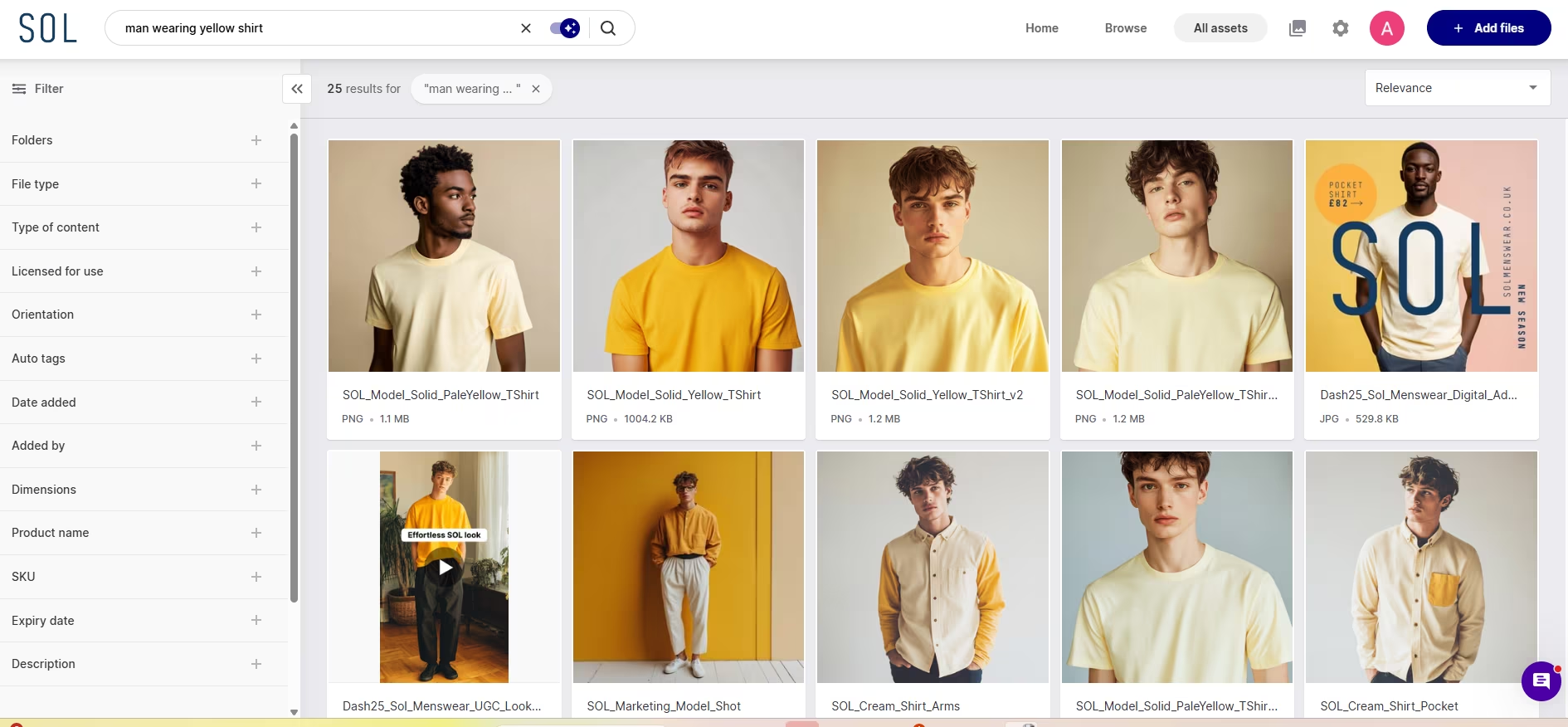
For ecommerce teams managing large product catalogues, you can also paste multiple SKUs directly into search to instantly pull up all assets related to a specific set of products.
Enterprise DAMs aren't always as straightforward here. As one Bynder customer noted on G2: "The one thing I dislike with Bynder is that its search is not the greatest, and finding an asset is sometimes very difficult." For a team moving at DTC speed, that's a real problem.
[fs-toc-omit] Sharing with your whole network
DTC brands don't operate in a vacuum. You've got creative agencies, PR contacts, wholesale partners, and retail accounts — all of whom need access to your assets at different times, with different levels of access. With most DAMs, sharing is a core feature. But not all of them do it well. For example, Jack from Brewdog told us how it was difficult to share assets with external partners in Brandfolder. They had to open their Brandfolder up to all their partners, which risked people using the wrong assets for the wrong location.
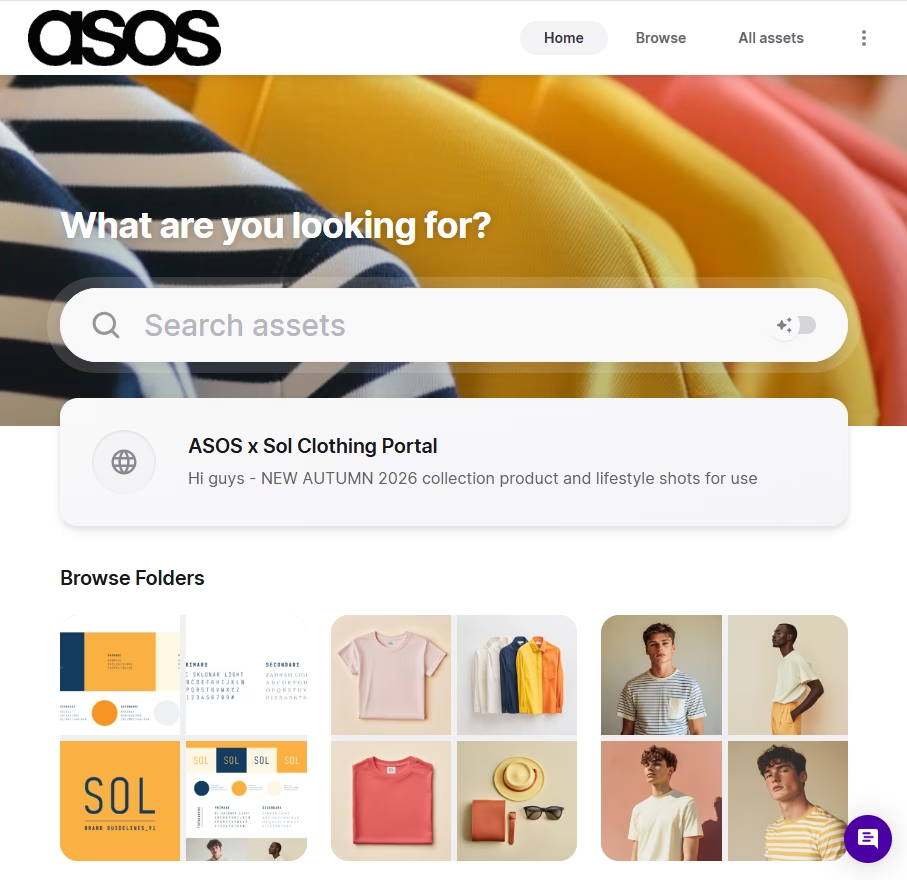
Dash, on the other hand, makes that easy through branded portals. These are public-facing versions of your Dash, but you can choose which folders are being shown. This way, retailers can self-serve assets without needing to hassle you. And you can be confident they’re only getting the content that’s relevant to them.
[fs-toc-omit] Resizing, versioning, and keeping content on-brand
Resizing and version control are standard features across most DAM platforms. With Dash, teams can download assets with custom crop sizes and file formats for any channel without needing a designer to resize everything each time. Plus, version control means that when you update an asset, everyone who previously downloaded it gets notified automatically. This minimises the risk of last season's campaign shot ending up in a live email, or an agency running imagery you've already replaced.
Some enterprise DAMs go further in brand asset management features. They’ve got built-in templating tools and hosted brand guidelines. If you're managing dozens of sub-brands across multiple markets, with hundreds of employees who need guardrails around how they use your assets, that functionality has real value.
That said, if brand guidelines are something you want to centralise, Dash integrates with Corebook—a dedicated brand guidelines platform—so your team and external partners always have a single, up-to-date reference point alongside your assets.
[fs-toc-omit] Integrations built for ecommerce
Enterprise DAM software tend to have long integration lists — but they're built around enterprise tools. Content management systems, print ordering platforms, stock image libraries. They’re impressive on paper, but perhaps less relevant when your stack is built around running an ecommerce brand.
Dash's integrations are focused on the tools DTC marketing teams actually use. Our native Shopify integration is the centrepiece — Dash matches assets to your Shopify products using SKUs, so you can bulk update product pages in one go rather than pushing images across manually. For teams managing large catalogues or frequent product updates, that alone is a significant time saving.
Beyond Shopify, Dash connects with Hootsuite, WordPress, Canva, Figma, and Adobe Creative Cloud. Your paid social team can pull assets directly without bothering the creative team. Your designers can drag files straight from Dash into their design tools. And your ecommerce manager can keep the store updated without a separate download step.
It's a more focused integration list than you'll find with enterprise vendors, but every connection is one your team will actually use.
How to make the case for a DAM platform like Dash
If you already know you need a DAM, the harder conversation is often internal. Depending on who you need to convince, the argument looks quite different.
[fs-toc-omit] Making the case to your CEO or founder
We’ve heard from a lot of brands that sometimes your CEO just needs to know what it’s going to cost. So here are the numbers:
- Dash starts at £79/$109 per month
- Every plan includes unlimited users and features
- Your plan increases as you increase your storage or you need more download capacity.
We price by download and storage because we don’t want to penalise you for adding new team members or extra features. It’s the best way for us to keep costs down, whilst ensuring we can maintain a smooth and speedy DAM system for your team.
Head to our pricing page for more information. Or check out our article that explores the ROI of digital asset management.
[fs-toc-omit] Making the case to your marketing team
Your marketing teams are going to be the people using your DAM every day. They’ll want to know that your digital asset management tool meets their requirements, and it won’t affect their day-to-day.
The good news is that Dash is designed specifically for marketing teams. They’ll get fast search, simple sharing, and direct connections to the channels and tools they use every day. Very little training will be required, and we can even help you migrate assets and set up your DAM so it doesn’t disrupt your work.
Here are some resources for your team to take a look at:
- The key features of a DAM system
- Why your team needs marketing asset management
[fs-toc-omit] Making the case to your IT team
From what we’ve heard, IT teams care less about workflow and more about security, data handling, and integrations. The key points:
- Dash is cloud-based SaaS — no on-premise infrastructure or internal server management required
- Secure access is controlled through permission groups, with portals for external partners
- Native integrations with Shopify, Hootsuite, WordPress, Canva, Figma, and Adobe Creative Cloud cover most DTC tech stacks without custom configuration
- No lengthy IT-managed implementation — most teams are up and running within a week
If your team is comparing options, our DAM comparison worksheet lets you lay out requirements alongside features and pricing in one place—useful both for making a decision and for presenting a clear recommendation to leadership.
Ready to find a DAM that's built for your brand?
If you're evaluating DAM options, the best next step is to see Dash in the context of your own content. Start a 14-day free trial. There’s no credit card required, no auto-renewal and most teams are up and running within a week. If you have a large asset library or you're moving from another system, our customer success team can handle the migration for you.
Not quite ready to commit? Download our free DAM comparison worksheet to lay out your requirements alongside the tools you're considering. It's a useful document to have whether you're making the decision yourself or presenting options to leadership.
And if you want to see how brands like yours are using Dash, our customer stories are a good place to start. See how COAT Paints streamlined their asset workflow, how Emmy London gave their whole team and agency partners access to the right content, and how Goodrays keeps their creative output moving at pace.

Amy Burchill is the SEO and Content Manager for Dash. She works with ecommerce experts to create articles for DTC brands wanting to improve their campaigns.