.avif)
Dash and Stockpress get compared a lot, and it's easy to see why. Both position themselves against the same two alternatives: messy shared drives on one side, bloated enterprise DAMs like Bynder and Brandfolder on the other. Both charge per storage tier rather than per user. Both promise you'll be up and running in days, not months.
That surface-level similarity is exactly why it's worth a proper comparison rather than skimming through a list of features. We spent time hands-on with Stockpress, uploading assets, running searches, testing share links, and digging through admin settings, to see where the two tools actually diverge in daily use.
{{stockpress-comparison="/blog-components"}}
Stockpress vs Dash: TL;DR
If you’ve not got time to read the full article, here’s a summary of the main things we cover, and how Stockpress and Dash stack up.
- Search: Dash understands what's actually in an image, so plain language searches work even on untagged files. Stockpress's search is thorough but you can only search for the metadata already on the file.
- Organising content: Dash's fields (dropdowns, checklists) stop inconsistent tagging before it starts. Stockpress relies more on tag categories and free text. These are more flexible, but easier for errors and inconsistencies.
- Image editing and resizing: Stockpress has a built-in image editor with AI tools like background removal, upscaling, and Editions. Dash has no editor, but handles bulk resizing and cropping across many assets in one download, so there’s no design tool needed.
- Sharing: Stockpress covers this well through customisable share links and content portals (which are like micro-sites). Dash also uses share links, and also adds branded Portals; a self-serve, searchable space for partners.
- Guest uploads: Dash has the option to route uploads through an approval step first. Stockpress doesn't gate uploads by default, so unapproved content can land straight in your library.
- Integrations: Both connect to a solid, overlapping set of tools, including Figma, Canva and WordPress. Dash adds WooCommerce and Hootsuite; Stockpress adds Webflow, Mailchimp and Klaviyo. Both also connect to Shopify, though Dash's integration goes further with bulk, SKU-matched exports (see the Shopify section above for the full picture).
- Pricing: Stockpress bundles storage and features into set tiers, so more storage can mean paying for features you don't need. Dash scales storage and downloads independently, but caps downloads on lower plans. Both offer low entry points but Stockpress marginally pips Dash to the post with $99 a month rather than $109.
- UI: Both are consistently rated among the easiest DAMs to use. This one really comes down to personal preference.
- Security: Stockpress offers deeper per-person permission control and SSO. Dash publishes more detail on its infrastructure and keeps data stored in the EU rather than the US.
Bottom line: there's no outright winner. The right choice depends on whether your team needs deep image editing and flexible tagging (Stockpress), or stronger search, partner-facing tools and ecommerce workflows (Dash).
What is Stockpress?
Stockpress is a cloud-based digital asset management platform. It's built to be as simple to use as Google Drive or Dropbox, with proper DAM features on top. That includes AI-powered tagging and facial recognition, custom fields, version control, sharing controls, and integrations with tools like Google Drive, Dropbox, Adobe Creative Cloud and Shopify.
It's aimed at a broad mix of teams (marketing, creative, nonprofit, education etc) rather than any one industry. Pricing is based on storage tier rather than user count, and there's a free plan for anyone who wants to try it without commitment.
Take a read of our article covering Stockpress alternatives.
What is Dash?
Dash is a digital asset management tool built specifically for ecommerce and DTC brands. Storage and organisation are just the starting point. The whole product is designed around what happens next: resizing content for channels, pushing product imagery to your store, and getting assets into the hands of retail partners without endless email chains.
In other words: Stockpress helps you organise your content. Dash does that too, as well as improving how you actually use it and deploy to your marketing channels.
Keep that distinction in mind as you read on. Almost every difference between the two tools traces back to it.
Dash vs Stockpress at a glance
Dash vs Stockpress: Feature comparison
Let's take a look at some core DAM features and how each tool stacks up.
Organising your content
Good organisation is what keeps a DAM usable at scale. It's not just about being able to find an asset. It's about consistency, permissions and structure.
Both DAMs take a similar starting approach: they use AI to tag images automatically on upload, which saves you from tagging everything by hand. You can also add your own tags and custom fields on top, to enrich the metadata of your assets.
Dash and Stockpress differ when it comes to controlled tags and fields. These allow admin users to be super specific about how they want assets to be tagged and organised. For example, you might include a dropdown where a user can select whether an asset has been approved for use (web only, social, print only, etc). Dash and Stockpress take a different approach to controlled tags and fields.
- Stockpress has a feature called Tag Categories. These are categories you create yourself, like Season, Client or Product, that you tag assets under. Admins can control who's allowed to add tags.
For controlled fields, however, Stockpress only has the option for free-text. It means anyone can type anything, and nothing stops inconsistent entries like ‘SS26’ and ‘Spring 26’ both being used (when they mean the same thing).
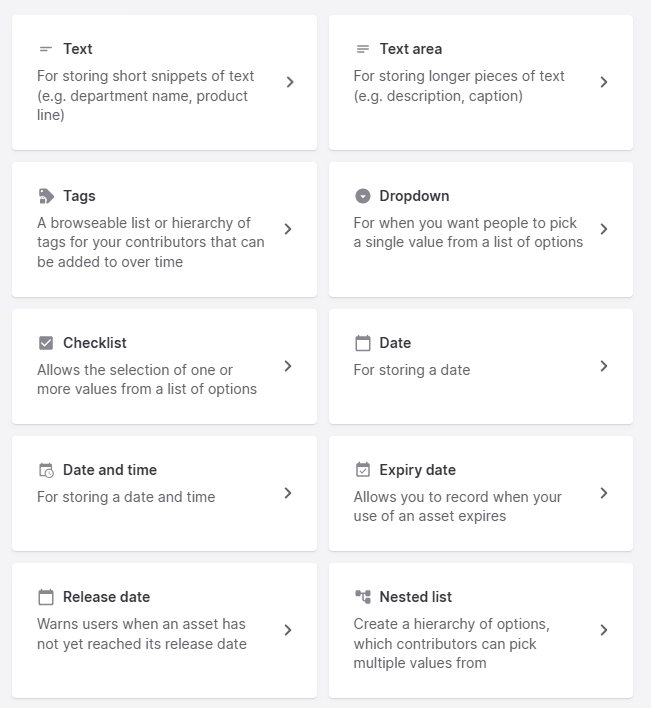
- Dash, on the other, gives you more control. When creating a new field, you can decide whether to make it a dropdown or a checklist, so people pick from an approved list instead of typing their own version each time. It means everyone is using ‘SS26’ instead of ‘Spring 26’.
There are additional field options like expiry date that warns someone if they try to use an asset past its licence, and a SKU field that Dash's Shopify integration uses to match assets to the right product (but more on that later).
In summary: Dash's controlled fields make it easier to keep entries consistent from day one. Stockpress's tag categories are more flexible, which some teams will genuinely prefer, but that flexibility relies more on discipline to stay tidy.
Searching for your content
Both Dash and Stockpress let you search the keyword of anything already included in an asset’s metadata. That might be the file name, description or tags. Type into the search bar of either tool and you'll pull up assets based on what's already recorded on the file. Both also let you filter by specific tags or fields when you want precise, exact results rather than a broad search.
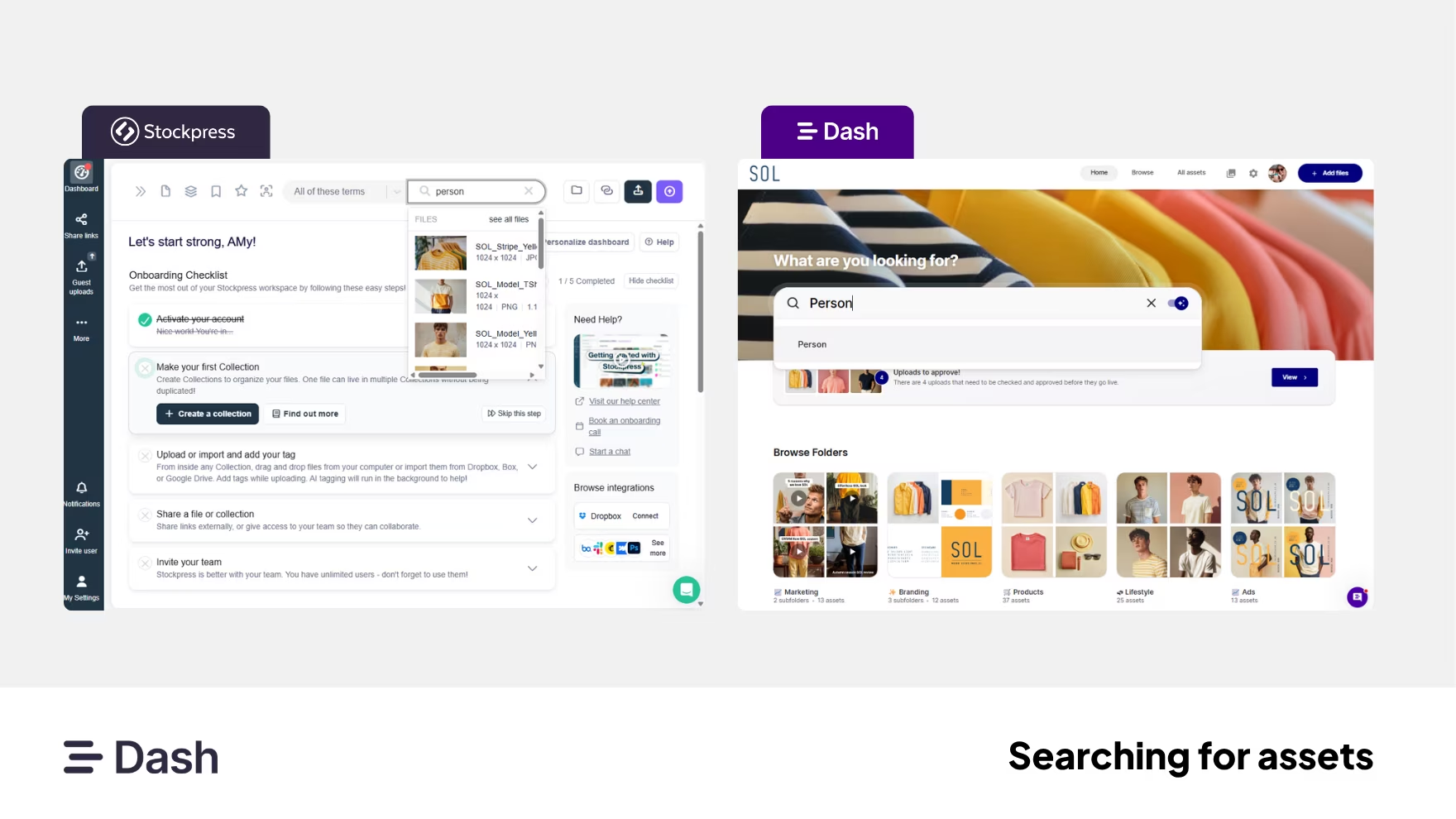
However, what happens if you don’t know what’s in the metadata of your asset? What if someone has forgotten to add fields and tags? This is where Dash and Stockpress differ:
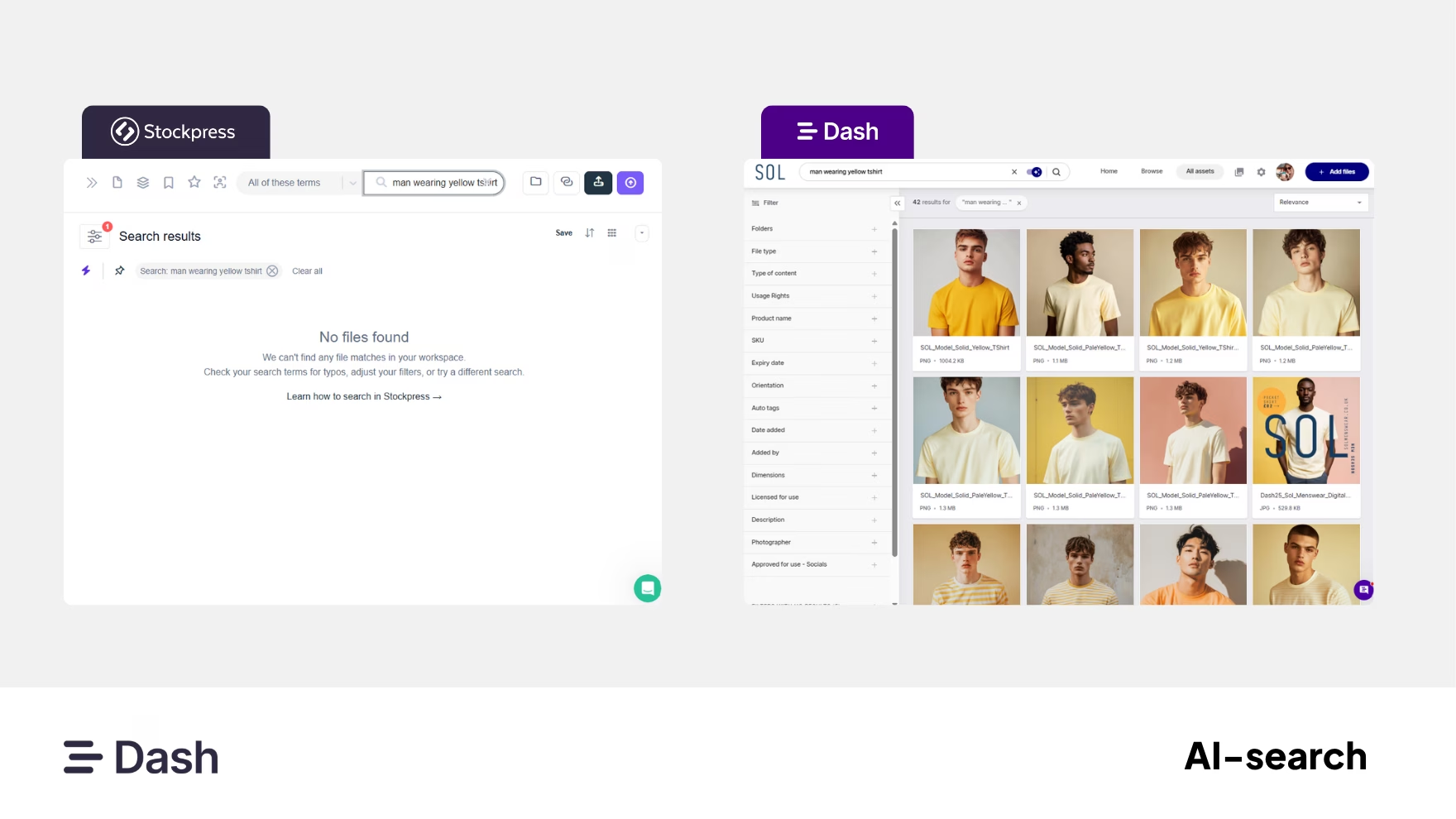
- Stockpress is limited to what's been recorded against the file. If the words you're searching for aren't written down somewhere like a tag or description, it won't find the asset. AI tagging helps populate some of that automatically, but the search itself only ever matches text against text.
- Dash goes a step further with AI natural language search: it can understand what's actually in the image itself, not just what's been written about it. So a search like "man wearing yellow t-shirtl" can still find the right photo, even if nobody ever tagged it that way. That’s because Dash is reading the asset itself, as well as its metadata.
In summary: Dash's understanding-based search gives it the edge for larger, less consistently tagged libraries. Stockpress's approach still works perfectly well if your team tags thoroughly and consistently.
Resizing and downloading
Most brands need to turn one asset into several versions, resized and cropped for different channels, or edited quickly without briefing a designer. Getting this right wastes loads of time, especially when the same campaign needs to go out across social, email and a storefront all at once.
Both tools let you crop and resize assets to specific dimensions without leaving the platform, and both offer preset sizes for social media.
Where they differ is depth versus scale.
- Stockpress has a built-in image editor that goes further on a single asset. It uses AI tools for removing or replacing backgrounds, expanding an image's borders, and upscaling resolutions. Its Editions feature lets you generate several connected crops from one master image, without replacing the original.
- Dash doesn't have a built-in image editor. Instead, resizing and cropping happen at the point of download, and it's built for doing this across many assets at once. You can select multiple assets and apply a preset or custom crop to the whole batch in a single download, rather than working through each file individually. The same resize and crop options are available from shared portals and links too, so external partners downloading assets can pick their own dimensions without needing to ask you.
In summary: this one's a genuine trade-off rather than a clear winner. Stockpress goes deeper on single-asset editing, Dash is built for speed across many assets at once, so the right choice depends on whether your bottleneck is production or throughput.
Sharing and working with external teams
If you work with photographers, retailers, distributors or agencies, you'll need a way to give them access to the right assets without them constantly emailing to ask for things.
Both tools let you share files externally via a link, with no login required for the recipient.
Stockpress offers two ways to share externally:
- Share links, to a single file or Collection. Customisable on Pro and Premium: password protection, expiry dates, view-only toggles, required name or email, branded watermarks.
- Content Portals, a no-code branded page built from content blocks and live Collection feeds, styled with your own fonts and colours. Good for things like a brand guide or media hub that needs to look polished and stay current automatically. Every plan gets one for free; more portals require Premium.
One thing to flag: a Content Portal is a curated page, not a searchable library. Visitors browse what you've put on it, they can't search or filter your workspace themselves.
Dash offers three routes:
- Quick share links, for one-off shares of specific assets: set an expiry, choose view-only or downloadable, and either copy the link or email it directly.
- Shared collections, which update automatically as content changes, so there's no need to resend a link.
- Portals, public-facing versions of your library where visitors get the same search and filter tools your own team uses, scoped to whichever folders you've shared. You can passcode-protect a portal, control which fields are visible, and choose view-only or view-and-download access. You can create as many portals as you need at no extra cost, and you can customise each portal to make each of your recipients feel like VIPs. Plus, portals activity will show you which portals are being used the most, and what content is being downloaded.
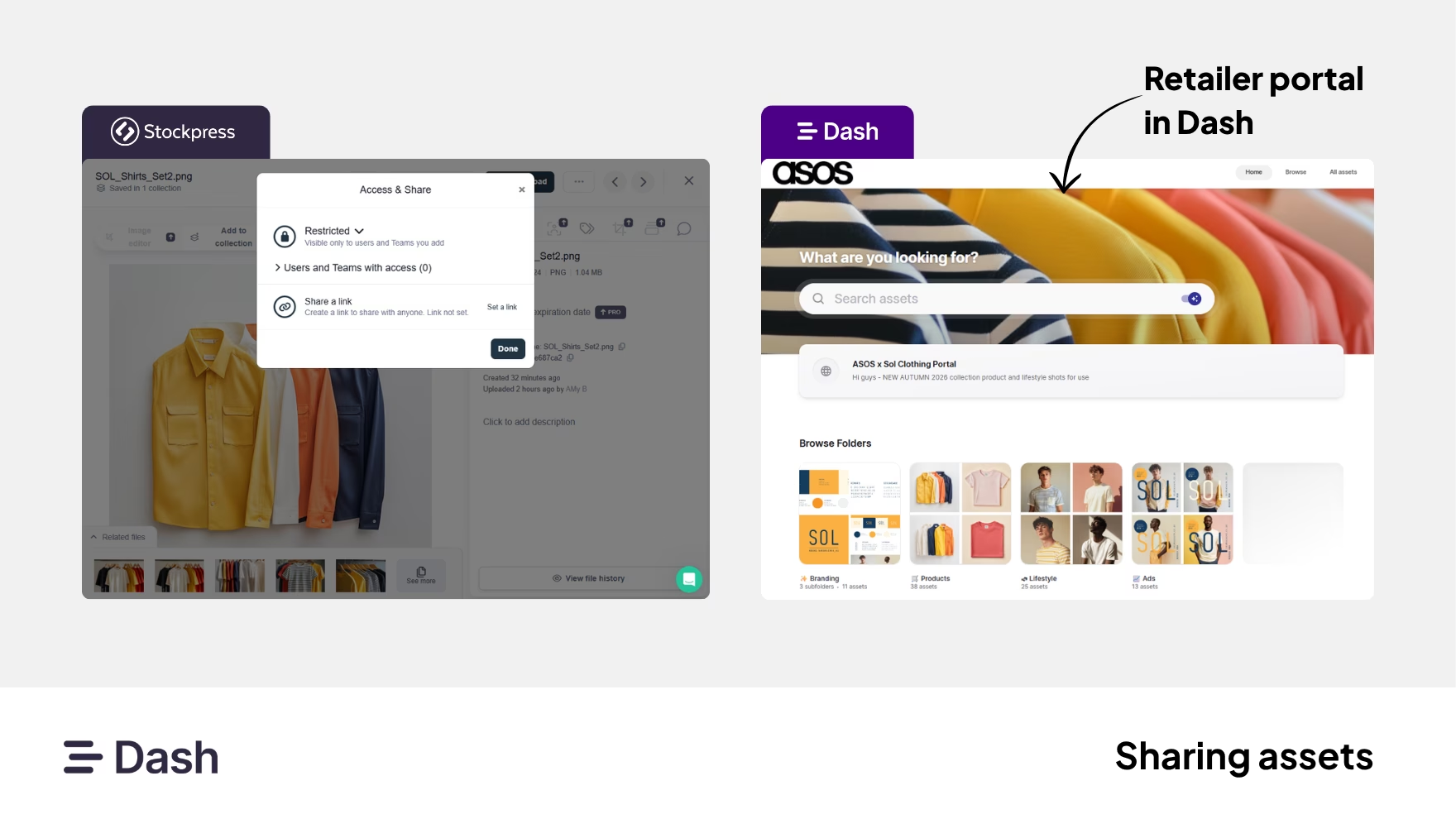
In summary: want a polished, browsable brand hub? Stockpress's Content Portals do that well, and you get one on every plan. Want partners to search and self-serve within your actual library? That's what Dash's Portals are built for.
Collecting content from photographers and creators
Brands often need a way for photographers, freelancers or creators to submit files directly, without giving them a full account.
Both tools offer guest uploads, so photographers and creators can send you files without needing a login.
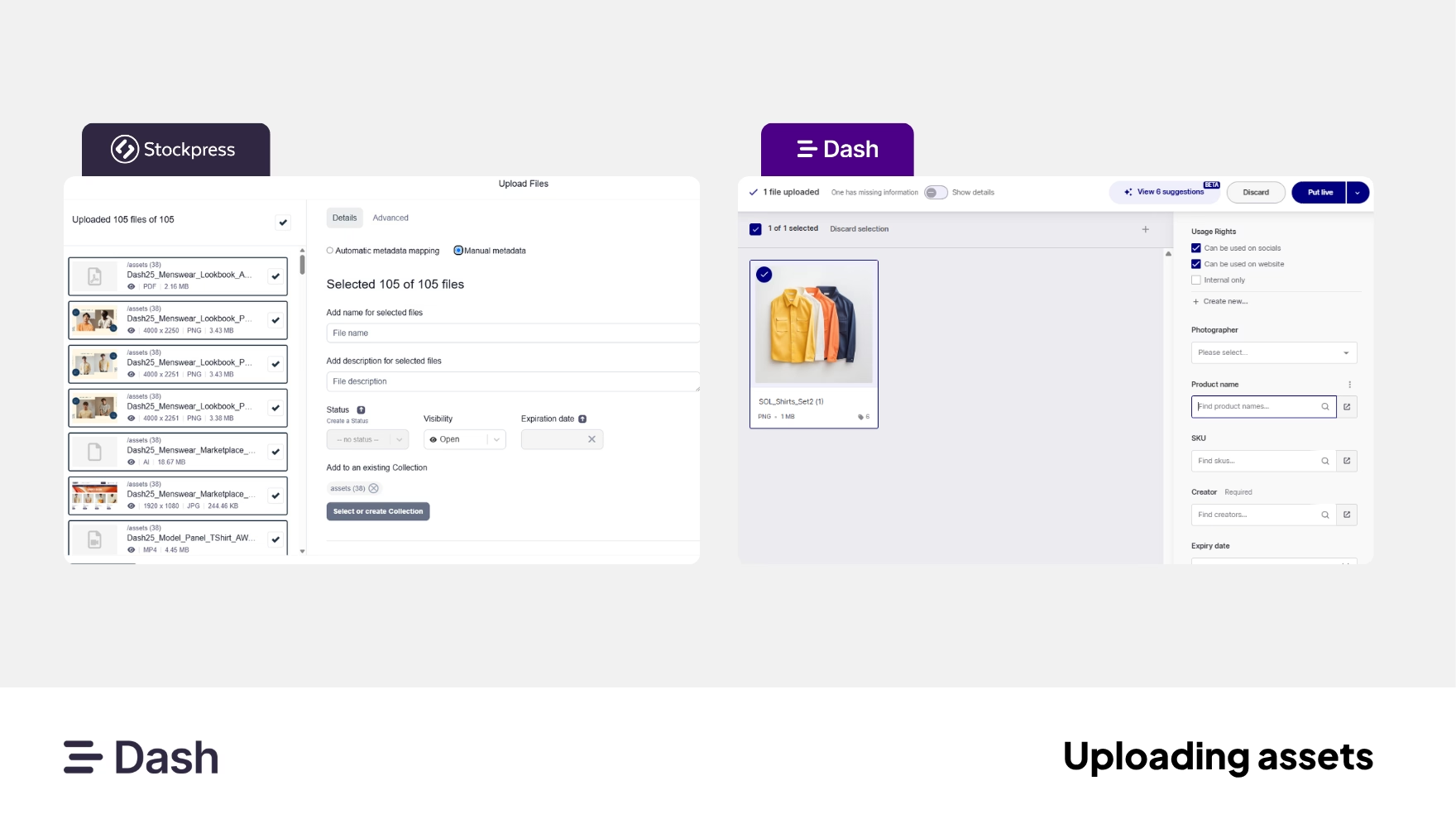
Dash's guest upload links are branded, automatically capture the uploader's email address, and route everything submitted through an admin approval step before it's visible in your library.
In Stockpress, setup is fiddlier: capturing the uploader's name and email requires toggling a setting on a separate page that's easy to miss. There's also no approval gate, guests can upload anything straight into your account. Files carry a "Pending Approval" or "Approved" status, but nothing actually stops unapproved content entering the library.
In summary: Dash's built-in approval step is the safer setup out of the box. Stockpress can do the same job, but it takes more manual configuration to get there.
Integrating with your tech stack
Stockpress and Dash connect to variety of tools that teams use everyday:
Both connect to Figma, Canva and WordPress. The clearer gaps are WooCommerce and Hootsuite (Dash only), and Webflow and Mailchimp/Klaviyo (Stockpress only).
Shopify is worth a closer look, since it's a key platform for many ecommerce brands. Stockpress and Dash connect directly inside Shopify admin, so you can add images to a product without leaving Shopify:
- Stockpress: browse or search your workspace from within Shopify, then add a single file, or multi-select several files, to one product page at a time.
- Dash: offers two methods, adding assets to one product from within Shopify (same as Stockpress), or exporting a batch of assets straight from Dash, auto-matched to the right products by SKU code. The second method is built for updating multiple products or launching a new collection in one go.
In summary: for everyday single-image updates on Shopify, both tools are comparable. Dash's bulk, SKU-matched export gives it a clear edge for brands regularly launching or refreshing larger catalogues.
User-interface and usability
A DAM's interface matters because it decides whether your whole team actually uses the tool, or falls back on old habits like a shared drive.
Both tools are consistently rated among the easiest DAMs to use on G2, and ease of use is the top review theme for each, so it's worth being upfront that the data doesn't support picking a clear winner here.
Dash holds a 4.5/5 rating on G2 and has previously won G2 awards for Best Usability and Best Relationship in its category:
Reviewers regularly describe the interface as clean and quick to pick up, including for non-designers: "The clean UX/UI of Dash makes it incredibly easy to navigate and use, both for admins and contributors who may not be as design savvy."
Stockpress also rates highly by star count, 4.9/5 on G2 from 82 reviews, with "Ease of Use" as its single most common review tag (40 mentions):
- Reviewers describe onboarding entire teams with little to no training: "Implementation was effortless because the platform is so intuitive to use."
- However a smaller number of reviewers flag "Tagging Issues" and "Poor Navigation" as minor recurring themes.
Both platforms are genuinely well-regarded for usability, so this largely comes down to personal preference. Take a look at both below and see which one feels more intuitive to you.
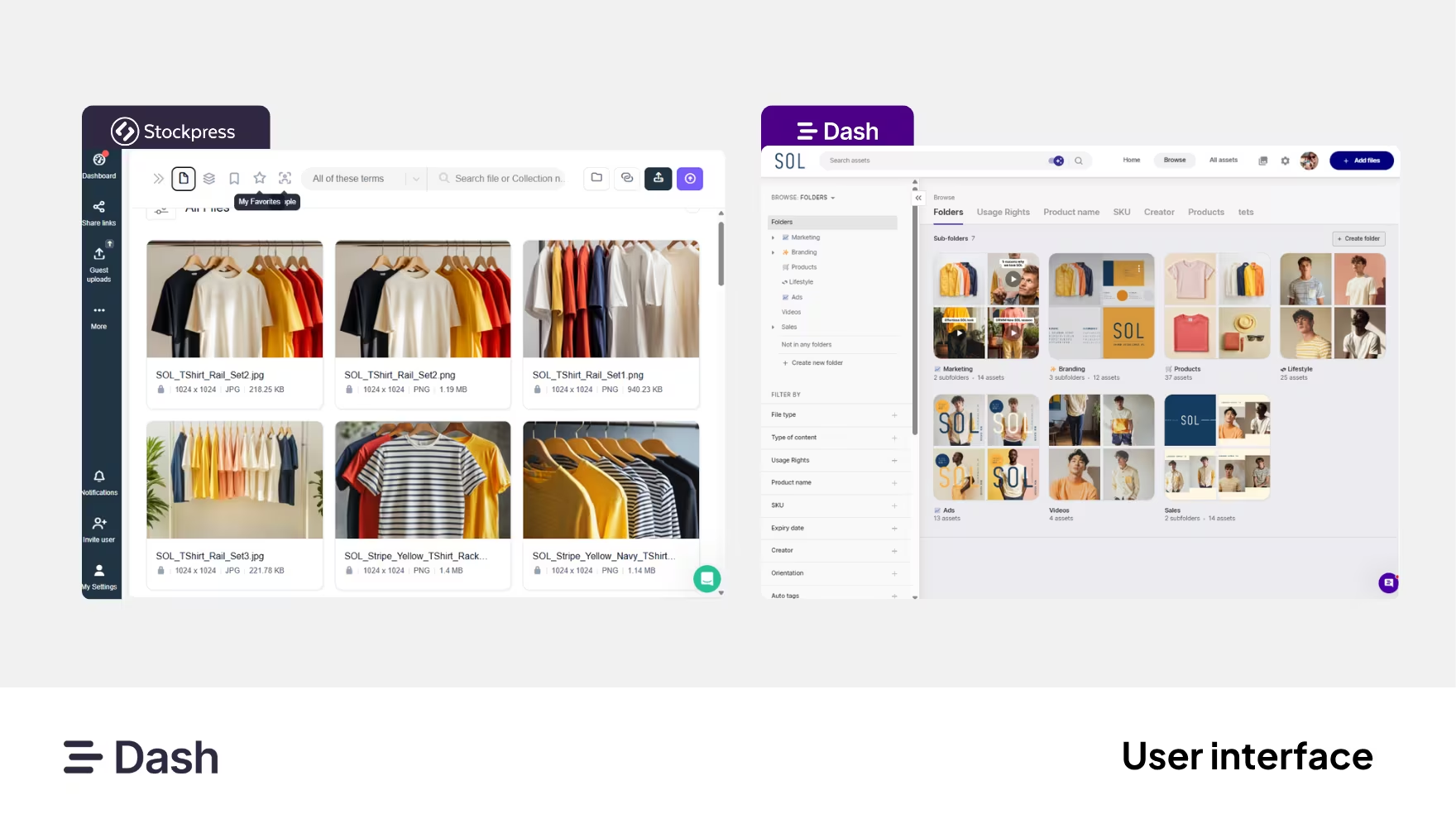
In summary: Both are highly rated for ease of use, so this one really is down to personal preference rather than either tool being objectively better.
Stockpress vs Dash: Pricing
Stockpress's published tiers:
- Free: 3GB storage
- Essential: $99/month, 200GB
- Pro: $175/month, storage from 500GB to 3TB
- Premium: $225/month, storage from 500GB to 10TB
On paper, that looks cheaper than Dash at every level. But beyond the most basic functions, almost everything else is locked to Pro or Premium: custom fields, text extraction, duplicate detection, share link customisation, metadata export, migration support, video transcription, and even how long deleted files stay recoverable. So it's very easy for the real cost to climb well past the headline price, not because you need more storage, but because you need almost any feature beyond the basics.
Dash's published tiers:
- Start-up: $109/month, 10GB, 250 downloads/month
- Small team: $179/month, 50GB, 500 downloads/month
- Growing brand: $299/month, 100GB, 1,000 downloads/month
- Established brand: $449/month, 200GB–50TB, unlimited downloads
Every feature is included from the first plan, so the only reasons to move up are genuinely needing more storage or more monthly downloads, not unlocking capability. Worth noting too: Dash doesn't bump you up a plan the moment you go over your download limit once, that only happens if an account exceeds its limit for two consecutive months, so a one-off busy month won't automatically change your bill.
Wondering why Dash charges by downloads? It's so we don't penalise fast-growing teams for adding new users, and don't need to hold back features behind higher tiers. Charging by storage and downloads instead keeps costs down and lets everyone access the same full set of features.
In summary: Stockpress's entry price is lower, but because nearly every core feature sits behind Pro or Premium, costs can escalate quickly once your team needs anything beyond the basics. Dash costs more upfront, but the only thing that pushes the price up is actual usage, storage and downloads, and even then, only after sustained overuse rather than a single busy month.
Dash vs Stockpress: Security
A DAM often holds a brand's entire creative library and controls who can see, edit or download it, so it's worth knowing what protections are actually in place on each side.
Both tools support two-factor authentication, an extra login step beyond just a password.
Stockpress:
- Supports single sign-on, letting people log in with an existing company account instead of a separate password
- Comes with three ready-made user roles (Admin, Manager, User) on every plan, plus fully custom roles on Pro and Premium, so you can control exactly what each person can and can't do
- Is locked down by default, external users can't browse your library without being given specific access or a share link
- Stores data on servers based in the US, and its terms note that data may be handled in the US or other countries outside your own
Dash:
- Supports single sign-on, letting people log in with an existing company account instead of a separate password
- Stores data on servers based in the EU, with backups also kept in the EU
- Encrypts your data both while it's being sent and while it's stored
- Regularly tests its own systems for weaknesses, and keeps a close eye on activity to catch issues early
- Keeps each customer's data separate from everyone else's
- Keeps regular backups and can restore your account if something goes wrong
- Commits to telling you within 24 hours if there's ever a data breach
- Deletes all your data within 90 days of cancelling, giving you the chance to export it first
- Controls access with two permission levels, Basic and Contributor, applied per folder, with an optional approval step before someone's uploads go live
In summary: both offer SSO alongside 2FA, so that's not a differentiator after all. Stockpress still offers deeper per-person permission control, while Dash publishes more detail on its infrastructure and keeps data within the EU.
Dash vs Stockpress: Onboarding
How easy it is to actually get going, moving your assets across, learning the platform, and getting help when something's unclear, matters as much as any feature on a spec sheet. Both tools are built to be self-serve, but the level of hands-on support differs by plan.
Stockpress:
- Import directly from Google Drive, Dropbox or Box, keeping your existing folder structure, or drag and drop files from your desktop
- Coming from another DAM like Canto, Brandfolder or Air, Stockpress can import your files from a simple list you provide
- Most teams are up and running within minutes, with self-serve onboarding built into every plan
- In-platform chat support, with an average response time under five minutes
- Hands-on migration help, onboarding, training, and a dedicated account manager are all part of the Premium plan; on lower plans, you're largely setting things up and finding help yourself
Dash:
- Import directly from Google Drive, Dropbox, OneDrive, SharePoint or Google Photos, keeping your existing folder structure
- For very large libraries, Dash's team can help move everything across and clear out duplicates afterwards
- Onboarding sessions can be booked with Dash's team as soon as you sign up, on every plan
- In-app chat support, with Dash customers on G2 regularly highlighting responsiveness and hands-on help
In summary: Stockpress gives you the basics to migrate yourself, but if you need real help, especially with a large library or a move from another DAM, that's reserved for the top two plans. Dash gives you a self-serve option for large migrations too, and includes hands-on help from its own team on every plan.
Brands using Dash and Stockpress
Both platforms have a varied customer base, though the kind of brand each tends to attract reflects the difference in who they're built for.
- Dash is used by growing ecommerce and DTC brands across categories like outdoor, food and drink, fashion and beauty, including Mountain Equipment, Beavertown, Brewdog, Reebok, Rixo, Riverford, Gozney, Emma Bridgewater, Passenger, COAT Paints, Roka and RevAir.
- Stockpress is used across a broader mix of industries, agencies, manufacturing, education, local government and nonprofits, reflecting its general-purpose positioning. Named examples include Modine (an HVAC manufacturer), KingFish + Partners (a content marketing agency), Downtown Houston+ (a city district organisation), and Arcbound.
Where Dash wins
To recap the key takeaways, here’s where Dash comes out on top:
- AI-powered search that finds assets by what's in them — no perfect tagging required
- Bulk resizing with crop control, plus video trimming, so content is channel-ready without a designer
- Portals, which are branded, self-serve spaces for retailers and partners
- Approval workflows on guest uploads, so nothing enters your library unchecked
- Ecommerce and marketing integrations including Shopify, WooCommerce, Figma, Canva, Hootsuite
- Everything included on every plan, including free migration and onboarding
Dash isn't just somewhere to keep your content. Instead, it's built to actually get it out the door.
Where Stockpress wins
A fair comparison should say this plainly. Stockpress does some things Dash doesn't:
- Facial recognition for surfacing images of specific people
- A built-in image editor with annotations for marking up assets
- Editions — connected deliverables generated from a master asset
- Per-person notification preferences, so everyone controls what they're pinged about
- A detailed activity log covering everything from deletions to share link creation
- $10 cheaper a month to get started
If those map closely to your workflow, particularly the annotation and markup side, Stockpress deserves a proper look.
The verdict: which should you choose?
Choose Stockpress if you're a small team that mainly needs a tidier, smarter shared drive. It's easy to use, quick to set up, and the free plan and low entry price make it a gentle way into DAM. Just audit the plan tiers carefully so you know exactly which features you're getting.
Choose Dash if you're a growing brand producing a high volume of creative — especially if you sell through Shopify or WooCommerce, work with retail partners, or need content resized and live across channels quickly. You get AI search that doesn't depend on perfect tagging, portals for your partners, proper approval workflows, and every feature included from day one.
The honest summary: Stockpress is a good organisation tool. Dash is built for what happens after you're organised.
If that second part sounds like your team, start a free 14-day trial or book a demo. ✨
Stockpress vs Dash FAQs
Is Stockpress cheaper than Dash?
On the surface, yes. But most of Stockpress's useful features are locked to Pro and Premium, so real costs often climb faster than the entry price suggests. Dash costs $10 more upfront but includes every feature on every plan.
Does Stockpress have AI-powered search like Dash?
Not quite. Stockpress's AI auto-tags images, but search only matches text already stored on the file. Dash's AI search understands what's in the image itself, so it can find an untagged photo from a plain-language description.
Which DAM is better for Shopify?
Dash. Both connect directly to Shopify admin for single-product updates, but Dash also supports bulk, SKU-matched exports across a whole catalogue, a big advantage for brands regularly launching or refreshing multiple products at once.
Does either tool have a free plan?
Stockpress does, 3GB with no credit card required. Dash offers a free trial instead.
Which has better image editing tools?
Stockpress. It has a built-in editor with AI tools like background removal and upscaling, plus Editions for generating multiple crops from one master image. Dash has no built-in editor, but resizes and crops many assets at once at download
Is my data more secure with Dash or Stockpress?
Both support 2FA and SSO. Dash publishes more detail on its infrastructure and stores data in the EU. Stockpress offers deeper per-person permission controls but stores data in the US.
Can I migrate easily between the two?
Both support direct imports from Google Drive and Dropbox. Hands-on migration help from the vendor's team is included on every Dash plan, but only on Stockpress's Pro and Premium plans.

Amy Burchill is the SEO and Content Manager for Dash. She works with ecommerce experts to create articles for DTC brands wanting to improve their campaigns.