There’s no getting away from Google Drive. Along with Dropbox, it’s changed how we work by making cloud-based storage for businesses the norm.
It’s great for file management and collaboration. It syncs with other Google Workspace apps like Google Docs, which is pretty handy.
But, here’s the thing. We often find ourselves using Drive for tasks it was never intended for. That can lead to a lot of frustration and wasted time.
When a tool is such a feature of your working day, it’s hard to imagine there are better-suited alternatives out there. But believe me, they exist. This article covers 10 affordable alternatives to Google Drive, so you won’t have to compromise any longer.
Why switch from Google Drive?
Good question. Google Drive can have some serious limitations depending on what you want to use it for. Let's investigate:
1. Drive isn’t a silver bullet
Drive isn’t your answer to all things. It’s good for storing documents in the cloud, sure. But it’s not always best suited to other tasks we find ourselves using it for. For instance, there are better ways to view, store, and share your brand’s images and videos. But we’re getting ahead of ourselves.
2. Doesn’t feel like yours
We spend so much time in Drive that we’ve gotten used to living and working within the Google brand. It’s a real shame there aren’t many options to make it feel personalised. Wouldn't it be nice to house your brand's content in a place that looks and feels like your company?
3. There are privacy concerns
Google is often in the news about the eyebrow-raising ways it stores and monetises user data. For instance, three U.S. states filed privacy-related lawsuits against the tech giant, as Bloomberg reports.
In the context of Google Workspace, this could also raise concerns. Drive updated their policy in December 2021 to allow them to block you from sharing your files if they’re deemed to breach their policies. As cloud collaboration tool Tresorit puts it:
“The move highlights how deeply Google scans the files uploaded to Google Drive, which raises several privacy concerns.”
Read this deep-dive by Cloudwards to learn more about Drive’s privacy issues. And scoot down this article for alternative Google Drive tools that have a better focus on privacy.
4. Drive’s customer support isn’t the best
As you’d expect from a mega corp, Google's support team mostly rely on online resources like help articles and forums to help customers in need. It’s tricky to talk to an actual person when you’re stuck.
On top of that, some users say that it can take a long time to get a reply from Google's customer support team. And when they do answer, there’s no guarantee the reply will . You might end up spending time on Reddit to find the answer you need.
5. Price by user can rack up
Drive is part of Google Workspace. That means businesses need to buy access to the whole suite of applications to access Drive. How much you spend on Workspace a month depends on the features you want and how many users need access to it.
Here’s what you get in their standard business plan:
- Access to all Google apps like Calendar and Google Docs
- 2TB of cloud storage space per user
- Controls to manage your security
- Your own custom business email
It's priced at $14.40 per user per month (flexible pricing). So, let's say you're working in a small business with 40 employees. That'll set you back $576 a month.
The best Google Drive alternatives for 2026
One or more of the reasons we discussed above might apply to you. In any case, let’s look at ten tools you can use instead of Google Drive.
Considering these competitor products doesn’t mean ditching Drive for good. Just that there may be other tools better suited for the work you’re doing.
Nb. pricing acurate as of March 2026
1. Dash: For managing your brand's visual content
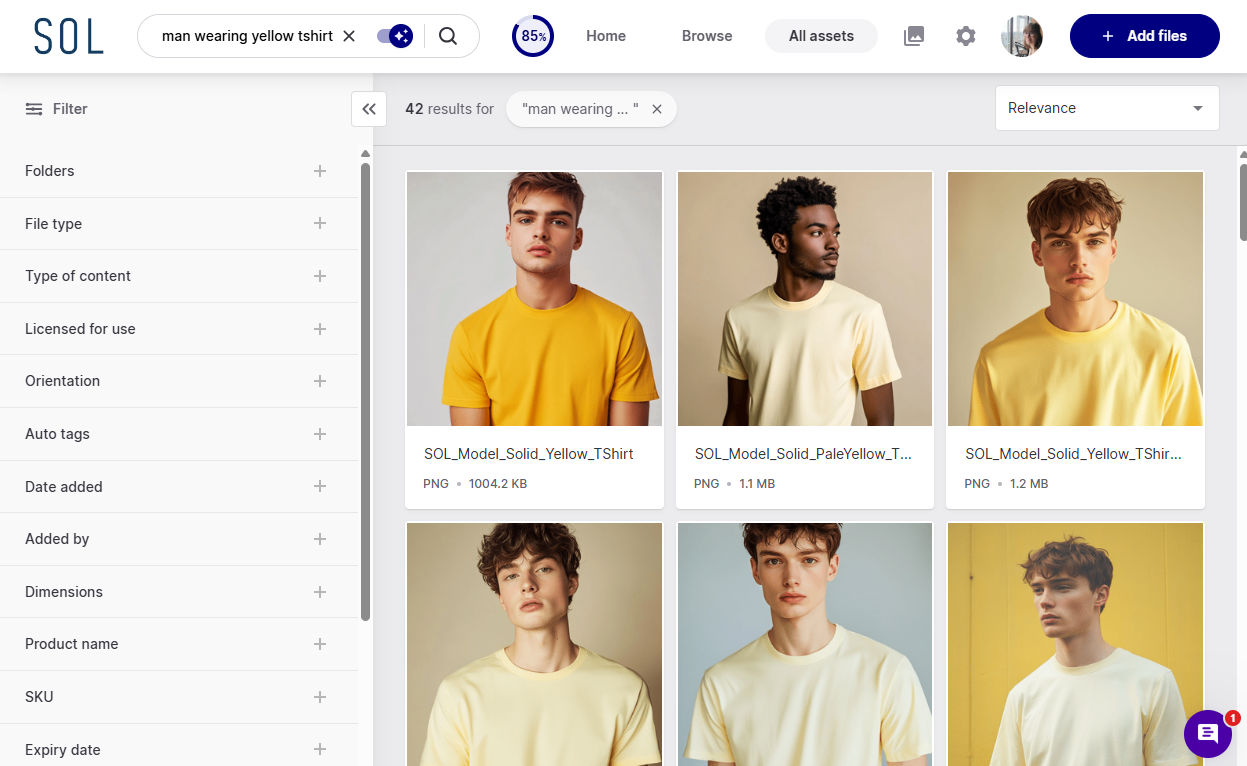
If your marketing or creative team is managing a growing library of product images, campaign assets, influencer content and videos, you need a digital asset management (DAM) tool built for the job. That's exactly what Dash is.
Dash gives ecommerce brands one beautiful, searchable home for all their visual content. Teams can find what they need, share it with the right people, and get it out into the world faster.
Here's what you get with Dash:
- Find anything in seconds. Every asset in Dash gets automatically tagged, so you can search by what's actually in an image, not just what someone decided to call the file. You can then add custom fields on top (product name, campaign, usage rights). It means finding the right image becomes genuinely quick.
- COAT Paints' Brand Manager Abi Moody told us this was a game changer after living in Google Drive: "The searchability in Dash has been a game changer for us. It helps spark new ideas — being able to dive into these little rabbit holes and discover things we didn't even know we had is incredibly useful."
- Share assets with anyone: Send individual files or groups of assets by email or shareable link. Use Collections to group assets across folders and share them without an expiry date. Or set up a branded portal — a public, searchable space where your retailers, agencies and press contacts can find and download what they need without bothering you.
- Collect content from creators: Working with influencers or UGC creators? Generate a guest upload link and send it to them. They upload directly into Dash — no login needed — and everything lands in a holding area for you to approve before it goes live.
- Push content straight to your sales and marketing channels: Dash integrates with the tools growing ecommerce brands rely on most. Dash is also one of the only DAMs to integrate directly with Shopify. Instead of manually downloading, resizing and uploading product images to Shopify one-by-one, Dash lets you do it in seconds.
Learn more about Dash's Shopify integration.
So, how much exactly do these features cost? Dash is meant for fast-growing brands and, so our pricing won't break the bank. Our monthly plans start from £79/$109, and you will get access to every feature for unlimited users.
Brands like Passenger Clothing and Goodrays have already made the switch from Google Drive to Dash. If you're managing a growing library of product images, campaign assets, or influencer content, it's worth seeing whether Dash fits the bill.
{{free-trial="/blog-components"}}
2. Dropbox - for document management
Dropbox? In an article about Google Drive alternatives? Groundbreaking.
But it’s a cliche for a reason. Dropbox and Google Drive have long led the pack as cloud storage services for businesses. There’s a reason for that - they’re both excellent products. They’ve got similar features but with a few key differences.
- Familiar folder structure: Google Drive emphasises using the search bar to find your files. That can be useful as it prompts users to think outside of traditional folder structures. But, training yourself out of relying on folders to find files can be a struggle for some people. If that’s the case for you, then you’ll prefer Dropbox’s user interface, which looks much more like your computer desktop. If you’re used to finding files by going through a series of nested folders, this won’t be as steep a learning curve.
- Speedier file synchronisation: Dropbox and Drive approach updating and syncing files differently. If you make any changes to a document in your Google Workspace, Drive will re-sync the entire document, even if you’ve made the tiniest of edits. Instead, Dropbox has a concept of incremental backup. This means if you edit a paragraph, Dropbox only syncs that paragraph rather than the entire document. While the speed difference between the two won’t usually be noticeable, it’s a consideration if you have dodgy internet bandwidths.
- More freedom when working on non-Google files: Drive is part of Google Workspace alongside other applications like Docs and Sheets. So, it’s hardly surprising that it offers less functionality for documents made by non-Google applications.
Dropbox’s advanced plan (recommended for companies) costs $18 per user/month and comes with 15TB storage capacity.
The key thing that’ll swing whether you’re for Drive or Dropbox is the context it sits within. Being part of Google Workspace, the integration between Drive and other Google applications (like Docs, Sheets and Google Photos) is seamless. For obvious reasons, there’s no way Dropbox will be able to compete with that. If you’re already using other Google Workspace apps, sticking with Drive makes sense.
But for your visual conent, you should still consider a a proper DAM solution like Dash.
Find more information about how Dropbox stacks up as a digital asset management tool.
3. Notion - for project management
Drive doesn’t support collaborative project management, but a lot of us still use it to store documents related to projects. If that’s the same for you, then consider Notion, a versatile cloud storage solution. It makes it easier to collaborate and work on projects.
If Trello and Drive had a baby, it’d look something like Notion. You can create a library of project-related files in Notion and then add it to your project tracker. Like Trello, you can assign colleagues and move items to columns depending on status.
It also offers numerous templates for you to pick from, made by Notion themselves or members of the community. These take a bit of configuration and getting used to. But, having said that, it would be possible to use Notion to replace other applications in the Google Workspace, like Google Docs.
Notion has a free plan with limited features. To get the most out of this tool, you'll need to upgrade to any of the paid plans, starting at $8.50 per user/month (billed annually). It also has an Enterprise plan with more advanced features, but you’ll have to get in touch with them for a quote.
4. Corebook - for brand style guides
PDF brand style guides look increasingly old-fashioned. If you’re using Drive to store yours, then spare a minute for your designer. They have to read your PDF guide, see that they can only use your logo in specific colours, and then go hunting for that logo variation across your Drive.
Corebook° knits your brand guidelines and assets together in one beautiful mini website. Display logos, colours, fonts and more — all within a living, easily-editable online site. Dash integrates with Corebook°, so you can pick the assets stored in Dash to feature in your style guide. See how Kinetics used Dash and Corebook° to elevate their visual appearance and maintain brand integrity across multiple channels.
Corebook° has two pricing tiers: Brand Owners and Agencies. Under the Brand Owner tier, it offers three pricing plans — starting at $99 per month (billed annually).
5. Slab - for company wikis
From HR policies to best practice guides on internal software, companies create stacks of information all the time. Trying to find that when it’s all housed in a poorly organised company wiki tool can feel super frustrating for any employee.
Linking families of related documents together into a company wiki that feels smooth is one thing Drive struggles with. Luckily, there are many alternative tools to consider, such as Slab.
One of Slab’s standouts is how it treats Topics. In its words, these are 'infinitely nestable’, so you can organise all your documents in ways that make sense to your business. You might want to create a ‘Company’ topic and then have policies and documents grouped in sub-topics under that, like ‘Office management’ and ‘Company culture’.
As a secure cloud storage service, Slab isn’t aiming to replace your entire tech stack, either. So Slab instead makes clever use of its integrations, too. You can connect Drive, Dropbox, Slack, Notion, and other third-party apps to your Slab, then search for the content housed on every integration within Slab.
Slab has a free plan that accommodates up to 10 users, while its paid plans with additional features start at $6.67 per user/month (billed annually).
6. Fellow App - for team meetings
Ditch your meeting folder in Google Drive for Fellow App. It's a meeting management software tool where you can create collaborative agendas, take minutes automatically, and send AI-generated meeting summaries and recordings.
Fellow integrates with over 50 business productivity tools, including Asana, Slack, and Zoom. As a secure cloud storage solution, it allows you to convert meeting resolutions into action items and export them into Asana projects for tracking. That way, you won’t forget important next steps after your meeting — which will likely happen if you have them in a document buried in a Google Drive folder.
Its powerful search feature is handy, too. You can search for information saved in a meeting transcript, file attachments and your private notes.
Fellow’s free plan gives you access to pretty decent features like meeting notes and integrations. But if you want to get more out of it, you can upgrade to a paid plan for extra features, starting at $7 per user/month (billed annually).
7. PandaDoc - for sharing contracts and agreements
Sharing contracts and agreements in Google Drive is so 2012. Not only is it harder to collect signatures, but it’s also tricky to keep track of these documents, especially when you’re dealing with hundreds or thousands of them.
That’s where PandaDoc comes in. It’t lets you generate contracts, collect virtual signatures, and even take payments from your contracts. We use PandaDoc at Dash when customers request a proposal to sign, so we can vouch for it!
It also works as a a library for storing and organising contracts. You can track files as they move from one collaborator to another, store the same document as separate file formats, and search using advanced filters.
PandaDoc has no free plans, but it offers a free trial for its Essential plan, which costs $35 per month for two seats. It also has a Business Plan, which costs $65 per month, and a locked tier for enterprise companies.
8. OneDrive - for cloud storage
OneDrive is a well-known cloud storage platform. It’s been around longer than Google Drive (since 2007). It’s part of Microsoft Office 365 and comes with features like offline file access and backups. It also integrates with apps like Trello and Salesforce. OneDrive also offers unlimited storage plans tailored for both businesses and individual users.
What people love most about OneDrive is how it quickly syncs files across devices automatically. You can start working on a document on your mobile device, switch to your tablet, then finish up on your work computer, and you won’t lose any work along the way.
OneDrive offers three business plans, starting at $5 per user/month. You get up to 1 TB of storage on OneDrive’s cheapest business plan compared to only 30 GB that the equivalent Google Drive plan offers.
9. Todoist - for task planning and tracking
There are other tools that make it easier to manage projects, like Todoist.
Todoist is a task management app that helps you stay organised and on top of your to-do list. You can create projects, set deadlines and reminders, and collaborate with others on tasks. The app syncs across all your devices to access your to-do list from anywhere. It also has a simple, easy-to-use interface.
Some useful features include:
- Team workspaces for tracking task collaborations
- Daily backups of task and project data so you never lose anything
- Colour codes for prioritising tasks to make sure your team focuses on the most important things
- Push notifications on task updates
Todoist has a free plan that lets you track five projects. Its business plan gives you a shared team workspace, unlimited project folders, and team permissions — for $6 per user/month (billed annually).
10. WeTransfer - for file sharing
WeTransfer offers some advantages over Google Drive when it comes to file sharing. One of the main advantages is that WeTransfer doesn't require you to sign up for an account. Just upload your file, enter the recipient's email address, and send it off.
It also allows you to send larger files than Google Drive. You can send files up to 2GB in size for free and up to 20GB if you upgrade to the paid service. In contrast, Google Drive limits the size of files you can share to 15GB, and you need to have enough space in your Google Drive account to upload the file first.
WeTransfer’s paid plans start at $10 per user/month (billed as an annual plan).
(I know what you’re thinking though. What a pain to use two seperate tools to store, then send, your assets. If only you had a tool that combined storing creative with advanced sharing features, too. Enter stage left, Dash. 😇)
The best Google Drive alternative for your ecommerce business
Now that you know what Google Drive alternatives are out there, which one should you choose? It depends on your needs. Bear in mind that some of these alternatives cannot replace Google Drive as they're not cloud storage services. Instead, they’re better suited for tasks Drive was never equipped for.
If you're a marketer or creative lead trying to manage a growing library of product images, campaign assets and videos, Dash is the obvious choice. Growing ecommerce brands like Passenger Clothing and Ethnotek have switched from Google Drive to Dash — and saved serious time in the process.
Download our free digital asset management worksheet to help you compare DAM vendors.
{{dam-comparison="/blog-components"}}
Or, why not take Dash for a free spin? You can try for 14 days, no credit card required.

Barney is the Marketing Lead for Dash. He writes about small business marketing strategies and how DTC brands can boost sales.