There's no shortage of articles comparing digital asset management systems. Every vendor wants to come out on top and prove why you should choose them. We get it. In fact, we regularly write alternatives articles ourselves, to help you decide whether Dash is the right choice or whether you'd be better off with one of our competitors.
The problem is that not every article about Dash is 100% accurate. Competitors often frame us as "lacking" because we don't have the sprawling feature lists of some enterprise digital asset management tools. Some (not naming names) just straight up lie.
But our smaller feature set is not a gap, it's the point. We're built for fast-growing ecommerce brands who want an easy-to-use, powerful and genuinely affordable DAM without the bloat.
So in this article, we'll give you a proper look at what Dash does and the features it includes. If you decide it's not right for you, we'll point you towards some alternatives that might be.
{{dam-comparison="/blog-components"}}
What is Dash digital asset management?
Dash is a digital asset management (DAM) tool built for growing ecommerce and DTC brands. It's a searchable home for all your product shots, campaign imagery, videos, logos and files.
The key thing about Dash is that it’s been designed to support the ecommerce workflow, where the need to launch campaigns, and get new products out quickly is vital. Customers who use Dash can find content and get it out to their channels in minutes, rather than spending ages trawling through shared drives.
Who uses Dash for digital asset management?
Most of our customers arrive at Dash from one of two places:
- They've outgrown Dropbox, Google Drive or SharePoint, where folder structures collapse under the weight of thousands of images and nobody can find anything
- They've been burned by an expensive enterprise DAM that took months to implement and their team never actually used.
These brands are often experiencing growth, and realised their current systems just aren’t supporting them anymore. Just take Silentnight, who realised SharePoint was seriously holding them back:
“Our SharePoint couldn't handle the amount of images and videos we had. It didn't have the capabilities to easily store and search for creative across teams, and it took up a lot of memory and space on the drive.” - Mel Hancock, Brand Manager
Or BrewDog who found enterprise DAM, Brandfolder, wasn’t actually serving their needs—despite the high price tag.
“We just needed our DAM to be really intuitive. A person who's never worked at BrewDog or been on our DAM site before just needs to be able to go in and find what they're looking for. We don't have the capacity to constantly teach people how to use the system.”
Dash is also used by loads of fast-growing brands like Passenger, RevAir, Filling Pieces and Furbish Studios. They all told us how Dash has saved them time, so they can get back to the jobs they were hired to do.
Take a look at our Dash case studies.
What features does Dash have?
Dash is often described as being ‘light-weight’ because it has fewer features than some of the traditional, enterprise-level DAMs (like Brandfolder or Bynder).
But 'fewer features" doesn't mean ‘missing features’. Dash includes everything a growing brand needs to manage its content. Here are Dash’s key DAM features.
[fs-toc-omit] Organise and store your assets
Like most DAMs, Dash is the place for you to store and organise your assets. Unlike a generic shared drive, you can organise your content in a way that works for your team.
When you upload an asset you can add filters (like ‘campaign type’) or fields like ‘SKU code’. You can also create folders and sub-folders like a traditional file storage tool.
What's more, Dash has solid version control and duplicate detection, to make sure all assets in your Dash are the most up-to-date and relevant for your team.
[fs-toc-omit] AI search to find content fast
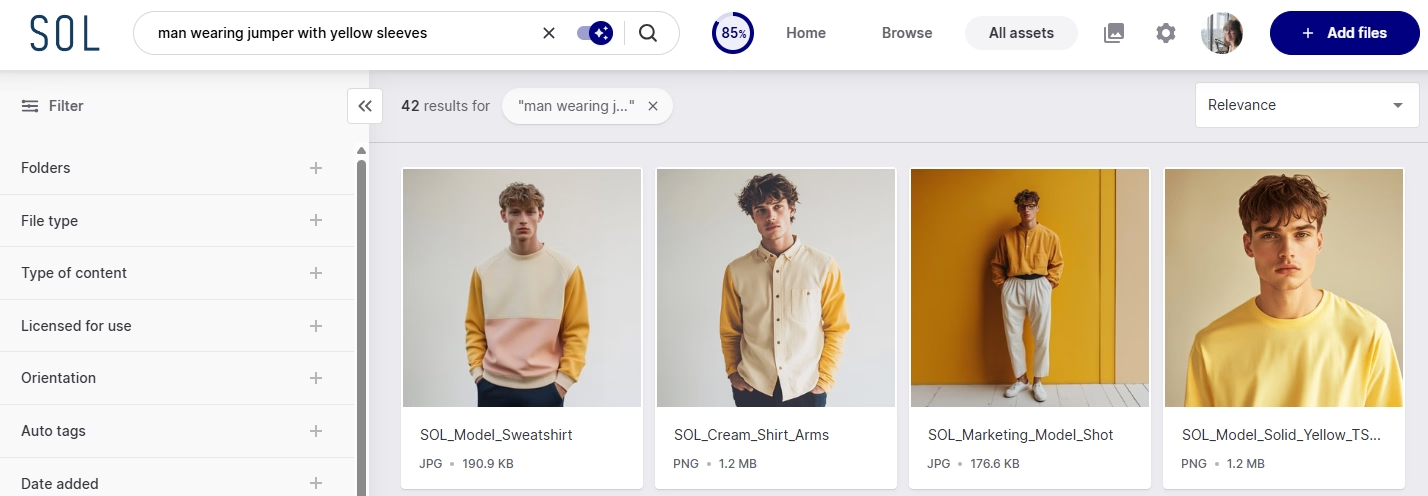
AI-powered search means you can find content using natural language. For example, search: ‘man wearing yellow jumper with sleeves’ and Dash will pull up relevant results in seconds. You’ll also add things like fields and filters when you upload an asset, making it easy to get to the right asset quickly.
[fs-toc-omit] Use links and portals to share content easily
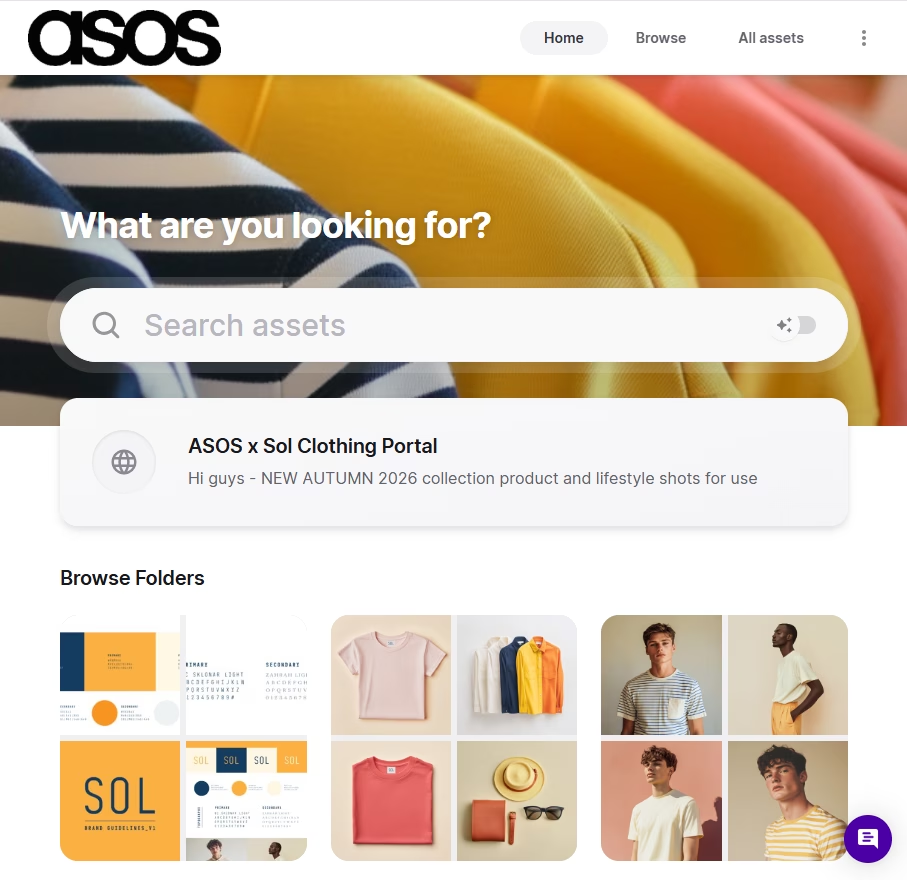
Sharing is vital, especially for ecommerce brands working with retail partners and agencies. You can send assets from Dash by link or email, or set up branded portals so retail partners and distributors can help themselves to the assets they need (without emailing you every time).
[fs-toc-omit] Collaborate with collections and guest uploads
Collections let you pull assets together for a specific campaign, channel or partner without duplicating files or reshuffling your folders. You can invite your team to the collection, where they can comment and add extra files.
And when you need content from someone, guest upload links let photographers, designers and creators send files straight into your Dash. This uploaded content won’t go live straight away, instead it’ll stay in a waiting area ready for your approval.
[fs-toc-omit] Use assets anywhere
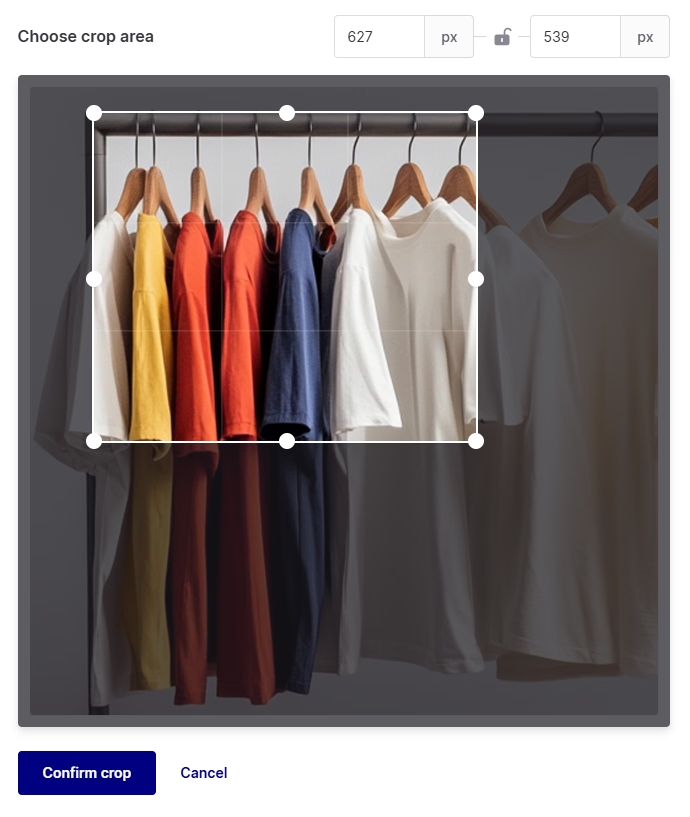
In Dash you can crop, resize and reformat images without waiting on a designer. You can also trim videos, download in bulk, or embed assets directly via CDN. Dash also plugs into Shopify, WooCommerce, WordPress, Canva and Hootsuite for easy deployment across your channels.
[fs-toc-omit] Integrate with your tech stack
Your assets are only useful if they're where you need them, when you need them. Dash plugs into the tools ecommerce teams already live in — push product shots straight to Shopify or WooCommerce, drop assets into WordPress, pull approved creative into Canva for design work, and schedule social content through Hootsuite. And for anything without a native integration, use Zapier to connect Dash to other tools in your tech stack.
The pros and cons of Dash digital asset management
We promised you a straight answer, so here it is—what are the pros and drawbacks of Dash for digital asset management?
The pros
[fs-toc-omit] It's genuinely easy to use
Dash is consistently rated highest for ease of use and ease of setup on G2. There’s no need for lengthy onboarding calls and your team can get started pretty much straight away.
[fs-toc-omit] Every plan includes every feature
In Dash we don’t lock away features or user limits behind higher paying tiers. You get everything (and we mean everything) no matter what plan you’re on from £79/$109 per month.
[fs-toc-omit] Unlimited users on every plan
Pricing scales on storage and downloads, not seats. You can invite your whole team, agencies and freelancers and you won’t be charged extra.
👉 Watch out video that covers why we price Dash the way we do.
[fs-toc-omit] Built for how ecommerce teams actually work
We have built Dash with ecommerce brands in mind, so we’re constantly striving to build features that support their workflows.
[fs-toc-omit] Migration and onboarding are free
Moving thousands of assets is the scariest part of switching — and it's the reason so many brands put up with a tool they've outgrown for years longer than they should. With Dash, it's not the hurdle you'd expect.
Coming from Google Drive or Dropbox? The built-in integrations mean you can pull your entire library across yourself in a few clicks.
Moving from another DAM or a more tangled setup? Our customer success team will handle the migration for you, at no extra cost.
Either way, we'll get your team onboarded and actually using Dash. There are no implementation fees, consultants and or six-month rollout plan.
The drawbacks
[fs-toc-omit] We're not an enterprise DAM
If you're managing dozens of sub-brands across global markets with complex, multi-stage approval workflows, tools like Bynder or Brandfolder are built for that.
[fs-toc-omit] No built-in brand guidelines or templating
We don’t currently have a way for you to build brand guidelines directly within Dash. We do, however, integrate with Corebook where you can create beautiful, live guidelines that are fed by your assets stored in Dash.
👉 Read out Kinetics Beauty use Dash and Corebook together to maintain their brand integrity.
[fs-toc-omit] Download limits on lower plans
This isn’t necessarily a downside of Dash, but you will have to think a bit more about how you’re downloading your content. We’ve priced Dash based on downloads (rather than features of user limits) because we don’t want to penalise you as your team grows. If you want to add more users, we don’t believe you should pay for that.
[fs-toc-omit] Dash pros and drawbacks: The honest summary
If you’re a team of 5–50 managing one brand's asset, Dash is built for you. But if you’re an enterprise managing ten brands across twelve markets with a procurement team involved, you might want to take a look at some alternatives.
The best Dash DAM alternatives to consider
We meant what we said at the start: Dash isn't for everyone. If the cons above rang alarm bells, here are the alternatives we'd genuinely point you towards — and who each one suits best.
{{dam-comparison="/blog-components"}}
1. Brandfolder: best for enterprise organisations
Brandfolder sits at the opposite end of the spectrum from Dash.
Where Dash prioritises simplicity and speed to value, Brandfolder prioritises governance, advanced features and enterprise-scale control. Permissions run deeper, reporting is more extensive, and the platform is designed for very large organisations managing sprawling asset ecosystems.
That power comes with trade-offs. Implementation is heavier, you'll likely need someone to own the platform internally, and pricing typically starts north of $1,600 a month—a different league from Dash's £79 entry point.
For global teams with complex governance needs, that's often worthwhile. For fast-moving marketing teams, it can feel rigid and bloated.
Learn more about Brandfolder alternatives.
2. Bynder: best for global brands with complex workflows
Bynder is another long-established enterprise DAM, built for big companies managing content across multiple teams, regions and approval chains.
Compared to Dash, you get creative workflow automation and global distribution tools at serious scale. If you're coordinating campaigns across twelve markets with legal sign-off at every stage, that structure earns its keep.
But the trade-offs mirror Brandfolder's: lengthy IT-managed implementation, an interface that can overwhelm smaller teams, and some admin settings that require Bynder's own intervention to change. If you just want to organise and share assets quickly, it's overkill.
Read up on Bynder alternatives.
3. Canto: good for mid-sized businesses wanting traditional DAM
Canto is closer to what people traditionally picture when they hear ‘DAM software’.
It's mature, stable and operationally robust, with structured metadata systems and more formal governance than Dash. It's a sensible middle ground if you've outgrown simple tools but aren't ready for full enterprise machinery.
The flip side: some users find the interface clunky, and it feels noticeably more traditional in its UX than Dash. The choice between the two usually comes down to whether your team values structure and governance or simplicity and adoption.
Read up on Canto alternatives.
4. Frontify: best for brand management
Frontify isn't really a Dash competitor because it's solving a different problem.
Its heart is brand management: hosted brand guidelines, design templating, and keeping large organisations on-brand. Asset management is part of the package, but it's not a core consideration like it is with Dash.
If your biggest headache is people using the wrong logo or going off-brand, Frontify is worth a look. But for deploying thousands of product images, it's the wrong tool for the job.
Take a look at some Frontify alternatives.
5. Air: for creative production workflows
Air positions itself as a collaborative creative workspace rather than a traditional DAM.
For design teams managing active creative production — works-in-progress, feedback rounds, shoot selects — it can feel more natural than any folder-centric system, Dash included.
But it's weaker as a long-term operational source of truth, and the pricing needs a close look. The free plan is very limited, and its the only DAM (that we’re aware of) that prices based on a confusing ‘credits’ system. These credits are used for anything you do in Air, so it’s hard to know how much you’ll need, meaning you’ll likely need to be cautious about how you use the tool.
Learn more in our article covering Air alternatives.
Is Dash the right DAM for you?
Here's the recap:
Choose Dash if you're a growing ecommerce or DTC brand that wants your whole team — plus photographers, freelancers and retail partners — storing, finding and sharing assets from day one. There’s no big implementation project or an eye-watering invoice. Everything's included on every plan, users are unlimited, and you'll be up and running within a week.
Choose one of the alternatives if you're an enterprise juggling multiple brands and complex approval chains (Brandfolder, Bynder), you want traditional DAM structure with heavier governance (Canto), your real problem is brand guidelines rather than assets (Frontify), or you're managing creative production workflows (Air).
And if you're still not sure? Dash comes with a 14-day free trial. You won’t need to add your credit card details and onboarding is totally free. Load in some real assets, let your team loose on it, and judge for yourself.

Amy Burchill is the SEO and Content Manager for Dash. She works with ecommerce experts to create articles for DTC brands wanting to improve their campaigns.