Shoppers have found a new way to shop. They're now asking AI — ChatGPT, Gemini, Microsoft Copilot, Google AI Mode — to find products for them. And the AI is answering with real recommendations, complete with images, prices, and a path to checkout.
That means your products can now show up in those conversations. Your titles, descriptions, metafields, and images have a new audience: AI agents deciding what to recommend.
This guide pulls together tips from merchants already selling through AI chat, plus Shopify's own guidance on making it work.
What is Shopify's agentic commerce?
Shopify’s agentic commerce is a new evolution of search, where your products show up as recommendations inside AI chats. Essentially, AI agents (like ChatGPT) act as the discovery and recommendation layer between shoppers and stores. Think of it as your AI shopping assistant.
And since Shopify launched Agentic Storefronts in December 2025, they’ve now rolled it out to millions of merchants, making it available across ChatGPT, Microsoft Copilot, Google AI Mode, and the Gemini app.All of which can be managed from your Shopify Admin.
Here’s what you need to know:
Discovery happens inside the AI chat: This is the new part. Your products show up as recommendations inside the conversation, so the chat interface is where product discovery, research (and potentially even sale) happens.
- Where checkout happens depends on the platform:
- The ChatGPT agentic storefront is currently available to all eligible US-selling stores. When a shopper taps a product card in ChatGPT, your store's checkout opens in a window inside ChatGPT on mobile, or in a new browser tab on desktop. The shopper completes the purchase on your Shopify checkout, the same way they would if they'd come from any other channel.
- Microsoft Copilot, Google AI Mode and Gemini are still in early access, with built-in checkout that lets shoppers buy without leaving the conversation.
- This is a new distribution channel, not a replacement storefront: Your store isn't going anywhere. Agentic Storefronts is a new shelf you're appearing on, the same way social commerce or marketplaces opened up new entry points without replacing your website.
- You don't need to be on Shopify to use this feature: Shopify's Agentic plan lets ecommerce brands on any platform sell through AI channels without migrating their store. Set up your data once, and it surfaces across ChatGPT, Microsoft Copilot, Google AI Mode, Gemini, and the Shop app
👀 Note: Shopify isn't alone in the agentic commerce race. For example, Salesforce Agentforce Commerce is in a pilot with OpenAI. But Shopify is the only platform where millions of merchants are eligible by default today.
How does the AI-powered shopping journey work?
AI referrals to ecommerce sites jumped 752% year-over-year. So, for every 100 shoppers AI sent your competitors last year, it's sending them 850 this year. 🤯
A solid share of those prompts are now shopping queries.
"Consumers are moving from traditional search to AI-driven discovery at an extraordinary pace, and increasingly expect to complete their purchase in that same moment," says Kelly Cook, CEO of David's Bridal.
David's went live on Shopify's Agentic Storefronts across ChatGPT and Microsoft Copilot in April 2026, becoming one of the first retailers to enable end-to-end purchases inside AI chats. They call it their ‘Aisle to Algorithm’ transformation.
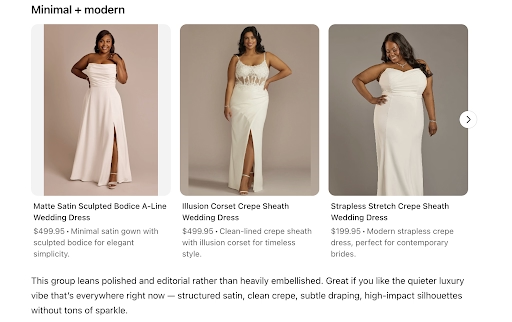
Let’s say a bride opens ChatGPT and asks for wedding dresses under $1,500. Here's what happens next:
- The AI queries Shopify Catalog: ChatGPT pulls structured product data like title, description, images, pricing, inventory, materials, sizes, and attributes from Shopify Catalog.
- Products surface inside the chat: David's products appear as rich product cards with imagery, pricing, customer ratings, and style descriptions. ChatGPT dynamically categorizes the assortment by silhouette with price coverage spanning from under $200 to $2,000+.
- The shopper clicks a product: Checkout opens in a ChatGPT in-app browser on mobile, or in a new tab on desktop. It points to the merchant's existing Shopify checkout, with all customizations and payment methods intact.
- The shopper completes the purchase: This is the standard Shopify checkout flow. You don’t need any additional fees beyond standard payment processing.
- The order lands in the merchant's Shopify admin: Orders flow in with full channel attribution, so merchants can see which AI platform drove each sale. From here, your standard post purchase support kicks in — order status updates, shipping notifications, and returns handling all run through your existing workflows, so the customer experience doesn't drop off once the chat window closes.
The mechanic underneath all of this is Shopify Catalog — Shopify's centralised product database that syncs your titles, descriptions, images, pricing, and inventory to every connected sales channel in real time. The quality of your data inside it determines whether you surface or get skipped.
🌎A for UK and EU brands: Agentic storefronts with built-in checkouts currently display only to customers based in the United States. UK-based brands selling into the US, like David’s, can show up in these conversations. But UK and EUbased brands selling only domestically will need to wait for an international rollout.
What makes products surface in AI search?
Shopify Catalog uses signals from millions of merchants and products to structure data so AI can understand it.
And what feeds it is your data, across three fronts:
- Product data: Titles, attributes, sizes, materials, fit, use cases—the more comprehensive your catalog, the more queries you're eligible to match against.
- Brand and policy data: AI agents also pull from your FAQs, return policies, and shipping information when answering follow-up questions.
- Real-time signals: Inventory and pricing have to stay current; an out-of-stock product that still shows as available flags you as untrustworthy, and the agent will route around your store next time.
How to optimise your products for AI search
Here are six moves to make sure your catalog is part of it.
1. Write product titles like you're describing the product to a stranger
The goal isn't to keyword-cram your titles — it's to make them descriptive enough that an AI can match them against a specific query. Think of how David's Bridal does it: 'Satin Basque Waist Ball Gown with Lace Hem' leads with the attributes a shopper would actually search for, without reading like a stuffed meta tag.
Work the most searchable attributes into your title naturally: material, silhouette, key features, and primary use case. If it reads well to a human, it'll read well to an AI.
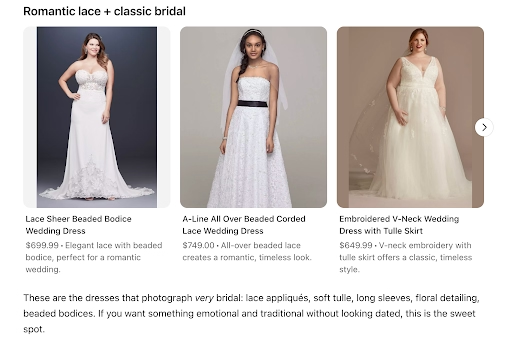
You can see the payoff in ChatGPT itself. Every dress card leads with the product attributes a shopper would search for:
2. Fill in every metafield Shopify offers
Shopify's own guidance for Perplexity Shopping gives you a useful audit checklist. Every product needs a Google product category, custom metafields for attributes like material and dimensions, and product identifiers like GTINs and MPNs.
Those metafields are the hidden layer AI uses to verify what you claim in your title and description — Shopify is explicit that they're designed to make products more discoverable across marketplaces and search engines, which now includes AI channels.
If you're managing a large catalog, Shopify Catalog Mapping controls how your existing custom fields map to Shopify's standard categories, so the data you've already collected doesn't get lost when it's syndicated to AI platforms.
3. Add a dedicated FAQ section
A Semrush study found that three things positively contribute towards AI citations: Q&A formatting, leading with the direct answer before the explanation, and E-E-A-T signals — the experience, expertise, authoritativeness, and trustworthiness markers that AI engines use to assess credibility.
Each FAQ should therefore appear as a question heading with the answer as a short paragraph below it.
For Shopify merchants, this can sit on product pages, category pages, or dedicated FAQ pages.
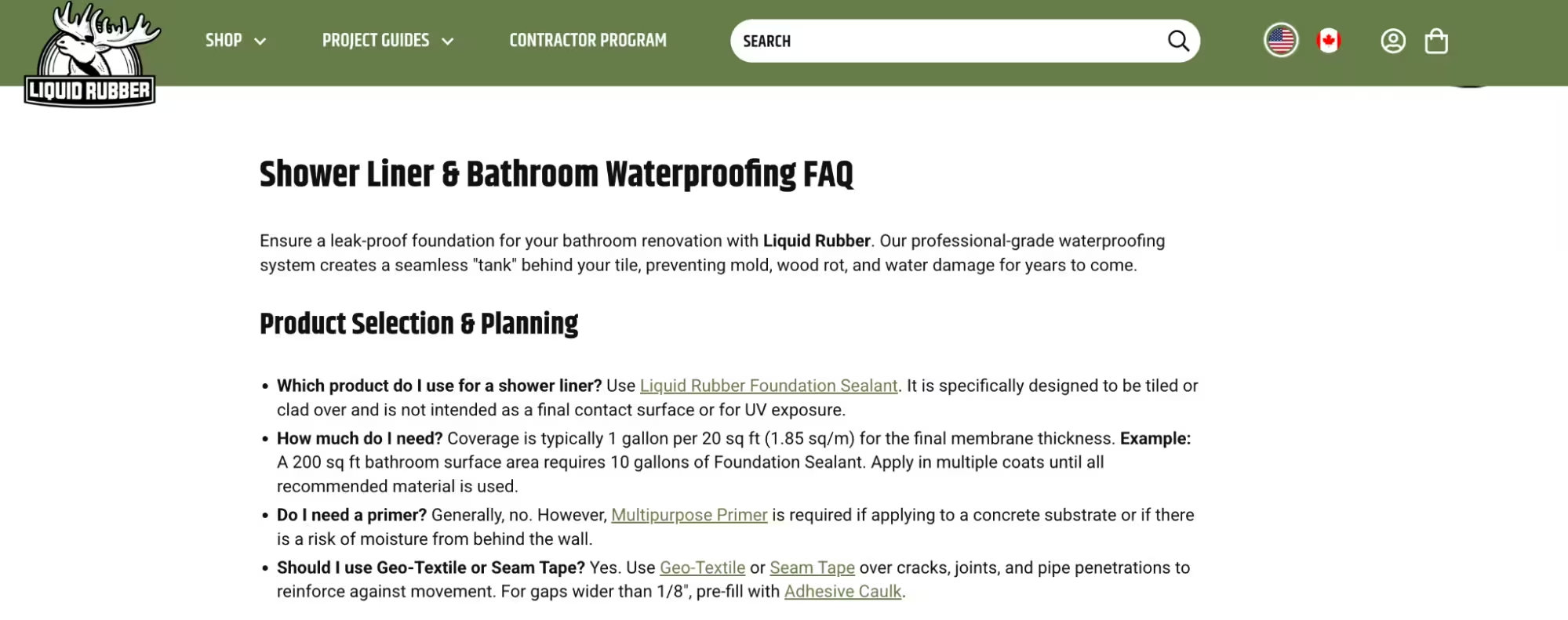
Liquid Rubber, a Shopify brand that sells waterproof sealants and mulch glue, cited in Semrush's AI-ready product page scorecard, is a great example. Their Shower Liner & Bathroom Waterproofing FAQ walks shoppers through specific, intent-rich questions with bolded question headings, short answers, and internal product links.
4. Add schema markup to your product and FAQ pages
Schema markup is structured data that tells AI engines what's on your page beyond what a human reads. Using the correct schema, you can flag the different types of website content (product pages, blog posts, an FAQ section etc) you have for AI clarity.
Search Engine Land's analysis of schema markup in AI search confirms that platforms like Bing Copilot and Google AI Overviews explicitly use structured data when extracting and citing content. Whereas ChatGPT and Perplexity both favour FAQPage schema for conversational answers.
Schema isn't a magic bullet—it won't compensate for weak content—but it's one of the few signals you fully control.
Here’s what to add, in order:
- Product schema on every product page, including name, description, image, price, availability, brand, and GTIN.
- FAQPage schema on any page with Q&A content.
- Organization schema on your homepage and About page.
- Article schema on blog and editorial content.
Most Shopify themes already include partial Product schema by default. For complete coverage, you can either edit your theme's Liquid templates directly or use a schema app from the Shopify App Store, like JSON-LD Schema.
💡Pro tip: Read Shopify’s full guide to ecommerce schema to see every schema type that applies to your store, with code examples for each.
5. Keep your inventory and pricing accurate across every channel
AI agents pull live data when they recommend products, and they don't forgive bad signals. For example, if a product shows as being in stock when it isn’t, the agent will consider your data to be unreliable.
That’s because, unlike a low-ranking Google result, there's no page two to scroll to. The agent moves to the brand whose data it can read confidently.
Shopify powers product discovery with real-time data covering pricing, inventory, images, and variants, syndicated automatically through Shopify Catalog.
So the platform side is sorted. Your job is to make sure your own data is clean before it gets there.
If you're managing complexity — multiple warehouses, bundled products, or a catalog big enough to need demand forecasting — your default Shopify sync may not be enough. Apps like Sumtracker keep stock accurate across Shopify, Amazon, Etsy, and eBay in real time, while Assisty adds AI-driven forecasting and reorder suggestions on top.
6. Give AI agents the context they need to represent your brand accurately
Your product pages are for convincing humans; your knowledge base is for feeding the machine beast. Most of this content is dark matter—humans will never see it, but it’s the only thing the AI cares about.
The Shopify Knowledge Base app handles a lot of this. Your FAQs sit behind the scenes as a ‘trusted data source’ that AI agents reference when shoppers ask about your store. The app also auto-generates FAQs from your existing settings and surfaces a ‘Top unanswered questions section’ so you can see exactly what shoppers are asking AI about your store that you haven't answered yet.
Victor Tam, CEO and cofounder of luggage brand Monos, says that agentic shopping lets a brand's story and product details show up "at the exact moment someone is asking real questions with real intent, in a format that feels helpful, not intrusive."
What content strategies can improve AI visibility?
The fixes above make your products legible to AI. The next layer is content that gives the AI a reason to recommend you over someone else with equally clean data.
[fs-toc-omit] ‘Best for X’ use-case content
This is the format AI shopping queries are built for. OpenAI describes how shoppers research products. They don't type ‘cordless vacuum’, they’ll type something like ‘find the quietest cordless stick vacuum for a small apartment.’ They expect tailored product recommendations for their specific requirements.
Those queries are specific, situation-driven, and full of conditions. Your content needs to speak to those exact scenarios — not just describe what the product is, but who it's for and when it's the right choice.
Take these tips from Search Engine Land: for each product, name the top three to five specific use cases or audience segments on the page. So, a standing desk could be ideal for remote workers, people with back pain, gamers, or small-business owners outfitting a home office.
A product page that only speaks to one will miss the others entirely.
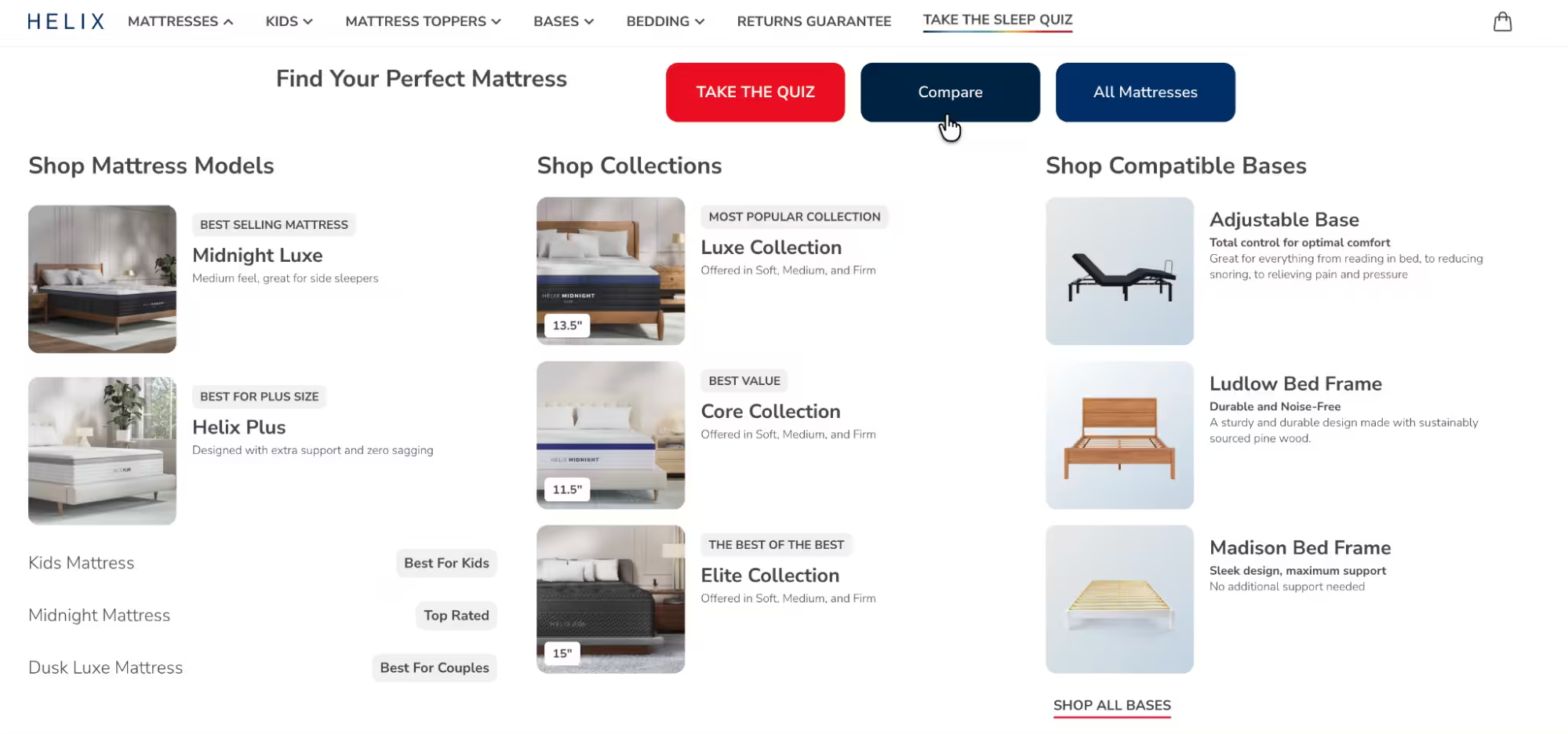
Helix, a sleep brand known for their organic mattresses, takes this further by building it into the product line itself. The mattress menu reads like a list of AI shopping queries: Midnight Luxe is tagged ‘Best Selling Mattress’ with the description ‘medium feel, great for side sleepers’; while Helix Plus is ‘Best for Plus Size.’
The seven core mattresses each map to a specific use case, so when a shopper asks ChatGPT for the ‘best mattress for side sleepers,’ they hand the AI a query that maps one-to-one with a Helix tag.
[fs-toc-omit] Comparison content
An analysis by Peec AI found that LLMs strongly prefer listicles and comparison content over individual product reviews. That’s because a single comparison page lets the AI pull multiple products into one response without stitching sources together.
Plus, pages with clear H-tag hierarchy and bullet points get cited more reliably than long narrative blocks.
☝️Most importantly, don't withhold the verdict to keep readers scrolling, because AI doesn't scroll.
DEUX, the vegan cookie dough brand, does this well. They feature a competitor comparison chart that stacks the brand against generic alternatives across five attributes. But DEUX doesn't name competitors directly; they use generic icons instead, which keeps attention on the DEUX product and avoids the legal risk of calling out specific brands.

[fs-toc-omit] Price transparency as content
AI agents handle price comparison as a default part of the shopping process. Shoppers ask things like 'which of these is better value' or 'has this gone on sale recently,' and the agent pulls pricing data to answer. Brands that make price history, sale cadences, and cost savings explicit in their product data give the AI more to work with — and more reason to recommend them over a competitor whose pricing context is thin.
[fs-toc-omit] Educational and product-led content
This format is the supporting structure. Think, buyer guides, category explainers, ‘how to choose a [product]’ content. The kind of content that builds topical authority rather than directly pushing a sale.
XFunnel's study found that product-related content dominated AI citations across every funnel stage. This content can be defined to include ‘best of’ articles, vendor comparisons, head-to-head comparisons, and product pages.
Educational content, therefore, earns AI citations when it's anchored to specific products.
Who Gives A Crap, the organic toilet paper brand, runs a full content hub, sorted into branded categories: Good Crafts, Good Deeds, Good Fun, Good News. It covers everything from how bamboo toilet paper is made to why people are searching for organic toilet paper to garbage disposal facts.
Every piece is anchored back to the brand's products and certifications.
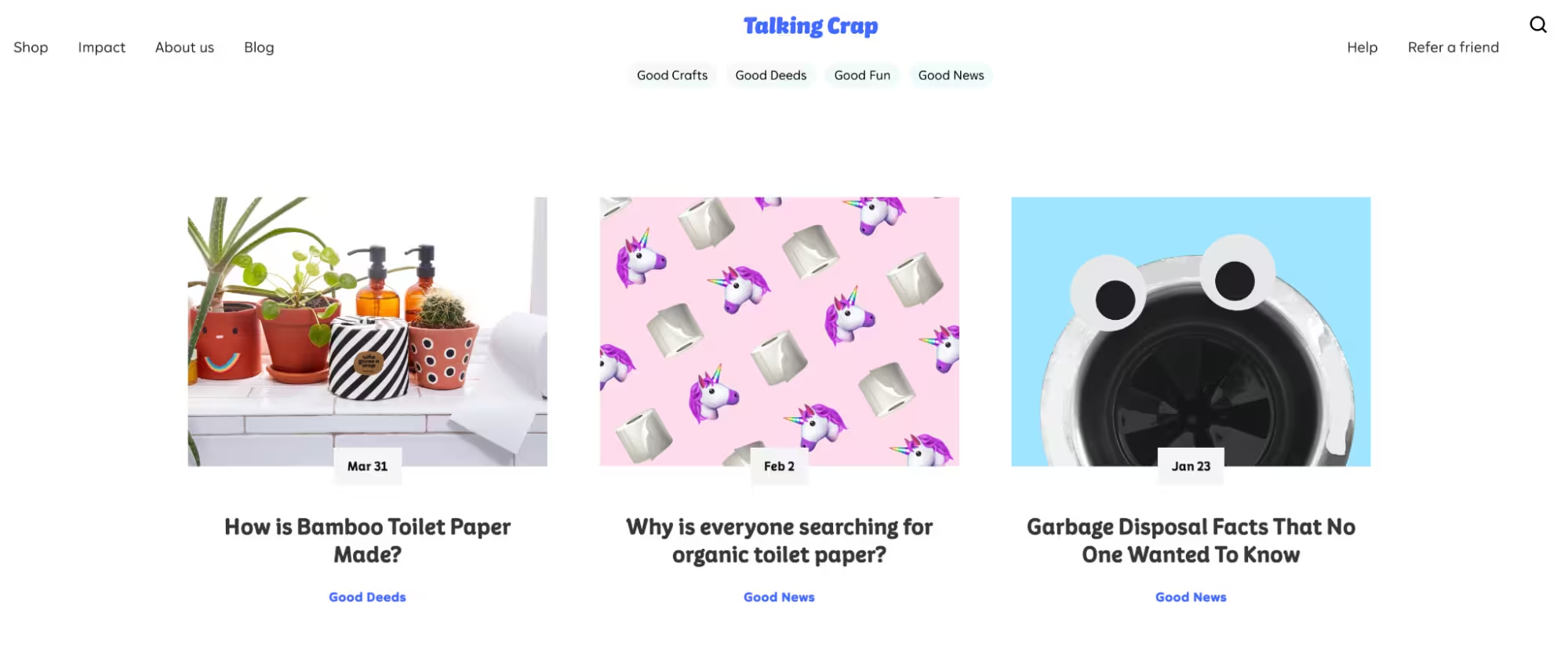
That breadth is the point as AI engines reward depth across a topic. A reader, or an AI agent, can land anywhere in the cluster and find an answer that connects back to a Who Gives A Crap product.
The role of product imagery and assets in AI search
Your ecommerce product photos are doing two jobs now. The first is the one they've always done: convincing a human to click. The second is feeding an AI agent that can't see them; it only reads what surrounds them.
That’s the case across different AI search engines.
OpenAI said that shoppers can browse products visually, upload reference images, and refine results in conversation. Ask ChatGPT for ‘the best mid-century coffee table under $400,’ and you get a carousel of product cards—image, price, the works.
Google Lens handles 20 billion visual queries per month, driven heavily by 18-24 year olds, the cohort already most likely to start their shopping in AI.
In other words, if your images aren't surfacing, your products aren't either.
Shopify also confirms images are part of the core product data syndicated to every AI channel, alongside titles, descriptions, options, pricing, and availability.
With that in mind, there’s a few things to get right here:
- Shoot for variety, not only hero shots: AI scans every adjacent object in the frame to build context. Props, backgrounds, and lifestyle cues all feed the AI's understanding of your price point, your customer, and where your product fits.
- Tag every image—alt text, EXIF, filenames, schema: AI reads around the image, not the image itself. image123.jpg with no alt text tells it nothing. Shopify calls for product information to be “organized in standard, machine-readable fields rather than embedded in marketing copy or page layouts.” Visual data follows the same rule.
🤓Read more: How to optimise your product images for Shopify
Remember that AI uses whichever image is easiest to grab. So if your beautiful, on-brand, paid-real-money-for-it hero shot is sitting in a Drive folder, no crawler will ever reach it.
A Shopify digital asset management (DAM) tool like Dash keeps the lot in one place with metadata attached, so when an AI, a retailer, or a marketplace grabs an image, it grabs the right one. Dash's native Shopify integration auto-matches your assets to existing SKUs, so updating product images across hundreds of listings is just a bulk export from inside Shopify itself.
Brands like Haws, the watering can brand running unique Dash portals for 100+ retail partners worldwide, are already running this play for traditional commerce. The same library that keeps 100+ retailers on-brand keeps an AI agent doing the same.
“Dash is brilliant and it’s changed how I do a lot of my job ... I can spend time doing work that needs doing, less time finding things,” says Josh Papworth, Purchasing Manager.
Your agentic commerce quick-win checklist
Most of the work to show up well in AI search is housekeeping. Run through these fixes in order:
[fs-toc-omit] 1. Identify your top 20 SKUs
Use the Pareto Principle to your advantage. 80% of your revenue comes from 20% of your products. Open your Shopify Analytics, pull that top 20, and open each in a browser tab. Those are the 20 pages to make perfectly machine-readable first.
[fs-toc-omit] 2. Fact-load your titles and descriptions
AI ignores your adjectives; it wants nouns and constraints. Move key attributes like material, size, and primary use case into the product title itself.
[fs-toc-omit] 3. Fill your metafield gaps
Metafields are the hidden layer AI uses to verify what you claim. In Shopify, under Settings > Custom data, fill out the standard category metafields for your products.
[fs-toc-omit] 4. Sync your source of truth
Pull up your top 20 products on Shopify, Meta Catalog, Google Merchant Center, and any retailer feeds you sync to. Look at price, primary image, title, stock status, and shipping copy across all of them.
Connect every channel back to Shopify Catalog so they pull from the same real-time feed, and stop any manual CSV workflows that override it.
[fs-toc-omit] 5. Shadow-box the LLMs
Open ChatGPT or Gemini and prompt it like a high-maintenance customer would: ‘I need a [product category] that is [specific constraint] and ships to [your location] by Friday. What are my best options?’
Run the same query across two or three platforms.
AI agents pull from different signals—ChatGPT leans on Shopify Catalog and OpenAI's search index, Gemini draws from Google's Merchant Center and AI Overviews, and Perplexity weighs review sites and editorial coverage more heavily.
Watch out for three things:
- You don't show up at all: Your product data isn't reaching the AI, or it's reaching it in a form the AI can't match against the query. Audit your titles, metafields, and category mappings first.
- You show up, but the AI gets details wrong: The model cites your old price or lists you as out of stock when you're not. This is a real-time data sync problem; your storefront says one thing, your other channels say another, and the AI is averaging the lies.
- You show up, but the AI hedges: ‘I'm not sure about their shipping’ or ‘Their return policy isn't clear from their site,’ is the AI telling you exactly which Knowledge Base entry it couldn't find. Write that one next.
What does the future of agentic commerce look like?
Right now, the work is showing up well across the AI platforms that already exist: ChatGPT, Microsoft Copilot, Google AI Mode, Gemini, and Perplexity. Next, brands will start building their own AI commerce agents on top of Shopify's infrastructure.
Redmond, the Utah company behind Real Salt and Re-Lyte, already has. A two-person team built a production AI agent in 10 weeks. The agent handles thousands of customer conversations a month, pulls real-time data from Shopify Catalog, and needs zero manual updates when Redmond launches a new protein powder mid-build.
Phillip Hinson, the developer who built it, called the MCP setup "like a USB-C: it should work almost everywhere."
That's the direction. AI as a discovery channel becomes AI as a brand-owned interface.
🤓Read more: Ecommerce trends and predictions for 2026
How to sell your products in AI search FAQs
[fs-toc-omit] How to enable agentic storefront in Shopify?
Go to Settings > Sales channels > Agentic storefronts in your Shopify admin, where you can opt in or out of direct selling per channel and decide whether shoppers check out in-chat or get redirected to your online store.
Shopify Agentic Storefronts are active by default for eligible stores, so for many merchants, there's nothing to enable; your products are already discoverable on ChatGPT as soon as your store and products meet the requirements.
You'll receive an email and an in-admin notification when your store is live on a given AI channel.
Per Shopify's Help Center, you can't explicitly opt out of ChatGPT; it's a discovery-only channel without built-in checkout settings, so your products are visible there, but the actual purchase happens elsewhere.
[fs-toc-omit] What does agentic storefront mean?
An agentic storefront is where AI product discovery and checkout happen inside an AI assistant, rather than on a traditional website.
When a shopper has a conversation with an AI agent and asks for product recommendations, the agent can search the Shopify Catalog, return product cards, answer follow-up questions, and let the shopper check out without leaving the conversation.
This is a new sales channel that runs on conversational commerce: relevant products meet shoppers in chat, not on a search engine results page.
[fs-toc-omit] What companies use agentic AI?
On the platform side, OpenAI (ChatGPT), Microsoft (Copilot), Google (AI Mode, Gemini), Anthropic (Claude), Salesforce (Agentforce), SAP (Joule), Adobe, Atlassian, Oracle, Workday, ServiceNow, and Box all run agentic AI products, per Google Cloud's Cloud Next 2026 announcements.
For ecommerce specifically, Shopify, David's Bridal, POLYWOOD, Fable, and Monos have all gone live on agentic storefronts.
[fs-toc-omit] What is Shopify agentic commerce?
Shopify agentic commerce is the infrastructure that lets shoppers discover and buy from Shopify merchants directly inside AI assistants. In Shopify's Winter '26 Edition announcement, Tobi Lütke, CEO of Shopify, framed it so:
"We're making every Shopify store agent-ready by default. Shopify is the easiest solution for merchants who want AI agents to find their storefronts, understand their products, and complete transactions."
The Shopify ChatGPT integration, and parallel integrations with Copilot, Google AI Mode, and Gemini via the new Universal Commerce Protocol, mean ChatGPT for Shopify merchants is a one-time admin setup.
.avif)
Brinda Gulati is a fractional content marketer and former thrift store owner who writes, reads, and speaks commerce and SaaS. She has two degrees in Creative Writing from the University of Warwick, and believes that above all, stories are a deeply human endeavour.