Filecamp has built a loyal following by doing something a lot of digital asset management (DAM) platforms struggle with: keeping things simple.
That’s the core of the product. It gives teams a structured way to organise and share files without the complexity, onboarding and heaviness that often comes with traditional, enterprise DAM software.
And for some companies, that’s enough. If your current setup involves a mixture of Dropbox folders, Google Drive links, WeTransfer and Slack messages, Filecamp feels like an improvement.
But modern, creative-led brands increasingly want more from their DAM than basic organisation. And that’s where Filecamp starts to fall down.
In this article, we’ll walk you through Filecamp, what it’s good for, its limitations, and what Filecamp alternatives there are in the market.
What is Filecamp?
Filecamp is a cloud-based digital asset management platform designed to help teams organise, manage and share digital assets.
At its core, it’s a traditional DAM system. Files are organised into folders, permissions can be controlled across users and groups, and assets can be shared externally via links.
It’s often popular for businesses where the main problem they’re trying to solve is just making assets findable. And to Filecamp’s credit, it generally delivers on those fundamentals well.
Filecamp pricing (how it works)
One reason Filecamp continues to appeal to smaller and mid-sized teams is pricing, which starts at $29 a month.
Compared to many DAM platforms, it’s straightforward and accessible. There’s no aggressive enterprise pricing structure, and the platform includes unlimited users across plans, which removes a lot of the friction companies experience with seat-based pricing.
But pricing conversations tend to change depending on your business. If you’re an ecommerce brand, where creative assets are the engine behind your growth, you might not settle for a DAM that just does good file storage. And that’s where simpler DAM platforms, like Filecamp, are limiting. Not because they’re bad products, but because they cater to different types of businesses than creative-led, high-performing ecommerce brands.
👉Learn more about DAM for ecommerce.
What features does Filecamp have?
Filecamp covers most of the core DAM features you’d expect.
You can organise assets into folders, apply tags, control permissions, resize assets and share files externally via links. For teams moving away from cloud storage tools like Google Drive and SharePoint, that alone creates a noticeable improvement in organisation and professionalism.
And don’t get us wrong, the platform feels practical and functional. But it also feels less polished and intuitive than some other digital asset management platforms that have invested heavily in UX and modern creative workflows.
For example, a folder-led structure is familiar to most people. But creative teams often want something that feels more visual, dynamic and connected to how they actually think about campaigns, products and brand content.
Filecamp pros and cons (based on reviews and customer feedback)
Most Filecamp users seem satisfied with the platform. It solves a real organisational problem. Teams become more structured, sharing improves, and digital files are easier to manage than they were previously.
But the praise tends to focus on the basics like organisation, accessibility, ease of use, rather than any deeper impact on how creative work gets done.
[fs-toc-omit] Filecamp pros
[fs-toc-omit] Ease of use
The biggest positive theme by far is simplicity. One team described Filecamp as “easier than previous DAM with simple structure.”
Compared to enterprise digital asset management solutions, Filecamp removes a lot of intimidation. Teams don’t feel like they need extensive onboarding just to locate assets or share files externally.
[fs-toc-omit] Organisation
Users also speak positively about organisation and client sharing, and this reflects one of Filecamp's genuine strengths. For teams coming from informal setups like shared Drives, email chains, or Slack threads, the jump to a structured folder system is like a breath of fresh air.
[fs-toc-omit] Cheap price tag
Affordability comes up regularly too, especially among teams looking for something more professional than Dropbox without committing to enterprise DAM pricing.
At $29 a month for the entry-level plan, Filecamp is hard to argue with on cost alone. But it's worth noting that price and value aren't always the same thing.
Filecamp's pricing makes most sense for teams whose primary need is organised storage and straightforward file sharing. If creative output is central to your business and you need a DAM that supports active workflows and integrations, a cheaper tool that doesn't quite fit can end up costing more in time and workarounds than one that does.
[fs-toc-omit] Filecamp cons
Filecamp’s limitations become more obvious once creative operations become more sophisticated.
[fs-toc-omit] Focuses on file storage, rather than creative workflow improvements
Filecamp improves structure and accessibility. But it doesn't reshape the creative workflow itself.
That's fine if creative isn't at the heart of what your business does. But for ecommerce brands, your digital asset management software sits right in the middle of everything. You're managing thousands of product shots, user-generated content, influencer assets, brand guidelines — and you need all of that moving quickly and reliably out to your channels, retail partners and marketing tools.
Filecamp doesn't really support that kind of operational flow. There's no way to push assets directly to your storefront, share self-serve portals with wholesale partners, or connect your library to the tools your team uses daily. You end up filling those gaps manually — downloading files, re-uploading them elsewhere, fielding requests for assets that should already be accessible. It's the kind of friction that's easy to underestimate until your creative operation starts to scale.
[fs-toc-omit] Poor user-interface and UX
This is a common thread when researching Filecamp reviews: the interface is clunky and awkward to use. You can see for yourself on the website homepage.
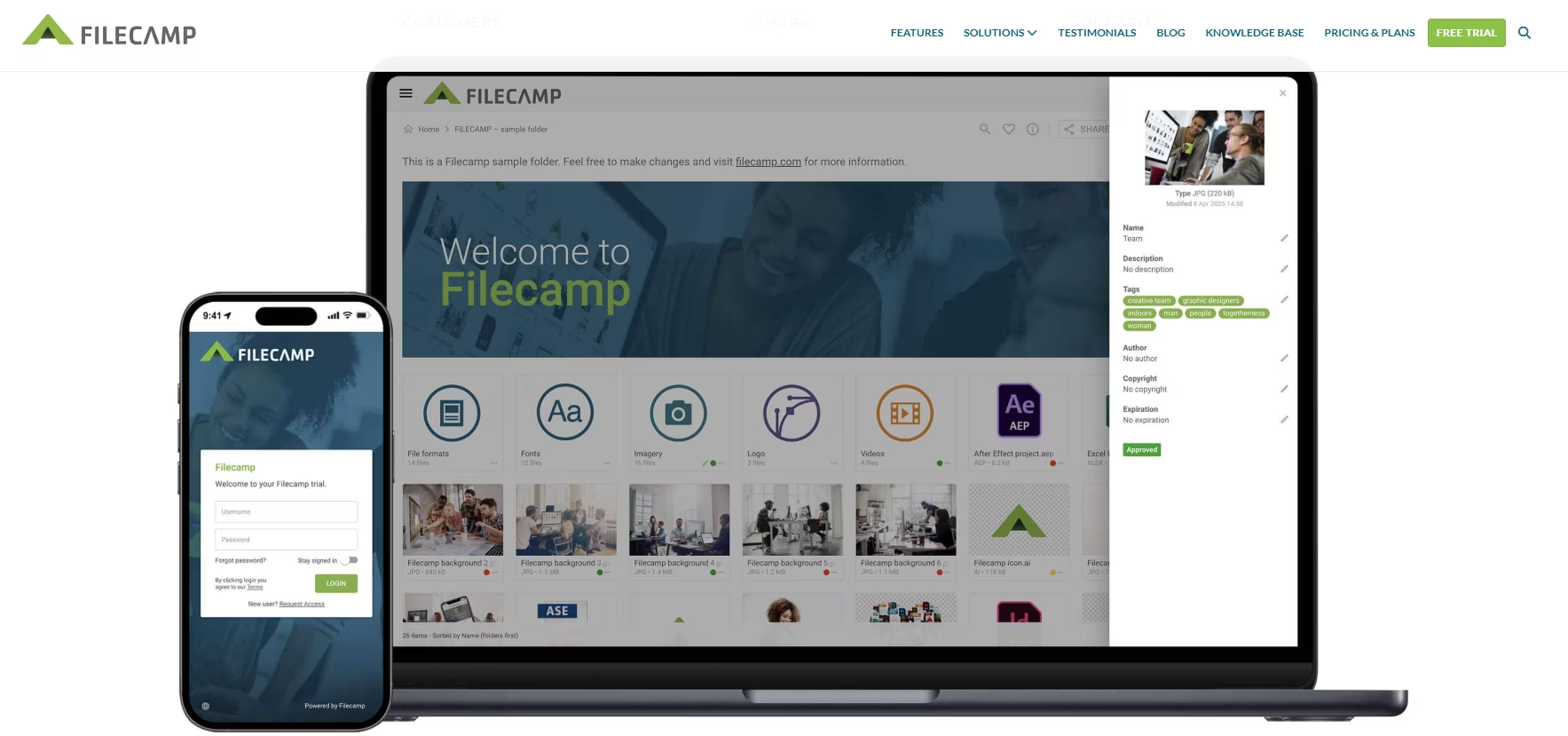
Functionally, it works. But if you’re in a marketing or creative team, this isn’t going to do your assets the justice they deserve. You want your DAM to be a genuine joy to use, with large, clear thumbnails and an intuitive interface. The more enjoyable and frictionless a DAM feels, the more consistently teams adopt it. And higher adoption means assets get used more, which is ultimately what drives return on investment.
Here’s a peek at what Dash (that’s us 👋) looks like. This is an example from COAT - one of our customers.
.avif)
Best Filecamp alternatives
{{dam-comparison="/blog-components"}}
So, you’re looking for an alternative to Filecamp. Here are our top picks for affordable digital asset management solutions for fast-growing teams.
1. Dash — best for ambitious creative teams
Dash is built for fast-moving ecommerce brands. It’s not just a file storage tool— it’s a home for your brand’s assets.
In Dash, you can:
- Use AI search to quickly find your content
- Create branded portals to share images and videos with external teams and retailers
- Crop and resize content before download (to stop you hassling your design teams)
- Connect to ecommerce tools like Shopify for faster product launches
Pricing starts at £79/$109 per month, and includes all digital asset management features and unlimited users.
Keep reading to find a deep dive on the differences between Dash and Filecamp.
2. Stockpress — best straight swap for Filecamp
Stockpress sits somewhere between Filecamp and more advanced DAM systems.
Like Filecamp, it aims to stay accessible and cheap. But the platform gives you a slight upgrade from Filecamp for asset discovery and its look and feel.
That said, the platform has similar trade-offs to Filecamp. Certain advanced functionality is gated behind higher tiers. And while the feature set is broader, it’s still positioned as a general-purpose DAM rather than a highly workflow-driven creative platform.
But for teams wanting something that feels a bit more modern than Filecamp, Stockpress is often a good step up.
Read our article about Stockpress alternatives.
3. Air: for creative production workflows
Air likes to think of itself as a collaborative creative workspace rather than a traditional DAM.
For design teams and content-heavy marketing departments, that can feel significantly more natural than folder-centric DAM systems.
Compared to Filecamp, Air certainly feels more workflow-oriented. But it’s also less focused on creative deployment.
So while it’s excellent for managing creative production itself, it’s not always as strong as a long-term operational source of truth.
Be wary of its price tag, too. While it advertises a free plan, it’s very limited. If you want to get real value from Air, it starts at $900 a month (making it ten-times more expensive than Filecamp’s most premium plan).
Learn more in our article covering Air alternatives.
4. Brandfolder: best for enterprise organisations
Brandfolder sits at the opposite end of the spectrum from Filecamp.
Where Filecamp prioritises simplicity and accessibility, Brandfolder prioritises governance, advanced features, scale and enterprise control.
Permissions are more advanced, reporting is deeper, and the overall platform is designed to support very large organisations managing huge asset ecosystems.
But that power comes with trade-offs too. Implementation tends to be heavier and pricing is significantly higher.
For huge, global teams, that’s often worthwhile. For fast-moving marketing teams, it can sometimes feel overly rigid and bloated.
Learn more about Brandfolder alternatives.
5. Canto: good for medium-sized businesses looking for DAM
Canto is closer to what many people traditionally think of as DAM software.
It’s mature, stable and operationally robust, with stronger metadata systems and more structured governance than Filecamp. But it also feels noticeably more traditional in its UX and workflow design.
Compared to Filecamp, Canto offers more depth and control. But it also introduces more complexity and more operational management.
The decision between the two often comes down to whether a team values: simplicity and accessibility or structure and governance.
Read up on Canto alternatives.
Dash vs Filecamp: a deeper comparison
We’ve covered a few alternatives to Filecamp in the above section. Here, we’re going to assume you’re working for an ecommerce brand: so we’ll compare how Dash, the DAM built for DTC, compares.
Like many of the other Filecamp alternatives we’ve covered, Dash overlaps with Filecamp on the basics.
But the philosophy behind the products feels very different once you start using them day to day.
Filecamp feels like a practical DAM built to bring structure to file management. Dash feels much more like a modern creative workspace. It’s a DAM tool designed not just to store images, but to make creative work easier, faster and more intuitive across the business.
That difference shows up in a few key areas.
[fs-toc-omit] UX and overall experience
This is probably the clearest difference between the two platforms.
Filecamp is straightforward. The interface is functional, relatively easy to learn and familiar to anyone who has worked inside folder-heavy systems before. For teams coming from Google Drive or Dropbox, that's often enough to feel like a step forward.
Dash takes a different approach. The platform is far more visual and discovery-oriented — built around how creative teams actually browse and interact with assets, rather than how files are traditionally stored. For ecommerce and creative-heavy brands managing large volumes of assets across campaigns, channels and partners, that difference becomes very noticeable very quickly.
[fs-toc-omit] Features and functionality
On paper, the two digital asset management tools overlap in a lot of areas.
Both offer:
- Asset storage
- Custom permissions
- External sharing
- Asset metadata
- Version control
- Requests for guests to upload files
But the similarity is mostly surface level. Filecamp is built around organised asset management — getting files stored, structured and accessible. Dash is built around active creative workflows — helping teams move faster, collaborate more naturally and get assets out into the world with less friction.
That difference shows up in areas like:
- Campaign organisation: Dash lets you group and navigate assets around campaigns and projects, not just folder hierarchies. For example, you can add filters and fields, making it easier to find what you need in the context you need it.
- Asset discoverability: Visual browsing and smarter AI search means teams can type in something like “man wearing yellow tshirt” and find relevant assets quickly (rather than relying on tags and specific file names).
- Partner access: Dash branded portals give retail partners and wholesalers self-serve access to the assets they need, without having to email your team for files.
- Collaboration: Feedback, approvals and sharing all happen inside the platform, rather than across a mix of email threads and Slack messages.
- Ecommerce-focused integrations: Dash connects directly with the tools ecommerce brands use every day. The Shopify integration, for example, lets you update product pages and bulk upload product photography using SKU matching — cutting out a lot of the manual work that typically sits between your asset library and your storefront.
Dash is aligned with the realities of ecommerce and marketing-heavy brands, where creative assets are constantly being reused across multiple channels.
[fs-toc-omit] Asset organisation and scalability
Filecamp's folder-first structure feels familiar initially, which makes onboarding relatively easy. But familiarity only gets you so far.
Ecommerce brands rarely think about creative assets in strict folder hierarchies. A single asset might belong to a campaign, a product SKU, a retailer collection and a seasonal promotion all at once. Folder-heavy systems struggle to reflect that reality, and you have to make do with workarounds like duplicate files, nested subfolders, manual variant management. This is time consuming and defeats the point of investing in a DAM system.
[fs-toc-omit] Collaboration and day-to-day workflow
Filecamp handles basic collaboration well. Teams can share assets externally, manage permissions and distribute approved files professionally. For traditional businesses and agencies, that often covers the majority of requirements.
But the platform still feels primarily focused on storage and access.
Dash feels much more attuned to how an ecommerce brand wants to share their visual assets. Dash Portals, for example, give your retail partners and wholesalers self-serve access to product photography, so they don’t have to ask you for files.
[fs-toc-omit] Integrations
It's surprisingly hard to find a clear list of Filecamp's integrations. There's no dedicated page on their website, which suggests it isn't a core part of the offering — and that makes sense given the platform is primarily focused on collecting and organising assets rather than getting them out into the world.
Dash takes the opposite approach. Direct integrations with Shopify, Hootsuite, Canva and Adobe Creative Suite are built around one goal: reducing the distance between your asset library and the channels, tools and teams that need them.
[fs-toc-omit] Pricing and long-term value
We won’t beat about the bush. Filecamp’s pricing is one of its strongest selling points, with a starting price of just $29 a month.
It’s affordable, easy to understand and accessible for smaller businesses that mainly need organised storage and sharing.
Dash is positioned differently. While affordable (it starts at $109 a month), Dash aims to be much more than a Drive or Dropbox replacement, and so it also delivers value through how it can transform your creative value.
So while Filecamp may look cheaper initially, the long-term calculation often changes as teams become more creatively mature and operationally complex.
[fs-toc-omit] Security
Both platforms cover the basics — encrypted data in transit and at rest, access controls and regular backups. For most teams, either will meet standard security requirements.
The main practical difference is SSO. Dash supports single sign-on, so access can be managed centrally through your existing identity provider. Filecamp doesn't, which has become a blocker for teams where IT requires SSO as a condition of software approval.
Dash also commits to notifying you within 24 hours of any security incident, giving you reassurance for brands handling sensitive assets.
Final verdict: the best Filecamp alternative
Filecamp succeeds at exactly what it’s trying to be.
It’s approachable, affordable and significantly easier to adopt than traditional DAM systems. For businesses that mainly need organised storage and professional asset sharing, it’s often a perfectly reasonable choice.
But not every business uses creative in the same way.
For ecommerce and marketing-heavy brands, creative assets are constantly moving through campaigns, retailers, social channels, creators and product launches simultaneously.
In those environments, the DAM stops being a passive storage layer and starts becoming operational infrastructure.
That’s where Filecamp can start feeling slightly limited. And that’s where platforms like Dash feel much more aligned with how modern creative teams actually work.
You can try Dash for free for 14 days. Or book a demo with a member of our team to see how it can improve your creative workflows.

Barney is the Marketing Lead for Dash. He writes about small business marketing strategies and how DTC brands can boost sales.